Whichever way your small business needs to process card transactions – whether in person, online, via email, or over the phone – our dedicated guide will show you how.
Startups.co.uk is reader supported – we may earn a commission from our recommendations, at no extra cost to you and without impacting our editorial impartiality.
Startups has been helping small businesses in the UK for over two decades, and our simple-to-understand guide will walk you through everything you need to know about accepting card payments. This includes choosing the right hardware and software, finding the best card readers, and affordable credit card processing fees.
Taking card payments involves three main methods: using a card machine for in-person sales, a payment gateway for online stores, or a virtual terminal for phone payments. Getting started typically requires either a merchant account or a payment service provider (PSP) and the right hardware or software for your chosen method.
Getting fully set up for taking credit and debit card payments can seem tricky at first, but it’s a simple process if you know the right steps to take.
- Small businesses can take card payments through three primary methods: card machines for in-person sales, payment gateways for online transactions, and virtual terminals for phone orders.
- Around 1.75% is generally the standard transaction charge for UK in-person card payments.
- Beyond transaction fees, businesses should budget for potential monthly service charges, card machine rentals, and PCI compliance fees.
- Online payment gateways and virtual terminals often carry higher transaction rates than face-to-face card machine payments due to increased security risks.
- You must maintain PCI DSS compliance to securely and legally process any credit or debit card transactions.
First, let’s take a look at the different methods you can use to take card payments from your customers.
How do you need to take payments?
Compare CostsTaking card payments: a guide
- Different ways to take card payments
- How to take card payments in person: step-by-step guide
- How to take card payments online
- How to take card payments without a card machine or over the phone
- What’s the best way to take card payments as a small business?
- How the process of taking card payments works
- Next steps
Different ways to take card payments
There are three main methods of card payment: via card machine (card present), payment gateway (card not present), and virtual terminal (card not present).
- Card machines (also called card readers or card terminals) are mainly used for face-to-face payments in brick-and-mortar stores. However, some card machines can take card-not-present payments, too.
- Payment gateways are built into ecommerce websites to process online card payments, which is why it’s important to check which payment gateways your ecommerce site is compatible with before selecting one.
- Virtual terminal platforms allow customers to pay over the phone. Just key in the card number, expiry date, CVV (card verification value) number, and the digits from the customer’s billing address postcode.
| Card reader | Payment gateway | Virtual terminal | |
| Best for | Brick-and-mortar shops such as cafes, clothing boutiques, salons etc. | Businesses that take ecommerce sales and provide services online | Businesses that take sales over the phone. For example, B&Bs, contractors, service providers, charities etc. |
| Hardware needed | Card readers: these can be basic devices that connect to your smartphone, or more advanced handheld point-of-sales systems | None | A computer, tablet or laptop with an internet connection |
| Customer present for sale | Yes | No | No |
| Can it accept payments over the phone? | Yes | No | Yes |
| Can it accept payments by link? | No | Yes | No |
Before we dive into card payment options, let’s clarify some important terms you’ll need to know when taking card payments:
Merchant account: this is a specific type of bank account used by merchants to accept card payments. It acts as a holding account for the money while the payment is verified, before sending the funds on to your business bank account.
Payment gateway: this refers to the software that you’ll be using to take online payments. It securely encrypts and transfers your customer’s sensitive payment information from your ecommerce site to the payment processor.
Virtual terminal: this is a web-based type of software that allows you to enter in card details for payment processing without the actual card being present for the sale.
PCI DSS compliance: this refers to Payment Card Industry Data Security Standards. This is a set of safety requirements that are in place to ensure all merchants and companies are handling sensitive payment information to a safe and secure standard.
AVS: this stands for Address Verification Service. This is a service provided by major card companies to verify that the billing address that a customer has provided to you is correct, and matches the billing address on file. This helps to combat fraud.
EMV chip technology: this refers to the computer chips in credit and debit cards that store cardholder information, and help make payments more secure. This is the global standard for payment cards.
How to take card payments in person: step-by-step guide
Taking card payments in person involves choosing a merchant account or payment service provider (PSP), and then setting up a card reader or POS system to process the transactions.
If you’re running a brick-and-mortar business such as a salon, shop, or cafe, you’ll be selling face-to-face to your customers. That means you’re going to need to take card payments then and there.
Step 1: Choose a merchant account or payment service provider
A merchant account is essentially a holding account that sits between your customer’s bank account and your business bank account (if you don’t already have one, you will need a business bank account to take card payments, too). A merchant account acts as a middleman between you and your buyers, allowing their money to be transferred instantly and safely.
It’s beneficial for all parties involved, as it allows you to process a range of electronic payments, including card payments, and gives your customer peace of mind that their money is secure and can be charged back in case of an error.
This differs from your business bank account: a merchant account is a special account that temporarily holds funds from card sales during verification. A business bank account is your main operational account where these funds are finally deposited and from which you manage all company finances (like payroll and expenses).
What does it cost?
You’ll have to keep in mind that merchant account providers will charge fees for using the service. Generally, these fees are dependent on the volume of card transactions you’ll be taking per month. It’s worth knowing that they usually charge less to process card-present payments over card-not-present payments.
Payment provider transaction fees can cover a broad range from 1.5% to 3.5% of each sale. However, the upper end of this scale is rare, and 1.75% is about the standard most merchants can expect to pay. While some provider fees can be as low as 0.2%, these are typically reserved for very large enterprises.
Below we’ve listed the transaction fees charged by the providers in our roundup of the best card readers, so you can get a clearer sense of how much you’ll be paying:
| Provider | Transaction fees |
|---|---|
| takepayments | Quote based |
| Barclaycard | Quote based |
| Tide | Sell in-person: 0.89% + 3p Pay as you go: 1.5% + 11p |
| Square | 1.75% for each contactless, chip and PIN, or swiped card-present transaction. 2.5% for payments manually keyed-in to the Square Point of Sale app, recurring payments facilitated via Online Checkout links, Square Invoices and Virtual Terminal. |
| PayPal Point of Sale | 1.75% for card transactions and PayPal QR Codes 2.9% Payment Links and PayPal Invoice |
| SumUp | 1.69% for in-person payments 2.50% for online payments |
| Clover | 1.49% on all cards (18 month contract) Quote based rates also available for over 100k in card turnover |
There’ll be other costs involved with taking card payments beyond just the merchant service fees. Here’s a breakdown of the most common fees and the average cost you can expect to pay:
| Type of fee: | Average cost: |
|---|---|
| Interchange fees | 0.2 to 0.3% for consumer cards in the UK, and around 1% to 1.9% for commercial cards |
| Authorisation fees | 1p to 4p per authorisation |
| Minimum monthly service fees | £10 to £30 per month |
| Card machine costs | £50 to £200 upfront (they can also be leased for around £10 to £30 per month) |
| Setup charge | Up to £100 upfront |
| PCI compliance fee | £10 per month |
You’ll most likely have to enter into a contract with the bank to agree on your rates, as well as additional fees to cover costs like PCI DSS compliance.
Which card types should I accept?
While most providers process Visa and Mastercard by default, accepting American Express (Amex) may require a separate agreement, so you should check this directly with your merchant account provider. It’s not actually mandatory to accept every type available, but it will make things more convenient for your customer.
How do I become PCI compliant?
You’ll need to be PCI compliant in order to take card payments – this is absolutely essential to your operation. In order to attain PCI compliance, at the very least, you’ll need to complete an annual Self-Assessment Questionnaire (SAQ).
As a merchant, you will fall into one of four different levels of PCI compliance. Your level is determined by how many transactions you are taking each year, with each level having different criteria to fulfil.
- Level 4: less than 20,000 card transactions per year: the typical requirement is to complete an annual SAQ. The business may need to complete quarterly network scans through an Approved Scanning Vendor (ASV).
- Level 3: 20,000 to one million card transactions per year: complete an annual SAQ, complete quarterly network scans through an Approved Scanning Vendor (ASV), and complete an Attestation of Compliance (AOC) form.
- Level 2: one million to six million card transactions per year: complete an annual SAQ, complete quarterly network scans through an ASV, complete the AOC form, and complete an annual Report on Compliance (ROC) internally.
- Level 1: more than six million card transactions per year: complete an annual ROC via a Qualified Security Assessor (QSA), complete quarterly network scans through an ASV, and complete the AOC.
Merchants of all sizes must comply with PCI DSS standards, so understanding your level and requirements is paramount. PCI DSS 4.0.1 is the current level of requirement. You can find out more from the PCI Security Standards Council.
Having a merchant account isn’t your only option, and for some smaller businesses that are just starting out or have a low annual turnover, it might not make sense to pay for one. You can still accept card payments without a merchant account by signing up to a payment service provider (PSP), such as PayPal, Stripe, or Square.
A PSP acts similarly to a merchant account as an intermediary between your business bank account and your customer’s bank account, but rather than locking you into a monthly payment, a PSP will just take a percentage of each of your individual sales.
You should begin by researching and comparing different PSPs or merchant account providers. This might seem intimidating, but we can help make the process easier with our thoroughly researched roundup of the best merchant service providers for your business.
Step 2: Set up your merchant account
Once you’ve made a final decision, you’ll then need to go through the process of applying for a merchant account and setting it up.
The first step is to get all the documentation that you’ll need ready to submit your application. There is no uniform process for applying for a merchant account as the specific requirements vary between providers, but it’s a pretty safe bet that you’ll at least need the following:
- Your personal details, such as ID and proof of address
- Your business plan, including what type of business it is and what you sell
- An estimate of your turnover expectations for card payments as well as the average transaction value
- How you’ll be expecting to receive payments
- Any recent trading accounts
Once you have all these details ready, you can begin filling out the official application for your chosen merchant account. In the majority of cases, you’ll be able to do this online via the provider’s website, and it should be a fairly brief process.
Once your application has been submitted, you just need to wait for approval. Approval for a merchant account can take from a few days to several weeks, as providers may require additional information from new businesses they consider to be higher risk.
In 2026, what’s important isn’t just the hardware on your counter; it’s about baking trust into your operations through tighter FCA safeguarding and seamless mobile integration. It’s easy to focus on basic transaction fees, but small business owners should choose partners that offer instant settlement and robust AI fraud protection. Don’t think of your payment gateway as a utility but as a strategic tool that can protect your cash flow and elevate your customer’s experience.

If all goes well and all your documents are correctly accounted for, you should be approved for your merchant account and will be on your way to accepting card payments!
Step 3: Choose a card reader
In order to be able to effectively take these card payments in person, you’ll need to get yourself a card reader, machine, or terminal. This is the device with which you’ll accept card payments in person. Having a card reader also allows you to take alternative payments like Google Pay and Apple Pay from your customers.
What is a POS system?
Most modern card readers for small businesses can be easily integrated with POS (point of sale) systems. These are comprehensive payment systems that include advanced sales features and devices like barcode scanners, cash drawers, and terminals with screens. You just have to make sure your card reader is able to integrate with the specific POS software you choose.
A full POS system isn’t actually necessary for taking card payments though – you can do it with just a card reader on its own, or through a smartphone app. There are also card machines that can function as all-in-one, hand-held POS systems (like the Square Terminal, for example).
How do I choose the best card machine for my financial needs?
When it comes down to selecting a card machine, there are quite a few different options you can choose from depending on what your business will need. Luckily, we have a dedicated article to help you choose the best card reader for your small business.
We compare hardware costs, transaction fees, and contract lengths, so you can understand which card reader is the best value for money for your business.
Card readers might appear on the surface to be much of a muchness, but choosing the right fit for your type of business will be crucial. If you’re running a business on the go (like a food truck) and will be operating in areas with poor signal, like a music festival, specifically look for readers that have an automatic offline mode. Don’t just think about the hardware itself either. If you’re a business that needs a quick turnover of cash to buy new stock (like florists or bakers, that can’t risk delay) make sure you’ve chosen a card machine that provides fast next-day payouts.

Step 4: Set up your card reader
Most modern card readers can be fully charged, set up and ready to start taking payments in under an hour. Once setup is completed, all payments can be processed through the card machine provider’s payment software, and you’ll also have the ability to process refunds, and have access to the sales data on all of your transactions.
The majority of payments taken with a card reader will be using contactless payment methods – the transaction limit for a contactless payment is currently £100. For a payment over £100, customers will need to input their PIN number.
Once your card reader is set up and integrated into your POS system – if you have one – you’re ready to start taking card payments in person!
Credit card payments largely involve the same processes as other cards, except that credit card processing fees tend to be greater (typically 1.5-3.5% per transaction).
Due to this, if your business is expecting to take a large volume of credit card payments – for example, you’re dealing with a large number of high value transactions – be sure to do a lot of research into the credit card processing fees that merchant service providers charge before you choose one.
How to take card payments online
There are two methods of taking online card payments: using a payment gateway or a payment facilitator.
Using a payment gateway to accept online payments
In order to receive online payments through your ecommerce site using this method, you’ll need to sign up for a merchant account, then link this with the best payment gateway for your business.
Helpfully, a merchant account provider can usually provide you with a payment gateway as part of your contract. However, you can go for a third party payment gateway, such as Square, if you find one that’s more suited to your needs.
Using a payment facilitator to accept online payments
Alternatively, you can use an all-inclusive payment facilitator rather than setting up your own payment gateway. Instead of having a contract for your own dedicated merchant account, a payment facilitator ‘bundles’ your card transactions with those of other merchants and processes them all together in one batch.
What are the pros of using a payment facilitator?
The upside of this method is that it tends to be cheaper than paying for your own merchant account and payment gateway. It’s also a more attractive option if you have a less than ideal credit rating. Plus, payment facilitators tend not to charge monthly fees (they take a fixed percentage of each sale you make instead).
What are the cons of using a payment facilitator?
The main downside of payment facilitators: they have strict rules and regulations. Businesses can be suspended or have funds held if their transaction activity is flagged as high-risk, or violates terms of service.
If you need more guidance or have more questions about this process, such as how to take direct debit payments, you can jump over to our dedicated article that explains how to take online payments in detail.
How to take card payments without a card machine or over the phone
To take card payments over the phone without a machine, you need a virtual terminal. This is web-based software that allows you to manually enter a customer’s card details and requires an internet connection and a merchant account.
It works in tandem with your payment gateway and merchant account. Most merchant account platforms will offer a virtual terminal as part of their online payment ecosystem. Depending on the model you have, you could also take payments over the phone with a card reader.
If you don’t have a card reader to hand, though, here’s a straightforward step-by-step process of how it works:
- Log in to your virtual terminal via your web browser and select manual card entry.
- Request your customer’s relevant details and begin inputting them into your secure virtual terminal system (please note, you need to enter these directly into the portal to be PCI compliant). You will need to enter:
- their full name
- the address associated with their card (virtual terminals use Address Verification Service to verify transactions)
- their credit/debit card number
- their card expiry date
- the CVV code on the back of their card
- the total amount they are being charged
- Verify the CVV code and then authorise payment to your merchant account.
- Once the payment has been approved, confirm to your customer that payment has been successful and provide them with a receipt or proof of payment reference number.
As you can see, it’s a relatively simple process, but if you do have any further questions about this you can check out our in-depth guide to taking payments over the phone.
What’s the best way to take card payments as a small business?
The best way to take card payments depends on your business: card machines are best for brick-and-mortar shops, payment gateways are ideal for online stores, and virtual terminals work well for businesses taking payments over the phone.
- For brick and mortar businesses – card machines are perfect if you’re taking payments face-to-face, for hospitality, beauty, or retail in particular.
- For online stores – payment gateways are ideal as there’s no need to purchase a card reader or any physical hardware if you’re solely an ecommerce business, and they can also really help to reduce costs (although you will need to factor in the cost of running a website).
- For businesses without face-to-face interaction – taking payments via virtual terminals is a solid option – although some card machines do also have this function available.
Chargebacks are a massive financial pain point for merchants. This is when a customer disputes a transaction and the payment is returned to them by the card issuer. This could be due to fraudulent activity, an unhappy customer, or just confusion over a transaction.
To help prevent chargebacks:
- Use clear billing descriptors so customers recognise the charge
- Provide excellent customer service with a clear refund policy
- Keep detailed records of transactions
- Use security tools like AVS and CVV checks for online or phone sales
How the process of taking card payments works
This helpful diagram illustrates the journey a transaction takes once a customer enters their card information:
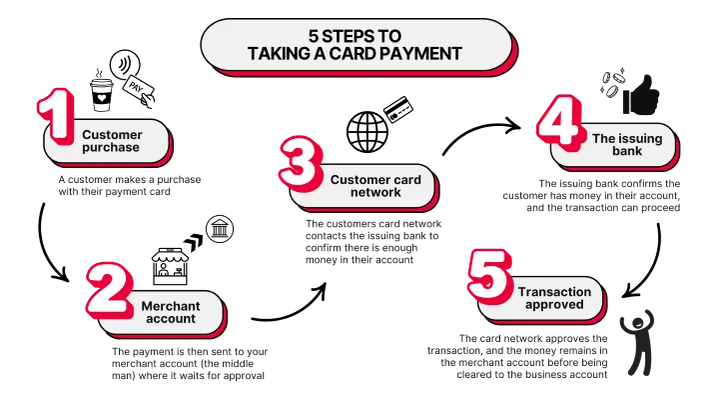
So, the key players involved in the behind-the-scenes card payment process are:
The merchant: that’s you! Or rather, your business. You’ll be accepting the money from the customer, which will go into your merchant account and finally your business bank account.
The merchant account: as we’ve mentioned, this is a holding account that acts as a go-between for your customer’s account and your business bank account.
The customer: this is the cardholder, who will be sending a payment from their bank account to your account in exchange for your goods or services.
The issuing bank: the bank that provided the credit or debit card – being used to pay you – to the customer, and which will authorise or decline the transaction.
Card machine/POS (point of sale) system: this is the hardware and software your business will use to take payment from your customer’s card.
The acquiring bank: this is the bank acting on your behalf, not the customer’s. It processes the credit and debit card payment received via your POS system or card machine from the customer’s issuing bank. It does this via the credit card networks.
The card networks: companies such as Visa and Mastercard that provide the communication network infrastructure between you and your customer, depending on the card they’re using. They can sometimes also act as the card issuer, but not always. They will notify your business of whether the customer’s transaction has been approved or not, and they might set the processing fees for each transaction, depending on your merchant account’s pricing model.
Let’s put this into a specific scenario to make things a bit clearer:
- Amit walks into Coast Roast, a new coffee shop that’s just opened up near his local beach. He orders a cappuccino and gets out his card to pay.
- The barista makes Amit a deliciously frothy cappuccino, then grabs the card reader for Amit to tap with his card.
- Amit taps his card and the transaction travels from the card machine to Coast Roast’s merchant account, where it waits for approval.
- Amit’s card network is alerted of an attempted purchase, and contacts his issuing bank to make sure there’s enough money in his account.
- Amit’s issuing bank tells the card network that he can afford to purchase the cappuccino.
- The card network approves the transaction, and the transaction remains in Coast Roast’s merchant account while it’s being cleared.
- Amit heads down to the beach to enjoy his coffee.
How long does payment settlement take?
Payment settlement will depend on your agreement with your merchant service provider. It can be as quick as the next working day, but some providers will charge you extra for processing your funds this fast, with a standard processing time of two to three business days.
When you’re running a business, inevitably things can go wrong. Here are some quick tips if you run into any of these common issues:
Declined transactions: whether it be insufficient funds, an expired payment card or potentially suspicious activity, there are a number of reasons why a payment might be declined. Our recommendation is to have a pre-prepared, polite response for this scenario, such as: “I’m sorry, but the transaction didn’t go through. Would you like to try a different payment method?”
Connectivity problems: for connectivity problems like a lost internet connection, merchants should look for card readers that feature an automatic offline mode to continue processing sales.
High transaction fees: transaction fees can really eat into your profits. You might be on the wrong pricing plan for your needs and type of business, or being bitten by hidden fees. Make sure to keep a diligent eye on your statements, and once you’ve established a reliable and trustworthy sales history, you could negotiate better rates and save considerably in the long run.
Next steps
Taking card payments efficiently is beneficial to both you and your customers, but to ensure your business succeeds, you’ll need to take the time to do as much research as you can into finding the best merchant account provider for you.
Next up we’d recommend jumping over to our dedicated guide to UK credit card processing fees, where you can start to get a more sophisticated understanding of how much you should be paying in card fees, and all the expenses involved. It’s even got its own handy calculator to help you work out how much you should be paying in fees!
Startups.co.uk is reader-supported. If you make a purchase through the links on our site, we may earn a commission from the retailers of the products we have reviewed. This helps Startups.co.uk to provide free reviews for our readers. It has no additional cost to you, and never affects the editorial independence of our reviews.


