
Sage stands out by providing customisable reporting and built-in payroll functionality. But is it worth your business’ money?
Startups.co.uk is reader supported – we may earn a commission from our recommendations, at no extra cost to you and without impacting our editorial impartiality.
Sage Accounting: 90% off for 6 months

Sage 50 Accounts: 90% off for 6 months
Sage Intacct: For Over 50 Employees
Sage Accounting costs between £20 and £59 per month across three main plans: Start (£18 plus VAT), Standard (£39 plus VAT) and Plus (£59 plus VAT).
We spent a total of 57 hours testing seven top accounting platforms and found that Sage delivers a fast, MTD-ready bookkeeping experience, with a competitive range of features across its three plans.
Based in Newcastle upon Tyne, UK, Sage has done an impressive job of giving its US-based competitors a run for their money as one of the best accounting software platforms for small businesses.
- Sage has three plans, ranging from £20 to £59 per month.
- The mid-tier plan, Accounting Standard, costs £34 per month, is the most popular, and offers strong features at a reasonable price.
- Sage includes built-in payroll functionality even on its lower-tier plans.
- Each plan includes at least one Sage Copilot user, the AI-powered productivity assistant.
- Sage offers strong value for money through customisable document templates, allowing users to tailor external billing documents to specific brand requirements.
All our accounting software recommendations have been put through an independent, user-led testing process.
Sage was judged against the six key categories we determined to be the most important to an accounting software platform, as informed by our own Accountancy Sector Report: core accounting tasks (20%), financial planning and visibility (17.5%), how it enhances overall productivity (17.5%), help and support options (15%), value for money (15%), and the overall usability (15%).
You can find the full explanation of our complete methodology process a the end of the page.
This article will cover:
- Sage Accounting Pricing Plans 2026
- Sage Accounting Start price
- Sage Accounting Standard price
- Sage Accounting Plus price
- Is there a free plan?
- What is Sage Copilot?
- Is Sage worth the money?
- How expensive is Sage compared with its rivals?
- Are there any hidden costs?
- What's Sage Accounting's help and support like?
- Our methodology
- The verdict
I frequently review and update this article, and I have verified all pricing information is correct as of 01/09/2026. However, as the accounting software industry is highly competitive, I always recommend confirming any pricing or features directly with Sage before making any purchasing decisions for your company.
How much does Sage Accounting cost in 2026?
Sage Accounting has three plans to choose from:
|
Plan
|
Cost
|
Included users
|
Suitable for
|
Key features
|
Sage Copilot included?
|
Snap and scan receipts/invoices
|
Payroll
|
|
|---|---|---|---|---|---|---|---|---|
 |
|
|
||||||
|
Accounting Start |
Accounting Standard |
Accounting Plus |
||||||
|
£20/month (+ VAT) |
£43/month (+ VAT) |
£59/month (+ VAT) |
||||||
|
One user |
Three users |
Unlimited users |
||||||
|
Sole traders and micro-businesses who are registered for VAT |
Limited companies that work with suppliers or with CIS |
For small businesses up to 49 employees, who work in different currencies, or need to manage an inventory |
||||||
|
|
|
||||||
|
|
|
|
||||||
|
Not included |
30 included (+ £0.20 per additional approved capture) |
100 included (+ £0.20 per additional approved capture) |
||||||
|
One employee included (+ £1.50 per employee per month) |
One employee included (+ £1.50 per employee per month) |
Five employees included (+ £1.50 per employee per month) |
With Sage, there’s no contract to sign, and you’re free to cancel at any time, with your account remaining active until the next billing date. There are also frequent deals and discounts: right now, you can get 90% off Sage Accounting for six months.
Sage Accounting Start: £20 + VAT per month
Current special offer: 90% off the first six months
Number of billable users: One
Sage Copilot users included: One
Suitable for: Solopreneurs and micro-businesses
Key feature: Prepare, track, and submit tax for Making Tax Digital Income Self Assessment
Sage Accounting Start is best for sole traders and solopreneurs registered for VAT, as my testing showed that it offers a seamless process for managing sales invoices.
With Accounting Start, you can:
- Send unlimited sales invoices each year
- Connect to third-party apps through the Sage Business Cloud App Marketplace or automation platforms like Zapier
- Track your invoices so you can see when they were created, sent, viewed, or paid
- Get automated bank reconciliations to help simplify your records
- All Sage plans also include Sage Carbon Accounting, which can help your business track its carbon footprint
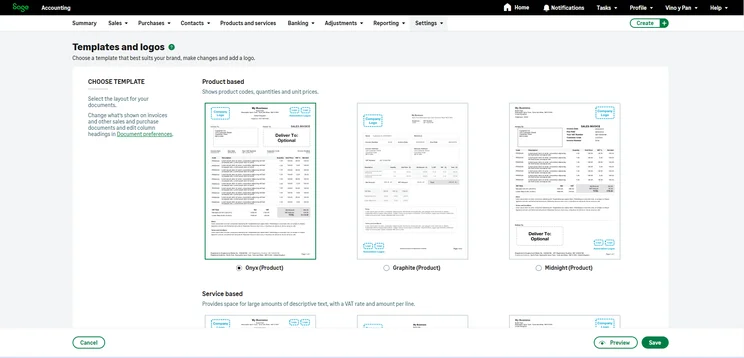
The clear design of the summary dashboard allowed me to quickly access essential financial data, like outstanding payments. I also liked how easy it was to customise an invoice template.
Each Sage plan also comes with one user for its AI-powered productivity assistant, which you can read more about in our section on Sage Copilot.
Getting paid on time doesn’t need to be a headache. With our business toolkit, you can accept payments with a simple link. No merchant account or complicated setup needed.
Payroll features
Payroll functionality is included for free on all plan levels, which is a standout feature for Sage.
You can complete a four-step pay run for your business, and your employees will have access to self-service payslips both online and via an app.
You’ll also get access to pension auto-enrolment, which includes built-in compliance checks.
Which UK banks are compatible with Sage’s automated bank feed?
Sage can connect to up to nearly 100 banks, including top options like:
- HSBC
- Lloyd’s
- Monzo
- Natwest
- Barclays
- Tide
- TSB
- Royal Bank of Scotland
Competitor context
Sage Accounting Start (£18 + VAT per month) is cheaper than FreeAgent’s Sole Trader plan (£19 + VAT per month), though FreeAgent offers a broader feature set. It’s also worth noting you can get FreeAgent for free with specific business bank accounts like NatWest.
Sage Accounting Start is slightly costlier than Xero’s Ignite, which costs £16 per month + VAT, however, Xero has transaction caps at this level, which Sage doesn’t.
Zoho Books has a free plan that is MTD compliant, and its Standard paid plan is cheaper than Sage’s starting plan, at £12 per month + VAT. Just keep in mind, however, that Zoho Books Standard has caps for invoicing and expenses, which Sage doesn’t.
Sage Accounting Standard: £43 + VAT per month
Current special offer: 90% off the first six months
Number of billable users: Three
Sage Copilot users included: One (three users maximum)
Suitable for: The majority of growing small businesses
Key feature: Input “bills”, and keep track of who you owe what to
Sage Accounting Standard is the best plan for limited companies, as you can use accrual mode accounting (as opposed to on a cash basis).
You’ll get everything included in Accounting Start, but Accounting Standard also lets you:
- Send out quotes to customers and convert quotes to invoices with a single click
- Get customisable profit and loss statements, giving you clarity and control over your finances with analysis types and tags
- Automatically capture, manage and classify invoices and receipts with AI
- You can submit CIS tax directly to HMRC, with automatic CIS deductions and calculations.
Sage Accounting Standard is also the best choice if you’re working with suppliers, as you can keep a record of who you owe what to with purchase invoice management. Plus, the AI can assist with more efficient uploading.
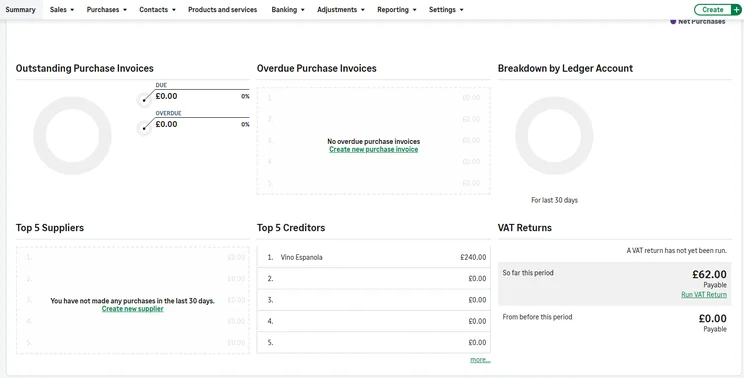
With Accounting Standard you get more advanced reporting tools, including a cash flow projection widget that factors in your expected outgoings and income to predict your bank balance.
I found the profit and loss statements to be really clear and easy to read when I tested Sage. You can view reports on the basic plan, but you’ll get deeper customisation with Standard, which will be needed by most small businesses. For example, on Standard you can use analysis tags to see which is the most profitable area of your business. Just be aware, you’ll need to pay for the most expensive Plus plan to get budgeting tools.

Competitor context
If you need multi-currency support then QuickBooks will be a very solid alternative option at this price level, with a comparable plan priced at £38 per month + VAT (QuickBooks also has an in-built receipt snapping tool without limits, whereas Sage’s becomes paid after 30 snaps).
Xero’s comparative plan is marginally cheaper at £37 per month + VAT, for its Grow plan, but you also need to pay an extra £5 per month to submit CIS returns.
Zoho Books has a strong offering at this price level, as it can handle CIS returns, as well as vendor management, for just £24 per month + VAT. It’s important to remember not to get caught out by Zoho’s transaction caps, though.
Sage Accounting Plus: £59 + VAT per month
Current special offer: 90% off the first six months
Number of billable users: Unlimited
Sage Copilot users included: One (unlimited maximum users)
Suitable for: SMEs who need to manage an inventory of products, as well as those operating internationally
Key feature: Multi-currency invoicing
Sage Accounting Plus is best for established businesses who need deeper reporting tools, as it lets you create a budget with your financial year data and track budget performance with the “Profit and loss – actual vs budget report” tool.
You’ll get everything in the previous plans, as well as key features like:
- Inventory and stock management: tailor prices to your business, including purchase, sales, trade, or wholesale
- Multi-currency invoicing and automatically updated exchange rates: receive payments in a range of currencies
- Out-of-stock warnings and stock limits: get a warning when you’re running low and set stock re-order levels
- Exchange rate reports: track gains and losses made from currency exchange rates
Competitor context
You can get multi-currency support on QuickBooks’s Essentials plan for just £38 per month + VAT, and stock tracking is unlocked on the Plus tier, which is cheaper than Sage at £56 per month + VAT.
All of Xero’s plans come with basic inventory management and multi-currency support is available on the Comprehensive plan, which is cheaper than Sage at £50 per month + VAT.
To get comparative features from Zoho Books, you’ll need to be looking at Zoho Premium at £30 per month + VAT, which in terms of features is very solid value for money (but Zoho Books Premium is limited to 10 users, whereas Sage is unlimited).
Does Sage Accounting have a free plan?
Sage offers a ‘Sole Trader Free’ plan for non-VAT registered businesses, which sits outside the main range of Sage Accounting software products.
Sage Sole Trader Free
Sage Sole Trader Free is a no-cost plan aimed at non-VAT registered sole traders, who want to see a self-employed tax summary, and also allows you to:
- Create and send five sales invoices per month
- Manage income and expenses
- Manually record cash expenses
There is also the option to upgrade to the paid version of Sage Sole Trader which costs £7 per month + VAT. This tier unlocks:
- Unlimited sales invoices
- AI-powered expense categorisation
- Snap and scan for receipts
- Connect up to 10 bank accounts
Just know that you can’t upgrade directly from Sage Sole Trader to Sage Accounting. You’ll need to cancel your subscription, and then purchase a new license.
You can also jump over to our breakdown of the best free accounting software for small businesses for our recommendations on no-cost plans.
Does Sage have a free trial?
Yes. You can try any of the three plans free for a month. However, you will not get the 90% discount, meaning you’ll be charged full price after this period ends.
What is Sage Copilot?
Sage Copilot is Sage’s AI-powered accounting assistant. It can help you improve your workflow by:
- Providing actionable insights
- Flagging potential risks
- Automating tasks for you
Sage Copilot also includes a VAT assistant that can flag upcoming deadlines and calculate what you owe to HMRC.
Is Sage worth the money?
Sage is worth the money, as you’ll receive a fast, AI-powered bookkeeping software without usage or transaction caps, that has payroll functionality already built-in.
I was especially impressed with the processing of invoices and quotes during my hands on testing of Sage Accounting. I really liked the progress bar showing the different stages from creating it, to sending to the client, to being able to see when they viewed it.
Sage’s clean and clear design was a standout element in my testing, which made it easy to navigate around. Sage’s quoting and invoicing worked seamlessly.
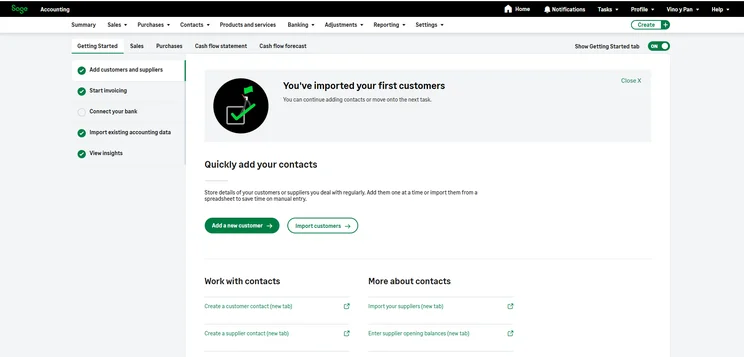
My hands-on testing identified client list uploads as a key usability misstep though, with the majority of our expert testers unable to successfully complete the process. Locating certain functions and features was also occasionally more frustrating than I would have liked.
What features are included in the Sage Accounting mobile app?
Sage provides a mobile app that is optimised for both iOS and Android, which includes features like:
- Create, manage, and send invoices
- Recording transactions
- Viewing your financial performance by week, month, or year
- Compare your performance month to month
- Search by transactions
- Import contacts from your device
- Service-based sole traders, such as builders, contractors, and handymen, who need to manage regular quotes and invoicing
- SMEs with stock and inventory management needs, like a wine merchant
- Businesses with small teams that want to seamlessly include payroll as part of their bookkeeping software
- Established businesses may find Sage lacking in advanced financial management tools
- The complex expense management might make Sage challenging for businesses handling high volumes of transactions
How expensive is Sage compared with its rivals?
Sage’s mid-tier plan is similarly priced to competitors, but its more advanced tiers are expensive:
- If you’re a microbusiness with very basic needs: you’d be better off going with Zoho Books’s free plan.
- For businesses with high transaction numbers: Xero’s Ultimate plan, while more expensive than Sage’s Accounting Plus at £65 + VAT per month, is better suited to fast-growing businesses with complex financial needs.
You can use our helpful comparison table below to see how Sage stacks up against competitors:
| Free plan | Starting price | Special offers | Standout feature | |
| Zoho Books | Yes | £12 + VAT per month (for paid plan) | None currently | Easiest to use platform we tested |
| QuickBooks | No | £10 + VAT per month | 90% off for six months | Excellent mobile app |
| FreeAgent | Yes, with a qualifying bank account | £19 + VAT per month for sole traders | 50% off for six months | Great value for money if you qualify for a free plan |
| Xero | No | £18 + VAT per month | 90% off for six months | Best for scalability |
| FreshBooks | No | £16 + VAT per month | 50% off for three months | Time tracking tools included |
| Clear Books | Yes | £16 + VAT per month | 50% off for three months | Free MTD plan |
The key point is that Sage Accounting Plus allows unlimited users, exceeding the limits of QuickBooks Advanced (25 users at £123 + VAT) and Zoho Books Ultimate (15 users at £199 + VAT).
Are there any hidden costs?
There are no hidden costs or fees associated with Sage. However, there are some limitations to bear in mind.
Sage has a limit on receipt captures that you won’t want to be caught out by. With the Standard plan, you get 30 approved captures, and 100 with the Plus plan. After this you’ll need to pay 20p per capture.
What did we feel was missing?
- There’s no built-in time tracking functionality on any of the plans. It can be somewhat rare for a small business to need this feature though, so it’s not what we’d call a dealbreaker.
- Employees cannot submit expense claims directly through the software with Sage – you will need to integrate a separate HR module for this.
What’s Sage Accounting’s help and support like?
I was impressed with the range of Sage’s help and support, including:
- Phone: available from 8am to 6pm on weekdays.
- Live chat with a real person: available 9am to 5pm on weekdays
- Live chat with a bot 24/7
- Community forum
- Knowledge centre
- Online materials, such as video tutorials and webinars
Our methodology
Sage was one of seven different accounting software platforms that we tested: Zoho Books, QuickBooks, FreeAgent, Xero, Sage, FreshBooks and Clear Books.
Our testing process was comprised of industry-based insights and actual, hands-on user testing spread across 1,512 total areas of investigation, with a total of57 hours of testing.
To ensure you’re getting your money’s worth, we determined the six criterion that are essential to a small business owner shopping for accounting software:
- What features am I getting with this software? (20%): we conducted an analysis of critical operations like invoicing and quoting, tax preparation, payment processing, reconciliation, and journal entries.
- How well does the software let me plan financially for the future? (17.5%): we reviewed the tools that allow for good financial decision-making, like forecasting and budgeting, reporting, inventory management, and compliance support.
- How efficiently will the software help me run my businesses? (17.5%): we explored the capability to integrate with other apps, the extent of customisation, AI features, and whether it allows for collaboration.
- How much does the software cost? (15%): we conducted an analysis of exit fees, contracts, set-up fees, one-time charges, hidden costs, and any free trials or plans, to ensure the software is providing you with good value for money.
- What options for support are there? (15%): we looked at the range of support types available, including their accessibility, as well as testing the accuracy of the knowledge centres.
- Is the software easy to use? (15%): I conducted hands-on testing of the platform to test the intuitiveness and accessibility of the software.
We also worked with our expert external accountant, Dan Heelan, who has 19+ years of actual accounting experience, to ensure our findings are correct and helpful.
Verdict: who should buy Sage Accounting?
Sage Accounting is the best choice for service-based businesses like contractors and builders who require customisable invoicing and built-in payroll functionality.
You can find more information about why we think Sage is one of the strongest options for sole traders in our guide to the best accounting software for the self-employed.
Frequently Asked Questions
Sage’s cloud accounting plans are aimed at small businesses and cost from £20 to £59, whereas Sage 50 is more advanced, enterprise level software that ranges from £115 to £234.
Yes. Sage has slightly increased the pricing of its Start and Standard plans, which have gone up from £18 and £39 per month to £20 to £43 per month. Sage’s main focus for 2026 is adding value through AI integrations, with Sage Copilot.
Unlike many other competitors, Sage includes payroll for free on all Sage Accounting plan levels.
Sage is fully HMRC compliant, and can handle MTD for Income Tax on all plan levels.
Startups.co.uk is reader-supported. If you make a purchase through the links on our site, we may earn a commission from the retailers of the products we have reviewed. This helps Startups.co.uk to provide free reviews for our readers. It has no additional cost to you, and never affects the editorial independence of our reviews.


