
An efficient POS system is the key to good customer experience and retail success. Here’s what we picked as the top options, and why.
Startups.co.uk is reader supported – we may earn a commission from our recommendations, at no extra cost to you and without impacting our editorial impartiality.
Square: best all-round POS system

Shopify: combine in-store and online sales

Lightspeed: advanced iPad system

Based on our testing of eight top POS platforms — evaluating them on 33 subcategories, from pricing to stock management—we found Square to be the best retail POS system thanks to its unmatched usability, suite of features, and the excellent range of terminals and accessories it offers.
When you’re running a retail business, every penny counts, especially with increased utility costs and supply chain volatility continuing to impact stores in 2026. Our guide is designed to help you find the best small business POS system for your retail store, whether it’s a multi-chain of shops or a market stall.
- Square is the best retail POS system thanks to its free plan, solid range of features, and improved overall usability (making it the easiest platform we tested).
- SumUp charges the cheapest set transaction fees at 0.99% on the Payments Plus plan.
- Clover can give you a bespoke payment plan if you want pricing tailored to your business.
- Think about your aspirations and how scalable the system should be – if you’re planning to open an additional store, for example, you need multi-store management features. However, for a short-term pop-up, a simple system makes sense.
The best POS systems for retail: quick comparison
|
Best for
|
Pricing from
|
Transaction fees
|
||||
|---|---|---|---|---|---|---|
|
BEST ALL ROUND
 |
 |
 |
 |
 |
 |
 |
|
Square |
SumUp |
Shopify |
Clover |
Lightspeed Retail |
PayPal Point of Sale (formerly Zettle) |
Epos Now |
|
Best overall retail POS system for small businesses |
Getting insights into your sales data |
Seamlessly combining in-store and online sales |
Supporting rapid expansion of your retail business |
Tools for managing multiple stores |
A simple and free retail POS for pop-ups |
Excellent tools for managing a complex inventory |
|
Hardware: from £15 + VAT Software: from £0 |
From £25 per month |
Currently from £9.99 per month (18 month contract) |
Hardware: from £299 (+VAT) |
Hardware: From £225 Monthly subscriptions: From £25 per month |
||
|
Free plan: 1.75% |
From 1.69% to 2.95% + 25p |
Starting from 1.7% for in person sales |
From 1.49% |
Quote-based |
1.75% |
1.3% |
We use an independent testing process that combines extensive data analysis with actual hands on user-testing.
Our ranking is determined by a metric that breaks down the key needs of a small business owner into separate categories with different importance weightings: software (35%), hardware (20%), usability (20%), pricing (10%), help & support (10%), and brand reputation (5%).
You can read more about this process in the full methodology breakdown.
On this date, I verified that all the pricing and information here is correct and up to date. However, given the rapidly changing nature of the payment processing industry, I always recommend confirming prices directly with the POS provider before making a buying decision.
1. Square: best overall retail POS system for small businesses
Overall rating: 4.8
In-person transaction fees from: 1.75%
Monthly costs: free
Contract length: none
Read our full review of Square
Square is the best POS for UK retail businesses because it’s the easiest POS system to use that I’ve tested, comes with a free plan, and has plenty of helpful features.
In our latest round of hands-on POS testing in May 2026, Square performed extremely well in our test run of a real shopping experience, which included changing an order mid-transaction, automated multi-buys, and applying discounts.
Square leads the pack with a task completion time of 9.8 minutes, coming in quicker than Shopify at 10.07 minutes and much faster than the overall average completion time of 13.3 minutes.
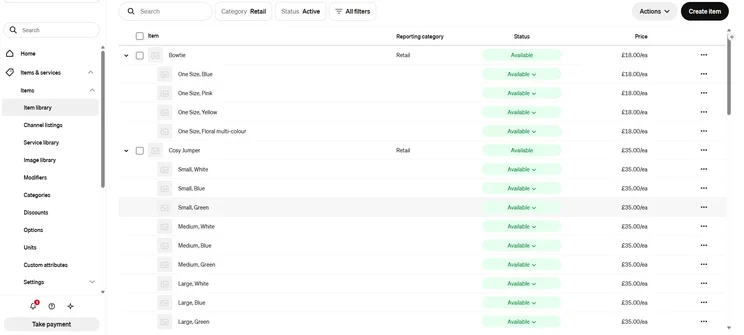
Square also makes it easy to seamlessly integrate your brick-and-mortar retail POS with an ecommerce store thanks to Square Online. The Square ecosystem provides a range of features for in-house multi-channel selling, including:
- Building your own website
- Creating your own email marketing campaign
- Designing a loyalty programme for your customers
Who do we recommend Square POS to?
We’d recommend Square to a range of businesses, from service-based retailers like salons and spas to independent boutiques and omnichannel retailers combining in-store and online sales. However, complex multi-site businesses will most likely need the advanced tools of Lightspeed Retail.
How much does Square POS cost?
| Pricing | |
| Software | Free plan: Free Square for Retail Plus plan: £49/month/location Premium plan (for businesses that process more than £200,000 per year): Custom pricing |
| Hardware | Square Stand (to turn your iPad into a countertop terminal): £99 plus VAT Square Handheld: £169 plus VAT Square Register: £699 plus VAT |
| Transaction fees | Free plan: 1.75% in person, 2.5% for virtual terminal and invoices, 1.4% + 25p for online transactions Square for Retail Plus plan: 1.6% in person, 1.4% + 25p for online transactions Premium plan: Custom rates |
| Free trial? | You can test the system using the free plan on a tablet |
Square has a completely free plan (which we ranked as the best free POS for small businesses), that’s subject to a reasonable in-person transaction fee rate of 1.75%, which is perfect for new businesses.
As you scale, you’ll be able to upgrade to the paid Square for Retail Plus plan, which unlocks advanced features like:
- Bulk inventory intake
- Barcode label printing
- Smart stock forecasting
- Square has an excellent employee management system
- Square AI: this is the AI-powered productivity assistant which can answer key questions
- Square has an impressive range of terminals and accessories: the Square Terminal is one of the best POS devices I've tested
- There's no built-in training mode for new staff, however thanks to the usability of the system, this is less of an issue
- Square POS is missing a dedicated cost/profit management tool, which Clover can provide
What stood out to me in my most recent testing of Square’s retail POS is how equally well designed both the frontend and back-office interfaces are. It can often be the case with POS systems that the two sides are imbalanced in terms of usability, but Square nails both.

2. SumUp: best for a low-cost setup and clear insights into your sales
Overall rating: 4.5
In-person transaction fees from: 1.69%
Monthly costs: free
Contract length: none
Read our full review of SumUp
SumUp is best for keeping operational and setup costs low with a free plan, low in-person transaction fees, and affordable hardware (the SumUp handheld POS terminal can currently be purchased outright for £135 + VAT).
SumUp is highly affordable while still allowing for helpful analysis of your sales data through features like the simple item variants and clear product performance reports.
SumUp’s standout point is really its operational simplicity, as it keeps everything streamlined with tasks like adding new inventory products, client profiles, or floor staff being quick and painless.
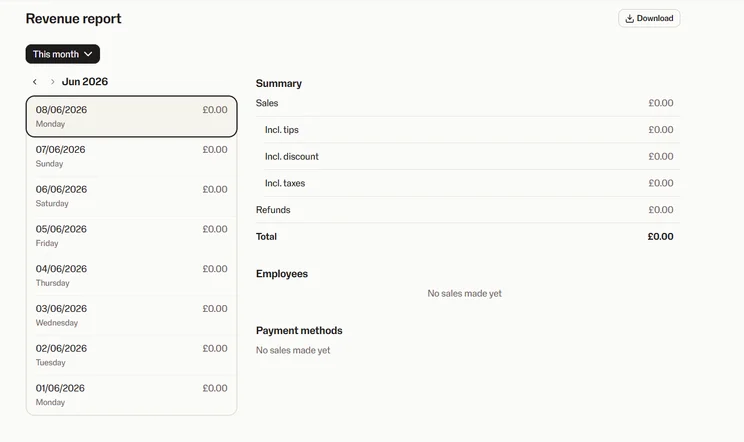
SumUp also provides a helpful range of support options for retailers, such as phone support, which is available seven days a week, from 8am till 7pm on weekdays, and 8am till 5pm on weekends.
Who do we recommend SumUp to?
We recommend SumUp to modest, smaller businesses such as sole traders with market stalls or pop-up kiosks, mobile artisans, and smaller retail counters.
How much does SumUp cost?
| Pricing | |
| Software | Free POS: free Payments Plus: £19/month POS Plus: £39/month Business Account Plus: £15/month Invoices Plus: £8/month |
| Hardware | Handheld Terminal: £135 + VAT Solo (standalone card reader): £79 + VAT SumUp Solo Lite: £25 + VAT SumUp Register: £399 + VAT Retail POS Kit: £649 |
| Transaction fees | 1.69% in-person transaction fee on Pay-as-You-Go plan 0.99% in-person transaction fee on Payments Plus plan Bespoke transaction fees for businesses that process £10,000 or more a month 1.69% for international/corporate/premium cards 2.5% for online payments |
| Free trial? | Yes; 7-day free trial with Payments Plus plan |
SumUp’s in-person transaction fee is lower than Square’s, but the actual difference is negligible (if you’re running over £5,000 per month in card sales, the 0.06% difference in card sales would only save you roughly £3 per month).
However, the Payments Plus plan (£19 + VAT per month) is what will give businesses an edge. If you’re taking in more than £3,000 per month in card sales, then the 0.99% rate will justify the monthly cost.
Just keep in mind, you’ll need to upgrade to Payments Plus for advanced reporting like supplier cost comparison and cash drawer session data.
- SumUp's inventory management tools include stock alerts and cost management features
- SumUp has a free plan, but you can also upgrade to Payments Plus for low 0.99% transaction fees
- The frontend interface is clear, clean, and responsive
- We found the backend to be less intuitive than the frontend, with some clunky navigation
- SumUp isn't able to natively support physical gift cards
- Unlike Square, there's no native knowledge base for getting quick answers to queries
I found that SumUp has a really simple and intuitive frontend interface that resulted in a very short learning curve. Most retailers can start processing payments very quickly with SumUp and the standout feature for me was the “park order” function. It’s a simple addition from SumUp but one that allows for flexible, quick adjustments mid-transaction, preventing a blockage in your checkout queue.
3. Shopify: best for combining in-store and online sales
Overall rating: 4.5
In-person transaction fees from: 1.7% with Shopify Payments (2% using a third-party provider)
Monthly costs: from £25 + VAT per month
Contract length: none
Read our full review of Shopify
Shopify is the best option for combining your brick-and-mortar sales with an online store because of its well-designed, unified dashboard that allows you to seamlessly sync your in-person and online sales, preventing errors like double-selling across your online and physical storefronts.
In terms of how Shopify functioned in our test sales environment, while it wasn’t quite as intuitive or easy to navigate as Square, Shopify was still fairly adept at a fast checkout process. It only came in a nose behind Square at a task completion time of 10.07 minutes, which was much faster than Clover’s 14 minutes.
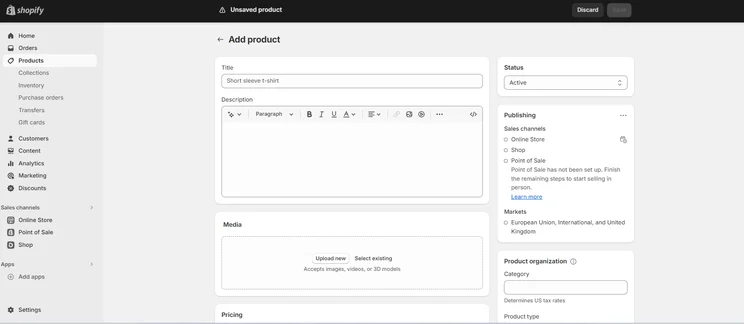
While Shopify has a steeper learning curve than some simpler competitors (like SumUp), it does provide some excellent help and support options to help out inexperienced users, such as:
- 24/7 access to the Shopify support team via live chat on all plans
- Priority phone and live chat support on the Plus tier
- Shopify Sidekick: this is Shopify’s built-in AI assistant which can answer queries, as well as analysing data, and automating tasks
Who do we recommend Shopify to?
We recommend Shopify to ambitious, existing ecommerce sellers that are looking to open a physical showroom, as well as retailers with complicated inventories involving high-SKUs of both physical and digital goods.
How much does Shopify cost?
| Pricing | |
| Software | Basic plan: £25/month Grow plan: £65/month Advanced plan: £344/month POS Pro: £69 + VAT per month |
| Hardware | Shopify POS Terminal: £239 Eddy Tablet Stand: £335 |
| Transaction fees | 1.5% – 1.7% for in person card payments 1.5% + 25p – 2% + 25p for online payments 0.6% – 2% for third-party payment providers |
| Free trial? | Yes |
Shopify is an expensive option, but this is because you’re predominantly paying for one of the best ecommerce platforms for small businesses, with the addition of POS capabilities.
Any business larger than a solo operation will need to pay for the mid-range “Grow” plan (£65 + VAT per month). For new retailers who just want to get set up with the lowest costs possible, SumUp or Square will be better options.
- The customisable smart-grid interface
- Access to excellent ecommerce tools, like abandoned cart recovery
- The Shopify app store: connect to over 89 POS apps to add extra features
- As you're paying for both a POS platform and an ecommerce platform, Shopify can be expensive
- Shopify doesn't have any first-party POS terminals, so if you want a dedicated countertop terminal then check out Epos Now or Clover instead
- Shopify's back office can feel complex, and there's no training mode for new staff
Unlike a lot of other POS platforms, you have a certain degree of flexibility with Shopify’s POS frontend, and you can tweak it to your preferred checkout style which I appreciated.
4. Clover: best for mid-to-large retail brands
Overall rating: 4.5
In-person transaction fees from: quote-based
Monthly costs: from £9.99 + VAT per month (includes device fee)
Contract length: quote-based (previously listed as 18 months)
Read our full guide to Clover
Clover is the best option for medium-to-large retail businesses that are scaling rapidly thanks to the range of well-designed countertop terminals and card readers, as well as the detailed analytics in the back office.
Clover’s reporting features have been built to provide a granular look at your sales and your financial visibility, including:
- Tracking sales over custom date ranges
- Breaking down daily revenue hour by hour, helping plan staff schedules
- Filtering sales by item, so you can quickly identify the highest-margin lines of stock
- Straightforward CSV and PDF exports directly from the Item Sales menu
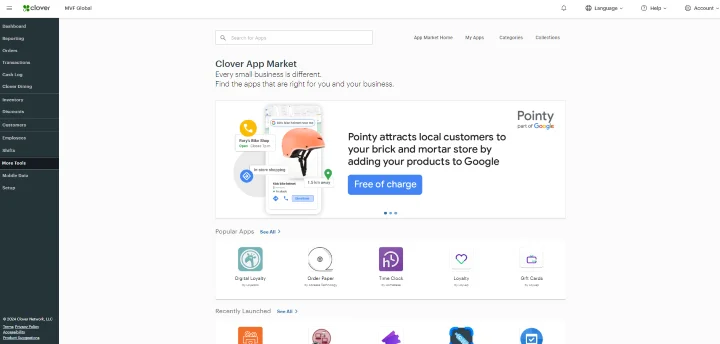
One of the other standout features of Clover is the wide-ranging app market featuring over 500 third-party apps you can use to increase efficiency. You can access retail-focused applications like:
- An advanced “Retail POS” for managing products and promotions
- Loyalzoo app for creating a customisable loyalty programme
- Bundle Discounts for driving customer engagement
- Inventory Pro for real-time stock tracking
Who do we recommend Clover to?
We recommend Clover to established retail businesses that are prepared to make the cash investment for its top-class terminals and accessories. We’d suggest smaller businesses like pop-up stalls and temporary market stalls look at a provider like Square or PayPal Point of Sale instead.
How much does Clover cost?
| Pricing | |
| Software | From £9.99 per month (includes device rental) |
| Hardware | Clover Flex: £15/month Clover Flex Pocket: £15/month Clover Mini: £20/month Clover Station Duo: £30/month |
| Transaction fees | Quote-based |
| Free trial? | No |
Clover typically operates on a quote-based pricing structure tailored to processing volumes. However, its current offer starts from £9.99 per month (monthly service fee, including device) on a short-term contract (previously advertised at 18 months).
While the total cost of Clover will price out smaller, untested businesses, those that are willing to make a long-term, multi-year investment into Clover’s infrastructure will benefit from the premium equipment and bespoke transaction fees.
- A standout customer display, which you're able to customise
- Clover balances feature-depth with usability, with tools for multi-site inventory and employee management
- The hardware is top-of-the-range, including the Clover Flex Pocket, a lightweight handheld POS
- Clover's back office can be unintuitive, with tasks like bulk item uploads being frustrating, unlike Square's more streamlined dashboard
- Clover is contract-based, lacking the pay-as-you-go simplicity of Square or the "cancel anytime" model of Shopify
- We found that applying the promotional and discount tools could be clunky, and less streamlined than with Shopify
For me, easily the standout feature on Clover’s countertop terminal is the fingerprint scanner. The biometric access meant that I could get into Clover’s system much faster than any other POS platform, which could be a crucial feature for staff on a hectic shop floor.
5. Lightspeed Retail: best for multi-location retail stores
Overall rating: 4.4
In-person transaction fees from: quote-based
Monthly costs: from £75 + VAT per month
Contract length: quote-based
Read our full Lightspeed review
Lightspeed Retail is best for managing complex, multi-site chains thanks to its impressive multi-channel data management allowing you to build and nest up to 2,000 inventory categories, and subcategories.
Lightspeed is adept at managing complex stock through sophisticated tools like:
- Comprehensive order visibility using the master order control panel
- Automated large bulk ordering through its “receive and distribute” functionality
- AI-powered inventory entry: automatically digitising and populating items, costs, and variants into the master database
Lightspeed also provides deep data analysis through its add-on module, Lightspeed Insights, which can track your business’s performance down to a granular level and compile order recommendations for both seasonal and non-seasonal stock.
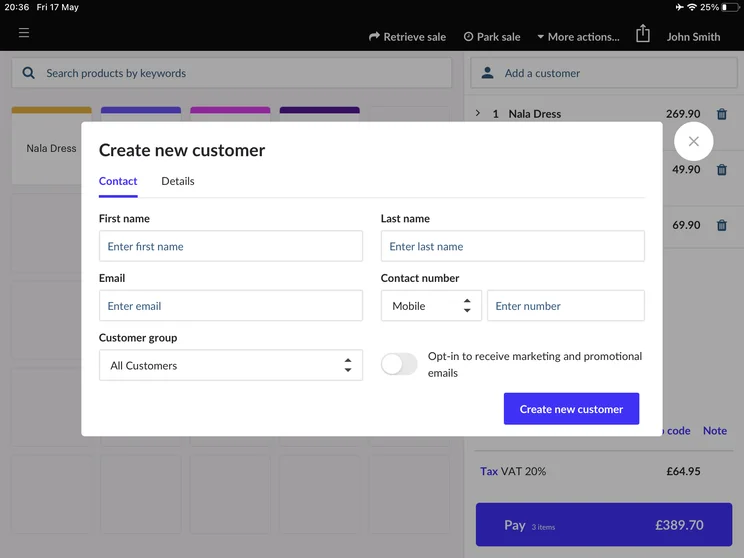
Lightspeed Loyalty is another modular add-on feature which provides highly sophisticated engagement tools for retailers, like unlimited custom VIP tiers, smart customer groups for tailored promotions, and drag-and-drop email marketing.
Who do we recommend Lightspeed Retail to?
We recommend Lightspeed Retail to high-SKU, specialty retailers such as sporting goods, footwear brands, apparel chains, bridal boutiques, specialty electronics, and home decor retailers. For simple, flat-catalog brands, Square is a better option.
How much does Lightspeed Retail cost?
| Annually | Monthly | |
| Basic | £75 per month | £89 per month |
| Core | £149 per month | £189 per month |
| Plus | £189 per month | £229 per month |
Please note that these are the starting prices for one register at one location. The price will increase for each location and register you need to add.
Lightspeed Retail is an expensive option because it provides enterprise-level software, and if you need to access the built-in loyalty features or you want to integrate an ecommerce site, you’ll need to pay for the “Core” plan, at least.
Just note that our research shows that there can be potentially high exit fees if you leave your contract early, so Lightspeed will be the best option for established businesses with reliable revenue streams.
- The Lightspeed App Market allows you to build out your software with third-party apps
- Lightspeed's tablet-based system is good for staff manoeuvrability
- Lightspeed Retail has built-in offline functionality that syncs automatically when back online
- Some aspects of Lightspeed can be overly complex, and more basic businesses would be better with SumUp or PayPal Point of Sale
- Navigation can be tricky due to the use of unlabelled icons on the interface
- Lightspeed doesn't have a contract-free plan, so it's unsuitable for microbusinesses
During my testing of Lightspeed, I found both the frontend and back office very easy to use, with a smooth and efficient interface. There were a few hiccups (creating discounts was quite unintuitive and clunky for example) but overall I found it to be an extremely fast and reliable system, and a clearly serious piece of software.
6. PayPal Point of Sale: best for short-term retail pop-ups
Overall rating: 4.0
In-person transaction fees from: 1.75%
Monthly costs: free
Contract length: none
Read my head-to-head comparison:PayPal Point of Sale vs Square
PayPal Point of Sale is the best choice for simple pop-ups and seasonal businesses, as you’ll have access to a quick-to-set-up, contract-free POS platform that’s connected to the PayPal financial ecosystem.
By having your POS and your PayPal account linked, you’ll benefit from fast payouts, ensuring a quick cash flow for startups, as well as the security of PayPal’s established infrastructure, which can provide fraud detection.

PayPal Point of Sale prioritises simplicity with a clean, minimalist interface that makes everyday tasks like creating promotions and discounts very smooth and easy. PayPal Point of Sale has a very short learning curve, and almost any seller could quickly get to grips with it.
Who do we recommend PayPal Point of Sale to?
We recommend PayPal Point of Sale to single-site boutiques and short-term businesses like clothing popups that need to prioritise speed and simplicity of setup, without having to worry about complex future growth.
How much does PayPal Point of Sale cost?
| Pricing | |
| Software | Free |
| Hardware | PayPal Terminal: £149 + VAT |
| Transaction fees | 1.75% |
| Free trial? | You can test the system using the free plan on a tablet |
PayPal Point of Sale’s completely free plan, and fair 1.75% transaction fee, makes it ideal for brand new business owners who want to avoid monthly outgoings in favour of software simplicity.
A key point to note: manual card entry (keyed-in transactions, where the card is not present) is subject to a high 3.4% + 20p per transaction fee. If you think you’ll be taking a lot of card sales over the phone, Square is a better option.
- PayPal Point of Sale is extremely quick to set up, and you can start taking payments with just the downloadable app
- PayPal Point of Sale's POS has easy-to-read sales reports for business insights
- PayPal Point of Sale provides phone support during weekday hours
- PayPal Point of Sale doesn't support stock tracking across multiple locations: multi-location chains should choose Lightspeed Retail
- PayPal Point of Sale doesn't provide premium plans like SumUp or Square, so it's less equipped for scalability
- PayPal Point of Sale doesn't have an extensive range of terminals and accessories like Square or Clover
I was especially impressed with PayPal Point of Sale’s back office, which was really nice to use and navigate around. While it had less depth than a lot of the other POS systems I’ve tested, like Lightspeed, what you lose in depth you gain in simplicity.
7. Epos Now: best for large-scale convenience stores
Overall rating: 3.8
In-person transaction fees from: quote-based
Monthly costs: £25 + VAT per month
Contract length: quote-based, typically starting at 12 months
Read our full review of Epos Now
Epos Now is the best option for high-volume convenience merchants thanks to the software’s capability for managing complex inventories, combined with a sturdy countertop terminal that can quickly process payments and scan barcodes.
Epos Now is adept at multi-SKU retailing, with deep functionality like automated stock count levels, age-verification alerts for selling alcohol at the till, and gross margin calculation in the back office.
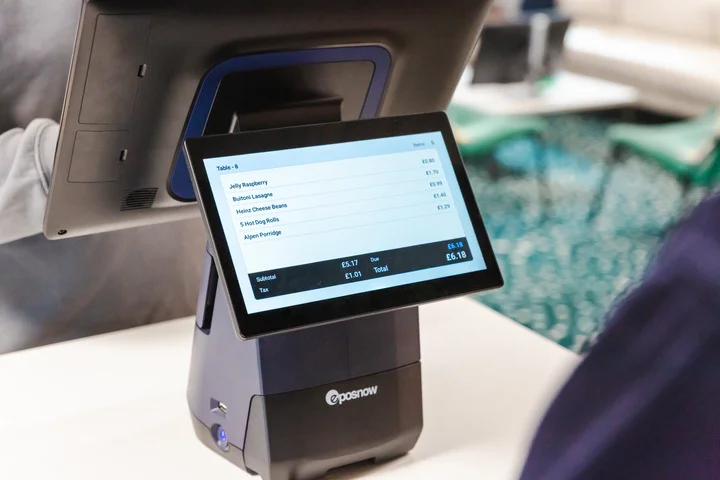
Epos Now also provides Standalone Mode, which allows you to continue taking payments directly from a card reader even when the integrated payment method (like your main till) isn’t working or the internet is down. This means you won’t be missing out on sales due to a technical mishap.
Who do we recommend Epos Now to?
We recommend Epos Now to established SME retail businesses such as high-turnover convenience stores, clothing stores, pharmacy chains, specialised gift boutiques, and businesses with multiple sites across different regional locations.
How much does Epos Now cost?
| Pricing | |
| Software | From £25/month |
| Hardware | From £299 + VAT |
| Transaction fees | Quote-based |
| Free trial? | No |
Epos Now has some very competitive starting prices, which will be worth the multi-year contractual lock-in for established retailers who are confident about their five-year plans.
Epos Now often runs limited time promotional offers on its countertop terminal, so if you’re willing to make a long-term commitment, you can get the hardware at a reduced price.
- Epos Now supports scaling businesses with its multi-store management features
- The customer facing screen on the countertop terminal helps your patrons see their total
- The back-office is feature-packed and customisable
- The frontend interface can feel unintuitive and clunky in areas, with a steep learning curve (Square and PayPal Point of Sale are better first-time choices)
- The customer-facing display is useful, but unlike the Clover terminal, it can't accept payments
- Unlike Square, SumUp, or PayPal Point of Sale, there's no free plan
I was impressed by the wide 15.6″ HD touchscreen on the Duo Countertop terminal, which comes with a handy customer-facing screen. I found the back office especially easy to use, though there could be a bit of a learning curve to contend with using the frontend.
Buying guide: how to choose a retail POS system
When selecting your POS platform, you should consider these five crucial factors:
1. Make sure it’s easy to use
Make sure to select a POS system that’s intuitive for your staff to use so they can process sales quickly and easily during a busy trading day.
Square is the easiest POS to use that I’ve tested, and this is a major reason we ranked it as the number one entry on this list.
2. Prioritise the features you’ll need
Ensure that your POS has features like strong inventory management and reliable automatic offline functionality before you make any purchasing decisions.
3. Ensure it can support multiple stores
To support scalability, you should choose a POS platform that can natively support multi-site management if your business grows in the future.
4. Don’t overpay
There are a number of different factors when it comes to understanding how much a POS system should cost.
Transaction fees will be one of your biggest contributing cost factors so look for providers that have a fee structure that makes sense for your business. New businesses will most likely be better off with a free or low-cost platform with higher transaction fees.
Businesses that have a large volume of transactions each month will be better suited to a platform that has a monthly cost, but lower individual transaction fees. You can use our own trusty calculator, found in our guide to credit card processing fees, to work out how much you should be paying.
5. Look for a free trial or demo
We’d always recommend you try before you buy, and many POS platforms will have a free trial or, at the very least, can arrange for you to demo the software.
Our methodology: how we choose the best retail POS systems
At our Startups offices in London, we assessed a total of eight different POS systems to ensure the relevancy and accuracy of our recommendations.
Our ranking is based on impartial analysis carried out by our research department, combined with actual hands-on yearly testing of the available platforms.
The final scores were worked out based on the six categories most vital to a successful retail POS system, each weighted based on its importance to small businesses.
We recently worked alongside our Head of Research to amend the weightings to ensure they accurately reflect the needs of a retailer in 2026:
1. How well designed is the POS software? (35%)
We reviewed the core software capabilities like inventory management, multi-site functionality, customer engagement, gift cards, offline functionality, reporting, and the app market.
2. Does the POS provide a range of terminals and accessories? (20%)
We investigated the range of POS terminals, including how portable they are and the display size and quality, as well the stands and accessories the provider has available (including barcode scanners and receipt printers).
3. How easy to use is the POS system? (20%)
We conducted hands-on user testing on all the POS platforms to see how they would perform in a test sales environment.
4. How much will the POS system cost for my retail business? (10%)
Is the system good value for money or not? We investigated monthly costs, transaction fees, and hardware prices.
5. What help and support options are available to retailers? (10%)
We examined the avenues of support that are made available, including if there’s a training mode for new staff, and the accuracy of the knowledge centre.
6. Does the platform have a good brand reputation in the industry? (5%)
We considered factors like brand recognition, competitor reviews and online comments.
The verdict: which POS system is best for retail
Square POS is the best POS system for retailers, as my latest hands-on testing in May 2026 confirmed it remains the easiest platform to use. Square POS is well designed and a pleasure to use, handling retail sales with ease.
However, for some more advanced retailers with multi-chain needs, you will be better off with an enterprise-level specialist software like Lightspeed Retail.
Jump back up to any of our reviews:
Startups.co.uk is reader-supported. If you make a purchase through the links on our site, we may earn a commission from the retailers of the products we have reviewed. This helps Startups.co.uk to provide free reviews for our readers. It has no additional cost to you, and never affects the editorial independence of our reviews.


