

Want to start accepting card payments? We’ve ranked and reviewed the best merchant service and card processing providers in the UK, based on extensive testing.
Startups.co.uk is reader supported – we may earn a commission from our recommendations, at no extra cost to you and without impacting our editorial impartiality.
Square: £0 monthly fees

takepayments: Next day settlements

Worldpay: International payments

takepayments is the best merchant service provider for UK small businesses in 2026, based on our testing of 26 providers with 45 tests over a total of 22.5 hours, completing 270 different evaluation tasks.
takepayments provides a bespoke transaction fee structure, with fast next-day settlements, and tight security, making it our number one choice. takepayments is also our recommendation for the best card machine for small businesses.
In March, the UK government announced it would be backing small businesses with a set of reforms to tackle late payments. In the meantime, merchants still need to focus on securing competitive transaction fees – which all begins with choosing the right merchant service provider.
- takepayments is the best merchant service provider, thanks to its in-depth actionable data, next-day payouts, and fully integrated handheld POS.
- Clover stands out as the best low-cost merchant account, offering key features and device rental at an affordable price.
- Monthly charges and transaction fees can be quote-based, like takepayments’s tailored approach, or set at a fixed rate, like Square’s 1.75%.
- Worldpay charges low fees for businesses with high-value transactions, but you’ll have to sign an 18-month contract.
- Key factors such as payment options, transaction fees, and contract lengths should be considered when choosing a provider.
We develop an independent, research-led testing framework to ensure an unbiased assessment of merchant account providers for SMEs.
We analysed 26 merchant service providers in total, testing them against the same four criteria we determined to be most important to the user: how much will it cost my business (35%)? What help and support is available (30%)? Is the software comprehensive (20%)? What hardware is available (15%)?
For a more in-depth breakdown of what these criteria focused on specifically, you can find our full methodology at the conclusion of the review.
The best merchant service providers: comparison table
|
Provider
|
Best for
|
Overall score
|
Transaction fees from
|
Monthly costs
|
Contract length
|
Payout time
|
|
|---|---|---|---|---|---|---|---|
|
FEATURED PROVIDER
 |
BEST OVERALL
 |
 |
 |
 |
|||
|
Square |
takepayments |
Clover |
Barclaycard |
Worldpay |
|||
|
A simple and cheap merchant service |
An all-in-one solution |
Established retailers and restaurants |
Best for Barclays Business Account holders |
High transaction volumes |
|||
|
4.7
|
4.8
|
4.8
|
4.7
|
4.7
|
|||
|
None (premium plans from £29) |
Quote-based |
From £9.99 (includes payment terminal) |
From £16 + VAT (includes payment terminal) |
Current offer: £1 monthly terminal rental for the first 12 months (additional fees may also apply) |
|||
|
None |
12-month minimum |
18-month minimum |
No contract for Smartpay Anywhere (18-month contract for the Barclaycard portable and countertop card readers) |
18-month minimum |
|||
|
Next day (instant transfers available for a fee) |
Next business day |
Next business day (with Clover’s “faster funding”) |
Next business day |
Same day or next day |
All pricing information in this article was verified as accurate as of 29/04/2026. However, the payment processing industry can shift quickly, so we recommend business owners confirm any pricing or feature information with merchant account providers directly before making any purchasing decisions.
Video: what to look for in a merchant service provider
We take you through key information on the best merchant service providers in our video guide:
1. takepayments: best overall merchant service provider

Overall rating: 4.8
Transaction fees: quote-based
Hardware price: from £25 + VAT per month
Contract length: 12 months
Payout times: next-day
Read our full takepayments review
takepayments is the best merchant service provider for small businesses due its tailored pricing model, helpful dashboard reporting that gives you actionable insights, and fast payouts. The bespoke fee structure, which is based on your transaction volume and average value, will mean you won’t be locked into a fee structure that doesn’t make sense for your business.
- takepaymentsplus was our favourite card machine (available in both the standard A029Pro, and slimmer A77 model)
- It offers actionable reporting that can be accessed from both the device and your own dedicated portal
- Accepts both cash and card payments
- Has excellent customer service
takepayments provides an all-in-one ecosystem for taking payments, as it will act as both your payment processor and provide first-class hardware: we loved using the takepaymentsplus in our testing as a handheld POS device.
- The custom transaction fee pricing can support scaling businesses, from a small seller to a medium-sized enterprise
- The fast, next-day payouts can provide a quick cash flow for newer businesses
- takepayments is an all-in-one setup: a payment processor, POS, and a payment gateway which can connect to over 50 shopping cart plug-ins
- takepayments doesn't provide the option to buy card readers and terminals outright, instead you'll be leasing them
- takepayments doesn't have a dedicated mobile app that you can manage your business from (the beepaidGo app is limited to sending payment links and invoices)
- While the range of support options are impressive, unlike Worldpay or Barclaycard, there is no 24/7 support
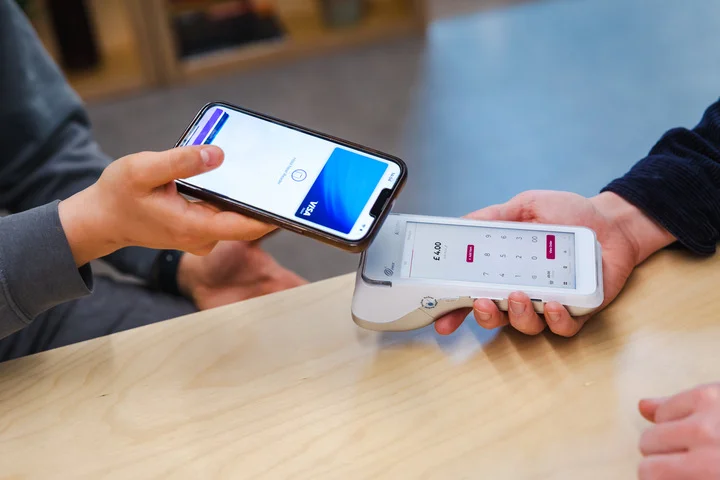
We found the takepaymentsplus card machine extremely easy to use in our testing. Source: Startups.co.uk
How much does takepayments cost?
The main cost of takepayments is the monthly fees that cover the cost of the card machine, the takepaymentsplus (£25 + VAT per month), and then what you’ll pay in transaction fees.
takepayments is suitable for a range of business types and sizes, but I’d recommend it to growing SMEs. For solopreneurs who want to start for free and avoid monthly outgoings, I’d recommend Square.
| Contract: | 12 month minimum |
| Processing fee: | Quote-based |
| Payout times: | Next business day |
| Exit fee: | None |
| Setup fee: | £250 setup costs for the POS terminals |
| Card machine costs: | From £25 + VAT per month |
| POS hardware costs: | tPOS counter: £45 per month + VAT for retail, £55 + VAT for hospitality tPOS complete: £55 + VAT per month for retail, £65 + VAT per month for hospitality |
| Free trial or plan: | None |
Find out more about merchant service costs and charges in our guide to card processing fees.
The standout feature of takepayments for me is that everything is bespoke and fitted to you and your company’s needs. It doesn’t offer a one-size-fits-all package and this is going to give your business the best chance of growing organically, and give you the knowledge that you’re never paying more than you should for transaction fees.

takepayments guides its customers through PCI DSS compliance with a team of specialists on hand to help them meet the requirements.
2. Clover: best for established retailers and restaurants

Overall rating: 4.8
Hardware price: From £9.99 per month (monthly service fee which includes the device)
Transaction fees: quote-based
Contract length: short-term contract
Payout times: one to three business days, though funds can be accessed immediately using Rapid Deposit (costs 1.75% of the deposit amount)
Our guide to Clover
Clover is the best merchant account for established UK retailers and restaurants due to its large app market and an impressive offline functionality.
Clover can take offline payments for up to seven days, making it well suited to merchants operating in areas with bad signal, like a market stall or food truck. Its impressive range of terminals and card machines have standout features like:
- Inventory management and advanced sales reporting directly from the Clover Flex
- Clover Flex can connect via wifi or LTE (high-speed data)
- Clover’s App Market includes over 200 third-party apps you can use to enhance your store or restaurants efficiency
- Connect your Clover payment system to accounting software like QuickBooks, FreeAgent or Sage to remain MTD compliant
- Clover offers up to a maximum of £1,000 to cover any exit fees from your existing provider
- Clover has integrated stock and inventory management
- Smaller pubs and restaurants can run their business from a single card machine
- Clover is contract based, so smaller businesses and solopreneur's will be better off with a pay-as-you-go provider like Square
- Clover doesn't provide 24/7 support, which would be an issue for businesses that are open late
- Clover has impressive hardware, but it's missing a small, basic reader that connects up to your smartphone
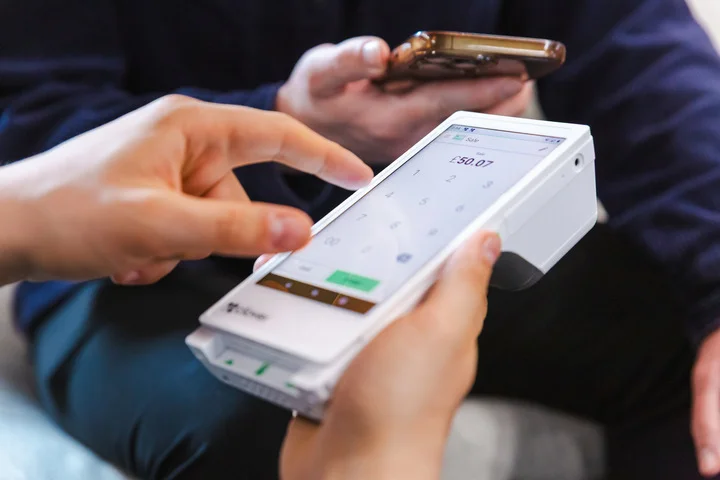
We appreciated that the Clover Flex had audio and visual feedback during our testing. Source: Startups.co.uk
How much does Clover cost?
Clover is currently running a promotion where you can secure a card machine from £9.99 per month, which will be your main outgoing in addition to the transaction fees, or you can contact Clover to receive a bespoke offer if you prefer.
Clover’s card machines can be expensive when bought outright though.
| Contract: | 18-months minimum |
| Processing fees: | Quote-based, but our research shows this can start from as low as 0.2% Mastercard Business Debit cards: 2.25% |
| Payout times: | One business day with Clover’s ‘faster funding’ |
| Setup fee: | None |
| POS hardware costs: | Monthly rental from £9.99 From £450 + VAT upfront (costs vary) |
| Free trial or plan: | None |
I loved the Clover platform thanks to its huge app store, which allowed me to connect with tonnes of apps, and the ease with which you can link multiple selling platforms. They have a great in-person choice as well as excellent ecommerce options that can link to sites like Shopify and WooCommerce.
Clover uses EMV 3DS to authenticate payments, helping defend against card-not-present fraud.
3. Barclaycard: best for Barclays Business Account holders
Overall rating: 4.7
Hardware price: card machines ranges from £18 – £29 + VAT per month, or a one-off fee of £29 for the Smartpay Anywhere (all transaction fees are quote-based)
Transaction fees: quote-based
Contract length: ranges from no contract to 18 months depending on your choice of card reader
Payout times: next day settlement
Barclaycard is the best option if you’re already a Barclays Business Bank account holder, as you’ll have a smooth administrative connection between your bank account and your merchant service, with speedy next-day settlement if your transaction is taken before 7pm.
Barclaycard’s impressive range of card machines will suit a variety of budgets and needs, and its new all-rounder device, the Barclaycard portable card reader (£18 per month), will allow you to:
- Download reports via your online portal for real-time transaction data
- Automatically switch between wifi and data, with the included 4G SIM
- Switch to an accessibility mode (with audio) for visually impaired users
- The countertop and portable devices both have a later 9pm cutoff for next-day payments (great for pubs and bars that might be trading late)
- Barclaycard can provide up to £3000 in switching fees for merchants trying to exit a current contract
- Barclaycard provides all-hours accessibility when it comes to customer support, which is best for 24/7 businesses
- Barclaycard has 24/7 fraud monitoring services to give you peace of mind
- Barcalycard's terminals lack the advanced offline functionality of the Clover Flex
- Despite having 24/7 support, there's no live chat function for quick answers
- Barclaycard is missing the option for a full till system, despite the great range of card machines
How much does Barclaycard cost?
For merchants who don’t want to be tied into a longer contract, the simple Smartpay Anywhere device is contract-free with just a small one off cost of £29 + VAT. If not, your contract length will be determined by your choice of device:
| Cost per month | Contract length | Cancellation cost | Connectivity | |
| Barclaycard portable | £18 + VAT | 18 months | Variable depending on number of card readers and remaining time on your contract | 4G SIM included, and wifi |
| Barclaycard countertop | £16 + VAT | 18 months | Variable depending on number of card readers and remaining time on your contract | Wifi, and optional Ethernet |
| Barclaycard Smartpay Touch | £29 + VAT | 12 months | None | Smart SIM which connects to wifi or data network |
Just note that you may also be subject to additional fees like a minimum monthly service charge, or PCI DSS management, but the full details will be in your contract.
| Contract: | Variable depending on device (ranges from none to 18 months) |
| Processing fees: | Customised pricing |
| Payout times: | Next business day |
| Setup fee: | None |
| Card reader costs: | Ranging from £18 – £29 + VAT per month |
| Free trial or plan: | None |
If you already bank with Barclays, then I’d highly recommend choosing Barclaycard for your online payment solution. I’m really impressed by their 24/7 support and fraud monitoring and the fact that they offer up to £3,000 for switching platforms.
Barclaycard provides 24/7 fraud monitoring services. This is a reassuring feature if you handle stressful high-value transactions – such as trading in luxury items like watches, jewellery, or vehicles.
4. Square: best all-in-one platform with no contract
Overall rating: 4.7
Hardware price: get started with the Square Reader for £19 + VAT
Transaction fees: 1.75% for UK card transactions
Contract length: none
Payout times: Square Transfers can provide your money in one to two working days, but instant transfers are available for a fee
Read our full Square POS review
Square is the best option for new businesses looking for a fast and simple setup to start taking payments with no contract to sign. You can also start taking payments with just your smartphone, with Tap to Pay on iPhone or Tap to Pay on Android available on the Square app.
Square can act as an all-in-one ecosystem for merchants that combines POS, payment processing, and ecommerce in one straightforward system, including:
- Advanced security features
- Live transaction monitoring
- Customisable payout schedule
- Allowing you to sell both in-store and online with Square Online
- Square Appointments can handle online bookings and staff appointments
- Square has by far the easiest interface that we tested
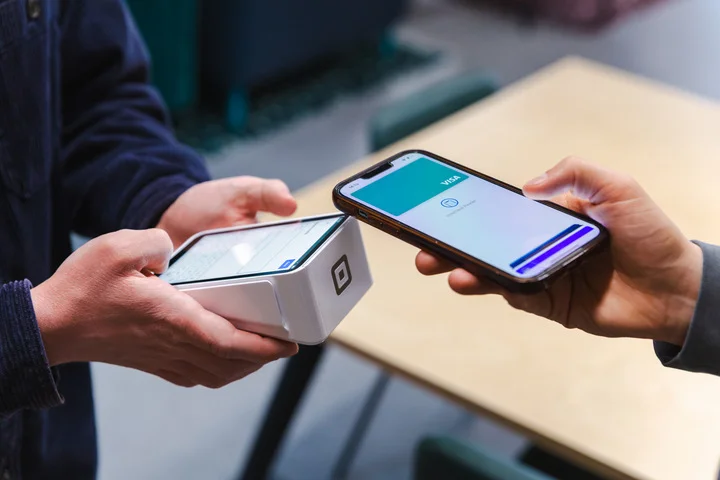
- The well-designed Square Terminal allowed us to quickly and efficiently serve customers in our test run
- Square provides specific plans for retail and restaurants separately
- Square can’t integrate with other POS devices or software: your system is all Square or no Square
- Square doesn't provide 24/7 customer support, unless you're using Square for Restaurants on Square Register
- Square's devices can't connect via mobile data, unlike the Barclaycard portable which has 4G SIM included
How much does Square cost?
Square is the best choice for avoiding up-front costs: you can begin on just the free app, and Square’s 1.75% transaction fee is average for the industry, which means you won’t be overpaying. However, if you’re processing many high-value transactions, then Worldpay will be a better option.
| Contract: | None |
| Processing fees: | In person UK cards: 1.75% In person non-UK cards: 1.75% + 1.5% Online UK cards: 1.4% + 25p Online non-UK cards: 2.5% + 25p Manually entered: 2.5% (2.5% + 1.5% for non-UK cards) Invoices: 2.5% (2.5% = 1.5% for non-UK cards) |
| Payout times: | One to two working days (instant transfers available for a fee) |
| Setup fee: | None |
| POS hardware costs: | From £19 + VAT to £699 + VAT upfront |
| Free trial or plan: | Free plan or £29+ per month for the Plus plan |
The platform is really easy to use, and we were able to create a site and get ready to take payments in under 60 minutes. Plus, you can do all of this completely for free and avoid committing to any major costs upfront!
Square gives merchants confidence in their payments by providing live transaction monitoring. If it spots any suspicious activity, you’ll be notified by email or SMS. Square also uses its proprietary tokenization scheme to prevent unencrypted payment data from touching your application or card reader, and uses its own vulnerability management suite to test its security.
Both Square and takepayments offer excellent payment processing solutions, but Square’s free plan and fast setup is better suited to simple businesses, like a food truck. takepayments contract-based, bespoke transaction fees will be more suitable to businesses that are dealing in relatively high volumes of sales.
5. Worldpay: best for high transaction volumes
Overall rating: 4.6
Hardware price: ranges from £15 – £89 + VAT per month, or £210 – £270 + VAT per year, for the devices
Transaction fees: Quote-based, or 1.5% on the simplicity pricing tariff
Contract length: 18 month contract
Payout times: One business day
Worldpay’s custom pricing model is best suited to established businesses with an annual card turnover of over £75k. Depending on your processing volume, you can get fees as low as 0.75%, as well as being able to customise your payout schedule with Worldpay.
The Worldpay Dashboard is a self-service portal that can reveal insights into your sales, like you customers’ spending habits, giving you actionable data to improve your business strategy.
- Worldpay offers an impressive range of 24/7 help and support (including a user forum)
- Worldpay also processes payouts on the same day on weekdays (if the request is made before the cut-off time)
- Worldpay can support integrating a third-party POS system
- Worldpay doesn't offer services without a lengthy contract, and you will incur exit fees if you terminate early
- Worldpay's model won't favour new, low-volume, businesses (you should try Square instead)
How much does Worldpay cost?
If you’re over the £75k card turnover threshold, then Worldpay will provide tailored pricing, with bespoke transaction fees, and a monthly terminal hire of £15.
Worldpay also offers the ‘simplicity pricing tariff’, with a fixed-rate transaction fee of 1.50%, monthly terminal hire of £22.50 per month, and no minimum monthly service charge
| Contract: | 18-month minimum |
| Processing fees: | Quote-based, or 1.5% on the simplicity plan |
| Payout times: | Same day or next day |
| Setup fee: | None |
| POS hardware costs: | From £15 + VAT per month (currently £0 per month with a special introductory offer) Other options range from £49 + VAT – £89 + VAT per month, or £210 – £270 + VAT per year |
| Free trial or plan: | None |
I’m really impressed by Worldpay and would 100% recommend it for rapidly growing or established businesses looking to take online payments. They’re such a powerhouse in this world, and they have so many great features, such as pay by link – which is great for on-the-go merchants as well as next-day payouts – and a huge dashboard to closely analyse your best payment methods.
Worldpay uses FraudSight, its multi-layered fraud solution, which can analyse a transaction in milliseconds to determine if it’s fraudulent. It also offers WorldPay OmniToken, a tokenization process that can help minimise fraud.
What is a merchant account, and how does it work?
A merchant account is a type of bank account that holds the funds you receive from electronic payments from customers. Funds are held there temporarily until the transaction is approved, at which point they can be transferred to your actual business bank account.
How do I choose a merchant service provider for my small business?
Choosing the right merchant service provider can significantly impact your operations and bottom line. Here are the essential factors to consider:
- Accepted payment types: a comprehensive range of accepted payment methods can broaden your customer base and increase sales opportunities – make sure you can accept digital wallets.
- Transaction fees: look for transparent pricing models with competitive rates and keep an eye out for common hidden charges that inflate costs over time.
- Contract lengths: opting for shorter terms or no long-term commitment can be a good way to hedge your bets.
- Integrations: keeping track of your myriad tech products is easier when your business software integrates with other tools, creating a unified system.
- Compliance measures: you should always verify that the provider adheres to industry regulations and standards for data security and compliance.
- Help and support: reliable support is critical for merchants, especially less experienced sellers, and you can compare the support options of our top providers below:
| Phone support hours | Live chat | Knowledge centre | User forum | ||
| takepayments | -8am and 7pm Monday to Friday -8am to 6pm on Saturdays -9am to 5pm on Sundays and bank holidays | Included | Included | Included (we rated this 5 out of 5) | Not included |
| Clover | -8am to 12pm, Monday to Sunday | Included | 8am to 10pm | Included (we rated this as 4 out of 5) | Not included |
| Barclaycard | 24/7 | Included | Not included | Included (we rated this as 5 out of 5) | Not included |
| Square | -9am to 5pm, Monday to Friday -Plus plans have access to 24/7 support | Included | Included | Included (we rated this 5 out of 5) | Included |
| Worldpay | 24/7 | Included | Included | Included (we rated this as 4 out of 5) | Included |
It’s critical for UK merchants to comply fully with PCI DSS. This stands for Payment Card Industry Data Security Standard, and it safeguards sensitive payment data throughout the payment lifecycle.
All merchants, regardless of size, must adhere to PCI DSS standards. It’s your responsibility as the merchant to be PCI-compliant and to ensure that your chosen merchant service provider complies with PCI standards and the General Data Protection Regulation (GDPR). Failure to do so could result in big fines and penalties.
Another term you might come across in payment security is tokenization: the process of replacing sensitive payment information with a set of random non-sensitive characters (known as “tokens”) to keep the transaction secure.
All the providers we’ve included in this roundup are both PCI-compliant and hold an ISO 27001 certificate (an internationally recognised standard for information security management).
How much should I pay for a merchant service?
Here’s a breakdown of the most common payment processing costs incurred by UK sellers and why you must pay them:
- Transaction fees – charged every time a customer makes a payment to your business (in person or online). Our research found that UK transaction fees typically range from 1.5% to 3.5% of the total value.
- Hidden fees – some fees will only be evident when you’re provided with your contract, for example PCI non-compliance fees which can range from £5-£15 per month.
- Card machine/reader fees – charged for buying or renting a card reader. Basic models start at around £20, while advanced models can cost over £300. Some providers include free readers.
- Virtual terminal fees – charged when you take payments over the phone, by email, or through an online form. Typically 2% to 4% per transaction.
- Payment gateway fees – charged when customers pay online. Usually 0.5% to 1.5% per transaction, though gateways also often charge a monthly subscription fee (£10 to £50+).
You may also encounter additional fees, such as chargeback fees (when a customer disputes a transaction) or settlement fees (usually 20p to 50p) for transferring funds to your bank account.
How we test merchant services for small businesses
When we tested the 26 merchant services, we evaluated them across four key criteria for UK-based small businesses, which we had developed as a result of our previous audience research from industry reports.
Cost was the dominant judging criteria for business owners needing a merchant account provider, with the most heavily weighted sub-category within the pricing criterion being transaction fees.
The biggest concern for SMEs when selecting a merchant service provider will be the transaction fees they incur. We determined the highest possible transaction fee and the lowest possible transaction fee from each provider in order to score this sub-category:
Pricing (35%): is my merchant service provider cost effective for my business?
- We assessed all the costs involved with using each merchant service, including transaction fees, contract costs, monthly costs, and upfront fees (which will affect your bottom line).
Help and support (30%): how easily can I get assistance if I run into any issues?
- We appraised the type and availability of support (phone, email, live chat, forum, or knowledge centre), and then tested the accuracy of the knowledge centre provided for merchants.
Software (20%): what are the key features of my merchant service provider?
- We assessed payout times, available data and reporting, mobile payments, accepted payment types, security measures, suitability for POS integration, offline functionality, and the provider app.
Hardware (15%): does the merchant service provider also have a card reader?
- We evaluated if the merchant service platform also provided a card reader, and then assessed the charging power, receipt printing, connectivity, and interface of the card machine. We also determined how likely we would be to recommend the card machine based on the results of our user testing.
What’s the best merchant service provider?
takepayments is the best merchant service provider for small businesses, thanks to its custom, quote-based transaction fees, detailed reporting, and fast next-working-day payouts for merchants.
However, there may be a better fit for you depending on your specific needs. Clover’s offline mode, for example, is particularly valuable for mobile businesses that can’t always rely on a stable connection.
Jump back up to any of our reviews:
- Best merchant services: comparison table
- 1. takepayments
- 2. Clover
- 3. Barclaycard
- 4. Square
- 5. Worldpay
- What is a merchant account, and how does it work?
- How do I choose a merchant service provider for my small business?
- How much should I pay for a merchant service?
- How we test card processing products and merchant services for small businesses
Frequently Asked Questions
Buying a card machine outright is generally cheaper for startups (like the Square Reader, or SumUp Solo Lite). while renting a card reader (from Clover or takepayments) is more cost-effective for established, higher-volume businesses.
These are the serious penalties you will incur by not handling sensitive data in the correct way: it’s your responsibility to be fully PCI DSS compliant when taking card payments. PCI DSS has four compliance levels, depending on transaction volume, but at the very least you will need to complete a Self-Assessment Questionnaire (SAQ). You could be faced with fines, as well as other penalties such as higher transaction feeds, or a termination of the bank relationship altogether if you don’t comply.
Traditionally, a standalone reader is considered a very basic card machine that connects to your phone via Bluetooth, whereas an ‘integrated’ POS connects to your till and workflow. Essentially, standalone readers are good for service-based businesses that just need to take payments from customers, whereas you should choose an integrated POS if you have inventory to track and more complex needs. However, as technology in the payment processing space progresses, the distinction between these two types of reader is becoming less defined.
Having a business bank account that’s separate from your personal account is your legal responsibility when running a Limited Company in the UK (it’s optional for sole traders, but still highly recommended). Once you open your business bank account, you can use the same account to receive payments and carry out other business functions, like receiving money transfers directly from clients.
Square is the easiest service to set up: to create your Square account and start accepting payments, you’ll need to provide some key details about your business (such as your business structure and estimated revenue) and verify your identity. Then, you just need to link a bank account – there’s no need to open a separate merchant account, as Square will handle this for you. In our testing we were set up and ready to take payments in under an hour.
Startups.co.uk is reader-supported. If you make a purchase through the links on our site, we may earn a commission from the retailers of the products we have reviewed. This helps Startups.co.uk to provide free reviews for our readers. It has no additional cost to you, and never affects the editorial independence of our reviews.


