

Stop chasing, start getting paid with AI solutions that get money back in your account seven days sooner. We explain how to use them effectively.

Startups.co.uk is reader supported – we may earn a commission from our recommendations, at no extra cost to you and without impacting our editorial impartiality.
In 2026, advancements in AI accounting now mean that entrepreneurs can help solve the eternal issue of unpaid invoices – automating time-consuming bookkeeping processes, and making your cash flow more predictable and reliable.
Leveraging AI to get your invoices paid quicker can be done with ease by using the built-in features of a top accounting software, such as Sage.
At Startups, we’ve been advising business owners for over two decades. In this guide, we explain how to use AI to get paid faster, making your life easier and keeping the cash flowing rather than slowing to a trickle.
- AI accounting tools can automate bulk payment reminders and draft personalised email templates, saving the 86 hours per year the average affected business spends chasing late payments.
- Generative AI can identify late payers, and provide real-time alerts for clients who are exceeding credit limits, allowing for proactive cash flow management.
- Sage users reported receiving payments seven days faster on average after implementing Sage Copilot.
- AI assistants can summarise outstanding quotes to help prioritise higher-value tasks.
- To maintain accuracy and security, business owners should set clear approval processes and audit trails when using AI for financial tasks.
In this article:
According to research conducted on behalf of the Small Business Commissioner in 2025, 22% of businesses surveyed said they had spent staff time chasing payments, with an average of “86 hours per business affected by late payment per year”. That’s a lot of time wasted on chasing down money.
With 14,000 businesses closing each year thanks to the scourge of late payments, it’s understandable you’ll want to do everything in your power to avoid becoming part of that statistic. That’s where AI Payment Workflows, that Sage have created with their Copilot productivity assistant, come in.
How can I use AI to get paid faster as a small business?
AI can get you paid faster by utilising automated reminders, drafting tailored emails, analysing client data, and providing alerts in real-time.
Here are the most effective ways to use AI in your daily accounting workflow to get invoices to clients, and cash in your account:
1. Set up automated payment reminders
Manually keeping track of who owes you what and when is inefficient, and manually sending reminders when clients haven’t paid up is a drain on your resources. By setting up an automated invoicing system, you can eliminate this problem entirely.
Using AI accounting tools, you can create payment reminders to send to clients automatically. We recommend Sage Copilot (Sage’s AI productivity assistant), with which you can set up parameters including:
- The minimum amount someone has to owe you before they get a reminder
- How soon after (or before) the due date the reminder gets sent out
If you have a large client base, you can also set Sage Copilot to send bulk reminders to a number of clients at once. Simply filter and select who to send reminders to from your invoice list in Sage Accounting. Though nothing is sent or processed without your consent, you’re still in control.
In a survey of Sage Copilot users, payments were received seven days faster on average thanks to features like this.
Automated payment reminders can only do so much, so if you’ve got a client who’s ghosting you on a self-imposed deadline, it might be time to down tools until the situation is resolved.
You need to maintain good client relationships, but it’s also important to stand your ground as a small business owner. You should try one final “softer” approach message, and potentially attempt a multi-channel approach (try calling, if emails are being unanswered).
If this fails, you shouldn’t continue any work until the client’s paid you in full – send a polite but clearly written message explaining that you won’t be able to complete the work until the payment situation is resolved (AI tools like Sage Copilot can help draft these messages for you, assisting with tone).
2. Instantly draft email templates
Not every business owner is a born wordsmith, and some can find drafting emails (like payment chasers) to be a chore. Using AI, you can instantly create ready-made payment reminder messages – just remember to tweak them to your satisfaction.
AI can personalise your copy to your business’s tone of voice and your intention. You might want to create a number of different templates, dependent on the context. For example, an initial message that’s lighter and friendlier, and a sterner message to send after previous ignored reminders.
Using Sage Copilot, you can quickly draft not just messages, but also quotes, estimates, sales invoices, and customer statements. You can also use the AI to refine the copy, selecting the length, tone of voice, and data fields and information you want to include.
3. Utilise deeper data analysis
AI accounting tools can collate trends and analyse data to provide deeper, more targeted analytics than would be available on traditional cash flow management software. Sage Copilot can flag late payers, and automatically draft reminders that you just need to approve before it sends them out.
Sage Copilot can also generate insights from your monthly reports to give an immediate snapshot of your profit. You can then make faster decisions on whether you need to ramp up your invoice chasing to top up your cash flow.
Startups that are scaling up to enterprise-level clients can find themselves in deeper waters than they expected. Beyond the big financial win, large clients can come with much higher demands, like granular spend data and niche invoice formatting.
You should leverage your accounting AI to organise every expense (and hour) to a specific, defensible category. This will demonstrate to corporate procurement teams that you’re able to handle this level of contracting.
4. Get alerted to issues in real-time
With AI accounting, you don’t need to spend as much time studying cash flow forecasts in order to spot danger signs in your finances. A generative AI assistant that’s built into your workflow can proactively flag up potential financial issues (such as customers who are over their credit limits) as soon as they come up, and suggest ways to respond and improve your cash flow situation.
These real-time alerts mean you can act on risks quicker than you would if you relied on your end-of-month reports for information, giving you a tighter grip on your cash flow and your small business accounts.
With Sage Accounting, Copilot gives you swift access to actionable insights without having to click around into different screens. It can be these streamlined approaches to finding and viewing data that end up saving you a lot of time overall.
The 52-day warning: how you can use AI to spot the ‘slow fade’
The ‘slow fade’ is a period in which your client’s communications slow to a halt over 60 to 90 days, before they eventually cancel. Try using AI to measure your clients’ check-in frequency and the speed of their responses. If it looks like things are slowing down, you generally have a 52-day window to save the client relationship.
- Set clear parameters and instructions for your AI assistant so you know you can trust its output. Sage Copilot, for example, allows you to set permissions with a clear approval process.
- View audit trails so you’ve got transparency around how your AI assistant operates. This is also something you can do with Sage Copilot.
- Use AI for support, not to replace your staff. Unlike humans, AI can’t make judgment calls or apply nuanced thinking. It can be an extremely helpful tool – just remember that it needs clear oversight from a real person.
Now you understand how generative AI can get your business paid faster. But if the statistics around late payments still have you alarmed, you can find tips and advice on getting paid quicker from our column Get Paid with Emma, by Small Business Commissioner Emma Jones CBE.
How to set up automated payment reminders with your accounting software
The main benefit of using an AI-powered assistant is that it naturally fits into your existing workflow. These types of tools use adaptive learning algorithms to understand your business’s workflow.
It’s very straightforward, but we’ll run you through the process of setting up automated payment reminders step-by-step so you don’t miss a beat. This might vary depending on which platform you’re using, but we’ll use Sage Accounting as an example. You’ll need Sage Copilot, which is included on all Sage Accounting plans, to set up automated payment reminders.
Step 1: locate the automated payment reminders setting
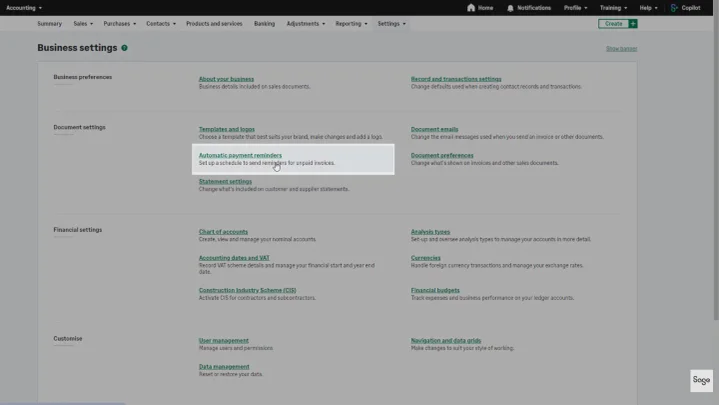
Once you’re logged into your Sage Accounting software, navigate to ‘Settings’. From there, you’ll find an option for ‘Automatic payment reminders’. Simply toggle scheduled reminders on here (you can toggle this off again anytime you wish).
Step 2: set your dates and minimum amount owed
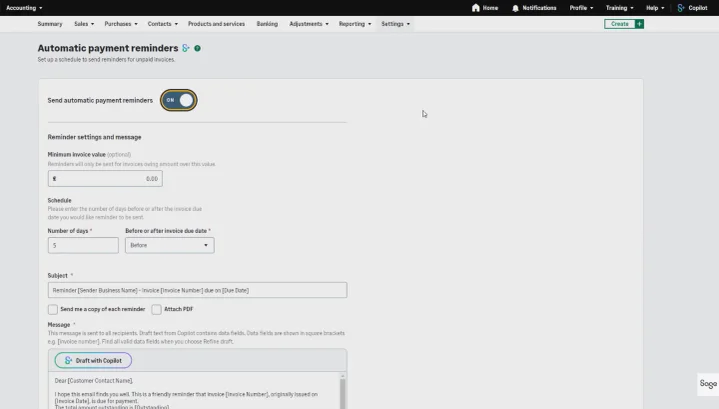
When you toggle reminders on, you’ll see various settings options appear. You’ll be asked to set a minimum amount owed (for example, only send reminders if more than £60 is due). Next, using the drop-down lists, you’ll need to select how many days before (or after) the invoice’s due date the reminders should be sent.
Step 3: draft your message template
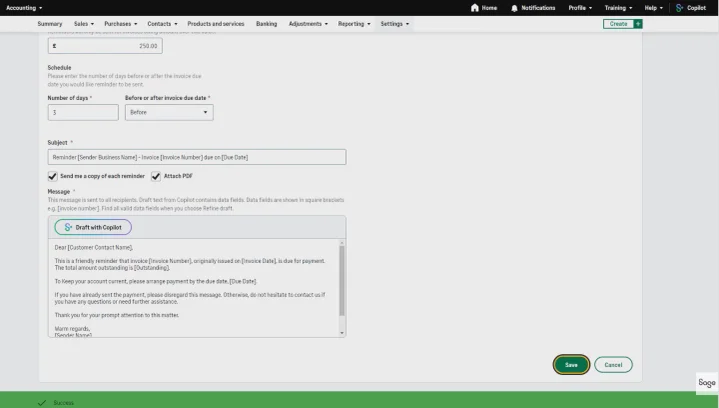
Next, you’ll need to draft the template message that will be automatically sent out. Navigate down to the ‘Message’ box. Here, you can edit the subject and content of the email. You should ensure this fits the tone of your business, and make it clear, friendly, and professional. You’ll need to include all the key details, such as the invoice number, amount due, and the payment due date, using tags such as “[Invoice Number]”.
To speed things up, you can use “draft with Copilot” to generate a ready-made email template (this option should appear at the top of the text box). Now you just need to review and edit the suggested draft, making sure it’s correct and fits with your company’s style and brand.
Step 4: save and complete
Finally, all you need to do is save your settings. Once this is all done, you’ve officially built automated payment reminders into your workflow!
Sage Copilot is an AI productivity assistant built specifically to assist Sage users, and comes included free on every plan in the core Sage Accounting software range. Think of it like paying for a smartphone that comes with an AI assistant built in.
Outside of the main range of Sage Accounting plans, you can potentially purchase Sage Copilot as a paid add-on. You can find out more from Sage directly.
Visit our dedicated Sage pricing guide to find out more about Sage’s plans.
Summary: how AI invoicing can save you time and money
By using generative AI in your accounting workflow, you can cut down on time-consuming manual tasks, get sophisticated real-time insights into your clients’ paying habits, and ensure a smooth cash flow. This isn’t just better for your business’s books, it also means you have more time to focus on getting the important jobs done. AI gives you a 360 view of your finances, so you won’t get caught out by a late payment, or a client exceeding their credit limit.
Don’t just stop with automated invoice chasing, though. There’s a multitude of uses for AI-powered software like Sage that can make your bookkeeping more reliable and efficient. You should explore the other ways you can use Sage Copilot to bring your business into 2026, including:
- Flagging frequently made tax errors to keep HMRC on side
- Helping with filing your VAT returns
- Assistance with your tax return
- Highlighting real-time trends and opportunities in your data for better decision making


