

Ready to take payments for your business? We explain the process of invoicing clients and getting paid quickly, including how to create invoices and what to do if invoice payments are overdue.
Startups.co.uk is reader supported – we may earn a commission from our recommendations, at no extra cost to you and without impacting our editorial impartiality.
An invoice is a formal payment request issued by a business to a client, bridging the gap between delivering goods or services and receiving payment.
And with accounting software like Xero and the support of a trusted accountant, you can create, send, track and manage invoices all in one place.
Still, with so much that needs to be included in an invoice – and the steps you need to take to ensure you receive your invoice payments on time – the process can be overwhelming for new businesses with little to no accounting experience.
That’s why, in this article, we’ll cover everything you need to know about invoice payments – from creating your first invoice to the actions needed if payments are overdue.
- Standard invoice payment terms are usually within 30 days of receiving goods or services, but it can be extended to up to 60 days in some cases.
- Invoices must include information like business details, client details, an invoice number, the invoice date, and total amount due.
- Accounting software like Xero simplifies the process by offering bank feeds with reconciliation suggestions (plus automatic reconciliation by JAX, currently in beta).
- To ensure you get paid on time, you should invoice immediately after delivering your service, clearly state your payment terms, and offer different payment options.
- If your invoice payment is 15-30 days late, you should send a formal overdue notice, including any late payment charges.

Get 90% off Xero for the first six months
Supercharge your small business accounting.
In this guide, we'll cover:
What is an invoice payment?
An invoice payment is the money paid to settle an invoice issued by a business, such as a seller or service provider. From the business’s side, the typical process of invoice payments goes as follows:
- You issue and send the invoice to your client (usually through email, mail, or an invoicing system within accounting software)
- After the invoice is sent, you monitor whether it’s been viewed, is approaching its due date, or is overdue
- Your client pays using one of the accepted payment methods
- You record the payment by matching the payment to the correct invoice and updating your accounting records
- You send a payment confirmation (receipt) to the client, and the transaction is complete
An invoice payment isn’t the same as a receipt. While an invoice is a request for money issued before the payment is made, a receipt is proof that payment has been received after the invoice has been paid.
How to invoice clients
Whether you operate as a sole trader or a limited company, the invoicing process is broadly the same. To start, you will need to create an invoice with all the correct information and send it to the client using your chosen invoicing method.
One of the most effective ways to create an invoice is through accounting software. For example, Xero allows you to create and send invoices, accept online payments, and see your cash flow and track unpaid invoices with reports like the Aged Receivables Summary. It also provides:
- Automated repeating invoices if you bill your customers the same amount each month
- Invoicing groups of customers at once if you charge them the same amount
- The ability to set up default details for each customer
- A “Pay Now” button on online invoices so customers can pay directly
- Direct debit with GoCardless and automatic collection of recurring direct debit payments for approved invoices
- Trusted payment service providers so your customers can pay their invoices securely online
With Xero, you can work with your accountant or bookkeeper in real time. You can create and send daily invoices to clients, while your accountant logs in remotely to review unpaid accounts, categorise income accurately, and check your invoices include the details HMRC requires (for example, for VAT invoices).
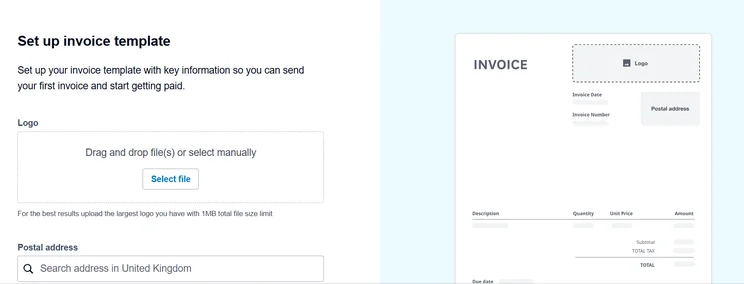
Alternatively, there are plenty of free online invoice generators and templates that let you create professional invoices quickly and easily without the need for specialist software. You can also create invoices through tools like Microsoft Excel and Google Sheets, both of which offer their own ready-made templates.
That said, we’d strongly recommend accounting software for other helpful capabilities it comes with, such as Xero’s features to help you stay on top of VAT and MTD for Income Tax obligations, with submissions to HMRC.
How to send an invoice to your clients
The most common ways to send an invoice to a client are:
- Email: attach the invoice as a PDF or send it directly from your accounting software.
- Accounting software: platforms like Xero allow you to create, send, and track invoices. Xero also shows when an invoice has been viewed and marks it as paid when your customer pays online.
- Online invoicing portals: some clients require suppliers to upload invoices through their own payment portal.
- Post: while less common nowadays, some organisations still request paper invoices to be sent by post.
How long do invoice payments take?
Under the Late Payment of Commercial Debts (Interest) Act 1998, if a contract does not specify a payment date, the statutory default requires payment within 30 days.
However, in B2B contracts, parties can agree to terms of up to 60 days – or longer, provided any extension beyond 60 days is expressly agreed and not unfair to the creditor. By contrast, transactions with public authorities are strictly capped at 30 days by law.
Still, the exact length of time the payment actually takes can vary depending on the client’s internal payment processes, the industry you operate in, and whether there are any disputes or queries regarding the invoice.
Therefore, you should clearly state your payment terms on every invoice and send them quickly to help avoid misunderstandings and ensure clients pay on time.
How to make sure you get paid on time
While late payments can happen, there are certain approaches you can take to smooth the payment collection process and minimise delays.
- Invoice immediately after completing work or delivering goods – delays in sending invoices often lead to late payments
- Clearly state the payment due date, accepted payment methods, and any late payment charges
- Offer different payment options, such as bank transfers, card payments, or online payment links
- Request deposits or partial upfront payments if applicable, such as for larger projects or new clients, to reduce financial risk
- Send payment reminders – send polite reminders a week before the due date and again on the date itself.
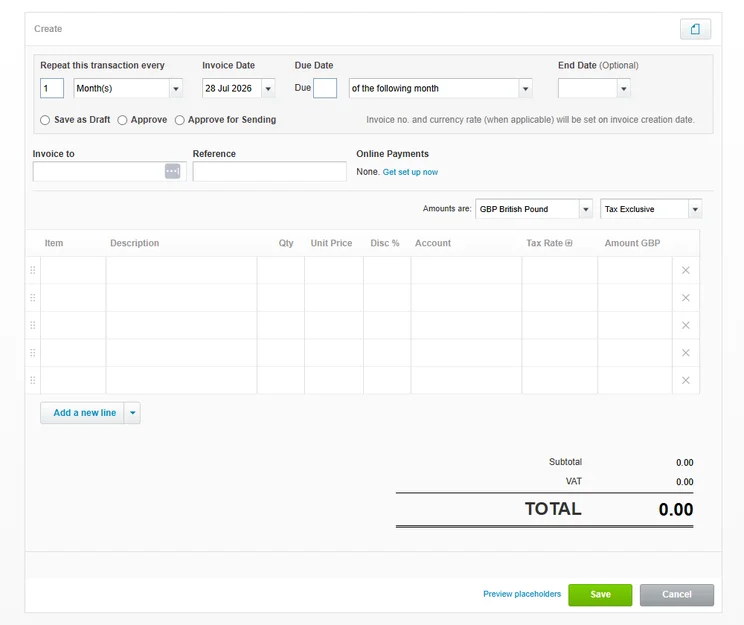
- Automate the whole sequence using accounting software – for example, using Xero’s automated accounting, you can automate repeat invoices, track the status of all your invoices, and automate payment reminders, so there’s less chasing for you to do.
Note: If chasing unpaid invoices feels daunting, an accountant or bookkeeper can help by setting up automated invoice reminders in your accounting software and reviewing key financial metrics like your aged receivables.
Collecting invoice payments quickly is crucial for maintaining a healthy cash flow and ensuring your business has the funds it needs to operate, so following the above steps is very important.
What to do if your invoice payment is overdue
If an invoice payment is late, check your records first. Ensure the invoice went to the right email and confirm the funds haven’t already arrived in your bank account.
If everything is correct on your side, here are the next steps you should take:
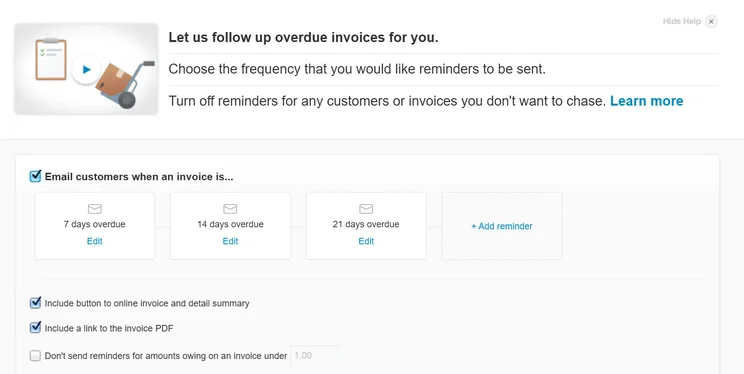
- Payment 1-7 days overdue: send a friendly follow-up (most accounting software can automate these reminders, or you could send a quick email with the original invoice and a direct payment link attached)
- Payment 8-14 days overdue: contact your client or their Accounts Payable department via phone to check in
- Payment 15-30 days overdue: send a formal overdue payment notice, reminding the client of the outstanding balance, requesting immediate payment, and outlining any late payment charges that apply under your terms
You can also contact the Office of the Small Business Commissioner (OSBC) – an independent body that tackles late payments and helps small businesses resolve payment disputes, recover outstanding invoice payments, and understand their rights.
However, if you need to take formal legal action, consult your accountant or bookkeeper first. They can help review your financial records to ensure no billing errors were made, advise on charging statutory late-payment interest (8% plus the Bank of England’s base rate), and help draft a formal Letter Before Action (LBA).
Conclusion
Invoice payments are an important part of maintaining a healthy cash flow and keeping your business running smoothly.
Just simple practices – like sending accurate invoices on time, offering different payment options, and following up quickly when payments are overdue – can help you reduce delays and spend less time chasing outstanding invoices.
Invoicing doesn’t have to be a solo effort, though. Through both intuitive accounting software like Xero and the guidance of a trusted accountant or bookkeeper, the entire process can be easier – helping you save time on admin so you can focus on growing your business.
To protect your cash flow, one useful method is to avoid offering Net 30 terms by default and state a shorter timeline instead (such as 7-14 days), and request an upfront deposit before starting work (the amount will depend on your industry and project size). Or add a source for the 25–50% range before starting work. You should match these terms with your own supplier costs. For example, if your suppliers or freelancers require payment within 14 days, your client terms should be 7-14 days (or your costs should be covered through an upfront deposit).
Yes. For international transactions, your invoice must include additional information, including an International Bank Account Number (IBAN), SWIFT/BIC code, intermediary bank information, and local account options (details for multi-currency platforms like Wise and Revolut Business) so overseas clients can pay locally without costly international wire fees. Additionally, under HMRC’s rules around conversion details, your invoice must explicitly show the total net value and the total VAT amount in pounds (even if the total is billed in USD or EUR). HMRC also requires you to use an approved rate at the time of supply, such as the HMRC monthly exchange rate, the daily European Central Bank (ECB) rate, or market spot rate.
Yes. Xero supports transactions in over 160 currencies, which is available on its Comprehensive plan and above. Its features include live exchange rates through XE.com, automatic calculation of any gain or loss to your profit and loss statement, and the ability to add and track bank accounts held in multi-currency accounts like Wise and Revolut.
You should match the tone to the timeline. Before the due date – or if payment is one day overdue – you should be polite and subtle and use phrases like “Friendly reminder”, “Just following up” and “In case you missed it”. If your payment is 7-14 days overdue, you should be direct, clear and professional (such as “Please confirm receipt” and “When can we expect payment?”). For 15-30 days overdue, you should adopt a firm, urgent and authoritative tone (“Immediate action required”, and “Late fees will apply”). And finally, for invoices 30+ days overdue, you should be formal and matter-of-fact (“Final notice”, “letter before action”, “legal proceedings”, etc.).
Startups.co.uk is reader-supported. If you make a purchase through the links on our site, we may earn a commission from the retailers of the products we have reviewed. This helps Startups.co.uk to provide free reviews for our readers. It has no additional cost to you, and never affects the editorial independence of our reviews.


