Is your current POS system not up to the task of running your pub or bar efficiently? Summer’s finally here in the UK, so it’s time to find a better solution.

Startups.co.uk is reader supported – we may earn a commission from our recommendations, at no extra cost to you and without impacting our editorial impartiality.
As a result of our research into 11 top POS platforms at our London offices, testing them across six categories and 37 subcategories, we’ve determined that Square is the best POS system for pubs and bars, as well as the best restaurant POS, thanks to its intuitive, easy-to-use interface and its free plan option if you’re looking to keep costs low.
With recent research from Northumbria University finding that the average pub delivers up to £1.3m of economic and social value to its local community, it’s crucial for for UK pub and bar owners to have the right equipment, software, and payment processing to succeed in 2026.
- Square is the best pub and bar POS thanks to its unmatched usability, free plan, and comprehensive help and support.
- Clover is a good choice for larger pubs or bars thanks to its in-depth analytics, which include stock alerts and profit tracking tools.
- Key features to look for in a pub and bar POS include easy bill splitting and reliable inventory management.
- Ensure your POS has strong security features, like encryption, and adheres to PCI DSS standards.
- Many POS platforms can be run from an iPad, but drinking establishments might prefer a durable countertop terminal.
We assessed 11 top POS systems against our independent review framework, which is based around six core criteria.
We’ve used our industry knowledge to help determine the six areas of investigation most critical to a successful pub and bar POS system: software features (35%, usability (20%), hardware (20%), pricing (10%), help and support (10%), and brand reputation (5%).
You can find more detailed explanations of our six testing categories in the full methodology breakdown at the bottom of the page.
The best POS systems for pubs and bars: quick comparison
|
Best for
|
Pricing from
|
Features
|
|||||
|---|---|---|---|---|---|---|---|
|
FEATURED
 |
BEST ALL ROUND
 |
 |
 |
 |
 |
 |
 |
|
Epos Now |
Square |
Clover |
SumUp |
Toast |
Lightspeed Restaurant |
takepayments |
TouchBistro |
|
Extensive tools for managing a complex bar inventory |
Overall best pub and bar POS |
Top of the range POS terminal and accessories |
Excels at speed and efficiency in a smaller environment |
Best for pubs and bars with complex kitchens |
Excellent tools for driving repeat business |
An all-in-one terminal to declutter your bar |
A bespoke POS package |
|
Hardware: from £249 |
Free software, plus £149 + VAT for the Square Terminal |
Currently £9.99 per month (on an 18-month contract), hardware is included |
Free software, plus £290 for the POS Lite terminal and Solo card reader |
$69 per month |
|||
|
|
|
|
|
|
|
|
I check this article regularly to keep it up to date. I’ve verified that all the pricing information here is accurate, as of this date. However, given the rapidly changing nature of the payment processing industry, I always recommend confirming prices directly with the POS provider before making a buying decision.
1. Square: overall best POS for pubs and bars

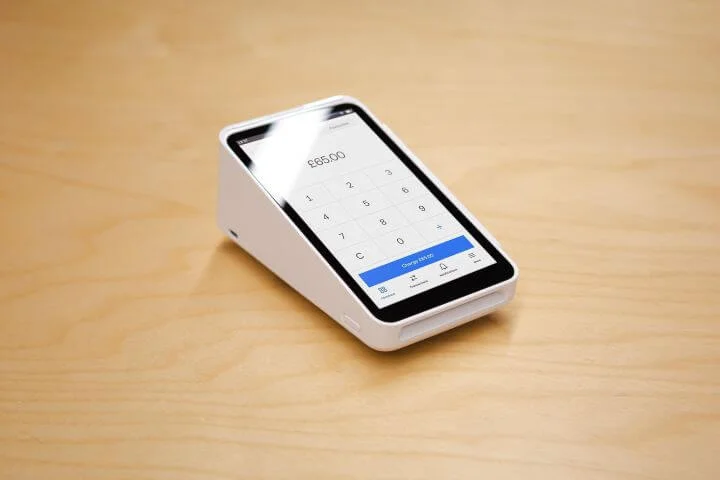
I really enjoyed using the Square Terminal and I was impressed with how responsive the touchscreen was, with virtually no lag. Source: Startups.co.uk
Overall rating: 4.8
Transaction fees from: 1.75%
Contract length: no contract
POS terminal price from: £149 +VAT for the Square Terminal
Square is by far the easiest pub and bar POS system I’ve tested and so you can get your bar staff trained to use it quickly. Plus, you can get started on the free plan to avoid monthly outgoings.
In our latest hands-on testing, in which we simulated getting out a round of food and drinks with modifiers, adding discounts, and processing payment, Square performed extremely well. Square impressed with an average completion time of 8.7 minutes, compared against SumUp’s slower 16.1 minutes.
Square’s POS comes loaded with helpful tools for bar owners like:
- Pre-authorisation for bar tabs: helping prevent unpaid walkouts, without having to keep your customers card behind the bar
- Customised kitchen display system: seamlessly integrates with your front-of-house POS system
- Synchronised updates: update all your menus at once from one dashboard
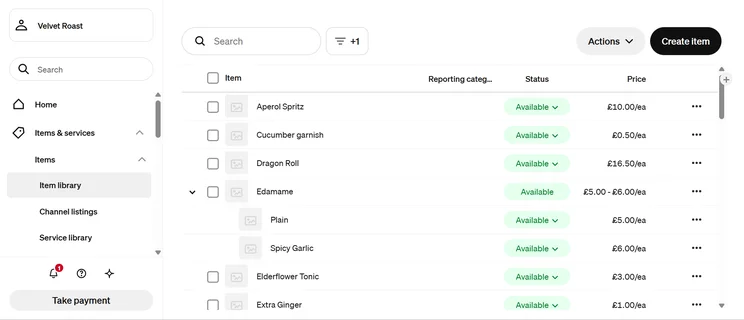
Beyond just the native features in Square’s POS you can also integrate with third-party apps, like MarketMan or BevSpot, to enhance your operational efficiency with specialised tools like ingredient tracking.
What’s new with Square in 2026?
In 2026 Square launched Square AI. Square AI is a business assistant that can help automate tasks, like auto-generating menus, generating product images, and providing business insights.
- You can begin on the free plan but upgrade to the deeper features of Square for Restaurants Plus when you need them
- The new Square Handheld: a pocket-sized POS device which is perfect for staff to take payments directly from the table or the pub garden
- Square has a great range of support options for business owners, including phone support, live chat, and 24/7 email support
- Square's missing a comprehensive cost versus profit management tool, which Clover can provide
- Square doesn't have a dedicated training mode, though this is less of an issue due to the usability of the platform
- Square can't track ingredient usage like Toast or Lightspeed can
How much does Square cost?
| Pricing | |
| Software | Free plan: Free Square for Restaurants Plus plan: £69/month/location Premium plan (For businesses that process more than £200,000 per year): custom pricing |
| Hardware | Square Reader: £19 + VAT Square Stand: (To turn your iPad into a countertop terminal): £99 + VAT Square Terminal: £149 + VAT Square Handheld: £169 + VAT Square Register: £699 + VAT |
| Transaction fees | Free plan/Square for Restaurants Plus plan: 1.75% in person, 2.5% for virtual terminal and invoices, 1.4% + 25p for online transactions Premium plan: Custom rates |
| Free trial? | 30-day free trial of Square for Restaurants Plus |
Square’s contract-free, no-monthly-fee starting plan is perfect for publicans who need to minimise outgoings, ensuring quiet mid-week shifts don’t become a financial liability.
Square’s excellent terminals and readers can also be bought outright for a reasonable fee, and you can upgrade to a premium plan for advanced features like seat management, course management, and floor plan customisation.
Read more: Square is also the best POS system for takeaway businesses.
I loved using Square in my testing, and it’s a great choice for any bar or pub due to the user-friendly, fast and responsive interface. Even when I did make a mistake with my inventory upload, correcting it was so quick and easy, and I was impressed with how fast the back office on my laptop synchronised with my handheld Square Terminal.

2. Clover: best for top of the range POS terminals

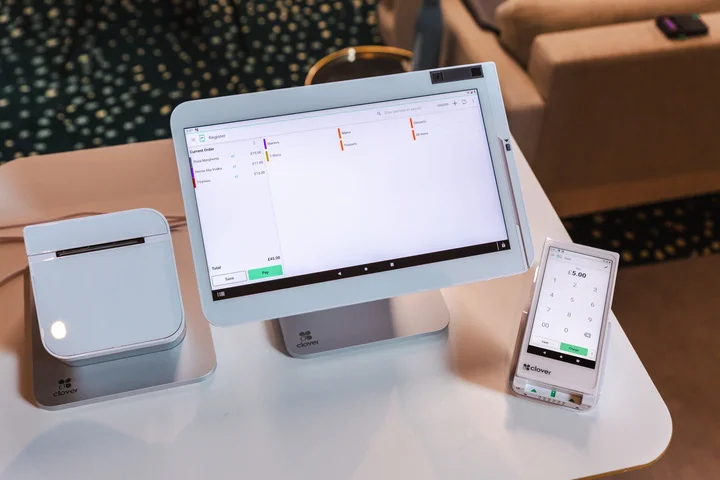
Clover offers some of the sleekest hardware we tested. Source: Startups.co.uk
Overall rating: 4.4
Transaction fees from: quote-based
Contract length: typically 18 months
POS terminal price from: £9.99 + VAT per month (special offer)
Clover is best for busy gastropubs and mid-to-large bar environments that need reliable POS terminals, as our tests found Clover’s countertop hardware to be sleek and highly intuitive, with a 14″ display that makes ordering easy.
Our range of expert testers gave Clover an impressive average score of 4.5 out of 5 for how likely they were to recommend the system, based on actual hands-on testing of the terminal.
Clover’s standout feature is the speedy fingerprintlogin for staff, allowing for incredibly fast access to the system. The fingerprint scanner isn’t just helpful during happy hour, either, but it also ensures tighter security by creating a clear log of who has access to the terminal and when.
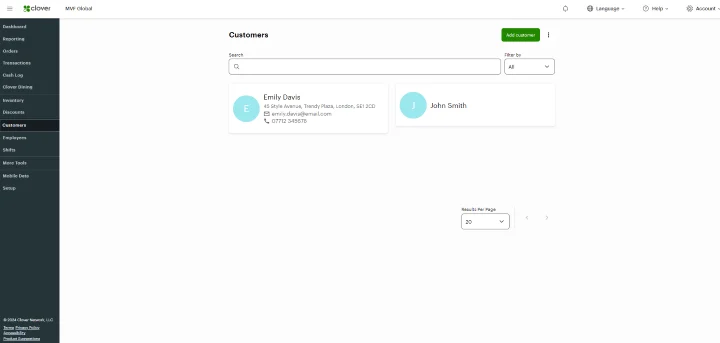
Another benefit of using Clover as your pub POS is the Clover App Market, which has over 500 third-party applications. This can help future-proof your bar by allowing you to add on extra tools as you go, building out your management hub as and when you need, with features like:
- Specialist apps such as Shopventory or Bar-i for more detailed inventory management
- Apps like 7shifts or Planday allow you to sync staff rotas with sales data
- Loyalty247 or Clover Rewards allow you to build a loyalty programme for happy hour and birthdays
- Xero and QuickBooks integrations mean your pub will stay MTD compliant
What’s new with Clover in 2026?
At the start of 2026, Clover announced a partnership with Wink in order to provide identity-based payments. This involves a biometric checkout, where customers can confirm payment with hand or eye verification.
- Clover has one of the best customisable customer displays we've tested
- Clover’s stock alert and profit tracking features give you an in-depth look at your analytics
- Clover has an impressive offline mode, which can take payments offline for up to seven days
- Unlike Square, Clover doesn't provide a contract-free option
- Unlike Toast, there's no automated tip sharing
- Clover's POS can sometimes struggle with a large and complex menu (Lightspeed is a stronger option)
How much does Clover cost?
| Pricing | |
| Software | From £9.99 per month (includes device rental) |
| Hardware | Clover Flex: £15/month Clover Flex Pocket: £15/month Clover Mini: £20/month Clover Station Duo: £30/month |
| Transaction fees | Quote-based |
| Free trial? | No |
Clover isn’t a low-cost, simple option like Square, but its bespoke approach to pricing for both card fees and hardware will benefit more established businesses with steady revenue.
Clover’s current promotion starts from £9.99 per month, which includes a device, but you will have to enter into a short term contract (this has previously been advertised as 18-months).
I’d highly recommend Clover for both pubs and bars thanks to the sleek and professional hardware, which will give your customers a great first impression when they walk in. The customer facing screen can also take payments directly which we found helped to speed up payments, as there’s less querying of orders, especially in louder environments. The hardware also felt really robust and could withstand people bumping into it, as well as drinks being spilled on it!

3. SumUp: best for smaller bars
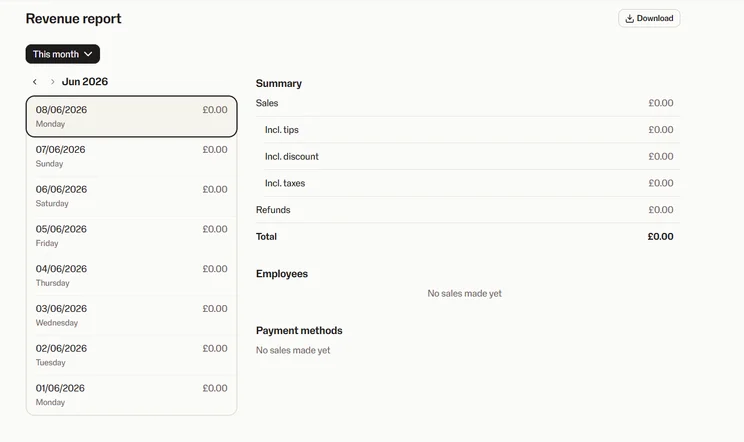
I liked SumUp’s minimalist interface which makes viewing your revenue reports easy. Source: Startups.co.uk
Overall rating: 4.2
Transaction fees from: 1.69%
Contract length: no contract
POS terminal price from: £135 + VAT upfront fee for the SumUp Terminal
SumUp is the best choice for smaller pubs and bars that don’t have plans to rapidly scale, as its POS platform has been built with simplicity in mind, and excels at processing payments with speed and without unnecessary feature-bloat.
You can equip your bar staff with the new handheld SumUp Terminal, which is drop resistant, has a battery which lasts a full day, and includes a free SIM card that’s great for taking payments in pub gardens with bad signal.
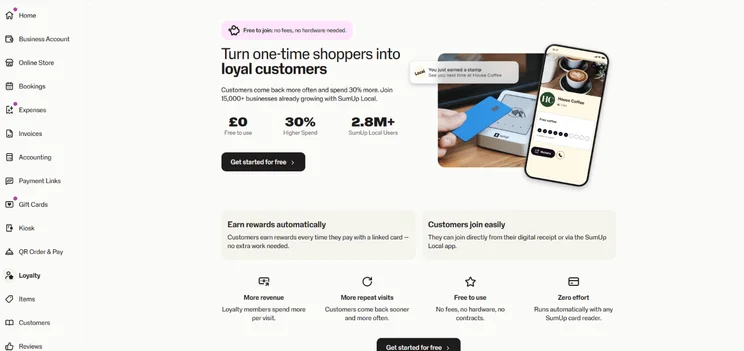
In my tests, I found SumUp’s interface to be very simple to navigate, with a short learning curve for new staff, and I really liked the “park order” function which made for easy order management.
You do have the option to upgrade to the POS Plus tier, which unlocks features like:
- Floor management
- Pre-set discounts
- Accounting integration
Just note that while SumUp’s simplicity is its strength, if you’re running anything more complex than a simple pub or bar, you’ll need Clover, Lightspeed Restaurant, or Toast.
What’s new with SumUp in 2026?
In 2026 SumUp continues to build out its range of readers and terminals, most recently introducing the SumUp Register. The SumUp Register is an all-in-one countertop device, which includes an 8″ customer display.
- SumUp's interface provides a high-speed, low complexity checkout workflow
- SumUp supports mobile and QR code ordering to free up your bar staff
- SumUp continues to expand its range of hardware and accessories with the new SumUp Solo Lite, and SumUp Register
- If you plan to move into a full table service gastropub, you will outgrow SumUp and find Square a better fit
- SumUp lacks the deeper cost/profit analysis tools of a more premium-grade POS like Lightspeed
- In our tests, we found that SumUp could occasionally be too stripped back in areas, and can only support a simple menu
How much does SumUp cost?
| Pricing | |
| Software | Free POS: free Payments Plus: £19/month POS Plus: £39/month Business Account Plus: £15/month Invoices Plus: £8/month |
| Hardware | Handheld Terminal: £135 + VAT Solo (standalone card reader): £79 + VAT SumUp Solo Lite: £25 + VAT SumUp Register: £399 + VAT Retail POS Kit: £649 |
| Transaction fees | 1.69% in-person transaction fee on Pay-as-You-Go plan 0.99% in-person transaction fee on Payments Plus plan Bespoke transaction fees for businesses that process £10,000 or more a month 1.69% for international/corporate/premium cards 2.5% for online payments |
| Free trial? | Yes; 7-day free trial with Payments Plus plan |
SumUp is contract-free, and charges the lowest set in-person card transaction fee at 1.69%, another reason it’s the best option for smaller pubs and bars.
You also have the option to upgrade to the Payments Plus tier, which costs £19 + VAT per month, but unlocks a low 0.99% card rate. If you’re exceeding £2,735 per month in card sales volumes, then Payment Plus will save you more per pint than Square’s free option (1.75% transaction fee).
SumUp is a fantastic choice for pubs and bars thanks to its impressive range of tools that give you both a physical and online presence. You can easily create a website alongside integrating a POS system, which means you can take delivery orders as well as market yourselves to a wider audience.
4. Toast: best for complex pub kitchens
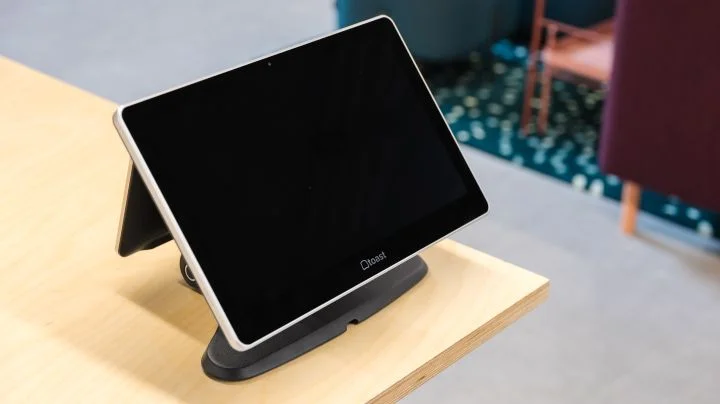
The Toast Flex is IP54 spill-proof rated, so you don’t have to worry about pints getting knocked over it. Source: Startups.co.uk
Overall rating: 4.1
Transaction fees from: quote-based
Contract length: typically between one to three years
POS terminal price from: quote-based (this will depend on your contract with Toast)
Toast is a high-end POS system, boasting features like deep-dive financial analytical tools, powered by its native xtraCHEF module, which make it the best for complicated pub/bar kitchens where the priority is preventing lost revenue from wasted stock.
Toast’s inventory management system allows for forensic analysis of your ingredient tacking, along with:
- Stock alerts if your bottle count is running low
- Identifying your low-margin items
- Actual vs. Theoretical (AvT) Analysis: preventing lost margin from unrecorded spills and overpours
- Automated extraction of line-item data to cut down on wasted admin time
- Setting localised “PAR levels” (minimum required stock) to prevent under or over-purchasing
Toast (along with Square) is one of the few providers that includes automatic tip sharing, which is a critical feature for landlords who want to remain compliant with the Tipping Act Laws.
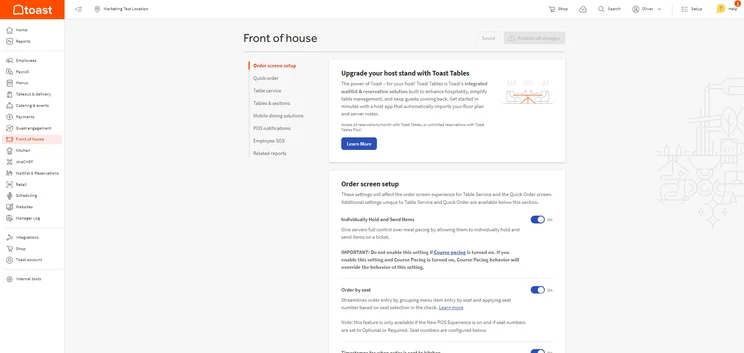
We found Toast really easy to get to grips with, especially with the help of its initial step-by-step tutorial. Source: Startups.co.uk
We did find that Toast has an extremely fast and intuitive frontend, but this is contrasted against a complex back office which requires extensive training to fully master. However, Toast comes with a good onboarding process and provides specialised hospitality support, so you’ll have the reassurance of industry-specific assistance if you do run into problems.
Ultimately, Square’s interface is far simpler and more intuitive for new business owners, but Toast far outperforms it when comes to high-volume bar tabs and complicated bill-splitting.
What’s new with Toast in 2026?
Toast rolled out some significant product updates to its POS system as part of its Spring 2026 product release. Most notably, this includes Toast IQ Grow, an AI-powered Marketing Agent, and an enhanced version of Toast Local, for efficient takeaway ordering.
- Toast is capable of running multi-location bar chains
- The top-class inventory management tools can help you stay on top of a complicated range of wine and spirits
- Toast provides built-in customer engagement tools, allowing for a points-based system for customers
- Toast's ecosystem is Android exclusive (if you were intending to use existing iPads then SumUp will be the better option)
- Toast is contract based, so if you just need a simple, no-contract plan then use Square instead
- Toast can't process live payments if the connection goes down (Epos Now and Clover both have more advanced offline modes)
How much does Toast cost?
| Pricing | |
| Software | Starter: from £80 + VAT per month Essentials: £150 + VAT per month Custom: custom pricing |
| Hardware | Quote-based |
| Transaction fees | Quote-based |
| Free trial? | No |
Toast is one of the most expensive options on this roundup, and so we wouldn’t recommend it to new pubs and bars that are just getting off the ground. But more advanced operations (including chains) will find the advanced inventory and customer engagement tools worth the steep monthly cost.
5. Lightspeed Restaurant: best loyalty tools for repeat customers
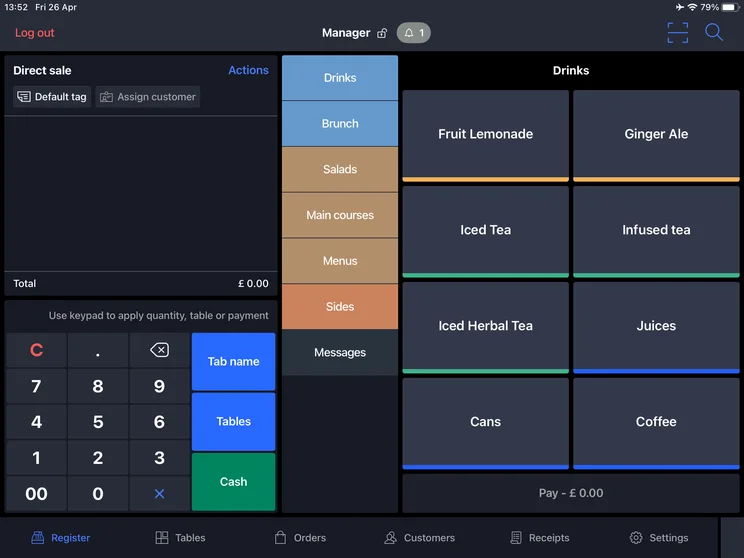
This is how your POS home page will look when using Lightspeed Restaurant. Source: Startups.co.uk
Overall rating: 3.9
Transaction fees from: quote-based
Contract length: 12-month minimum contract
POS terminal price from: quote-based
Lightspeed Restaurant is the best for encouraging repeat business, thanks to the excellent loyalty features which are amongst the best we’ve seen in a POS system. Lightspeed Loyalty generally comes as a paid-on to the base system, but you’ll access features like:
- Automatically grouping your guests into dynamic lists based on spending patterns
- Automatic email and text messaging to regulars who haven’t visited your establishment in 30 days
- Ability to create timed events, for happy hour
In addition to the standout loyalty tools, Lightspeed Restaurant has helpful cost/profit analysis tools to help bars and pubs stay on top of ingredient inflation. This is predominantly through Advanced Insights, a module which can automatically chart menu items, tracking popularity against profitability
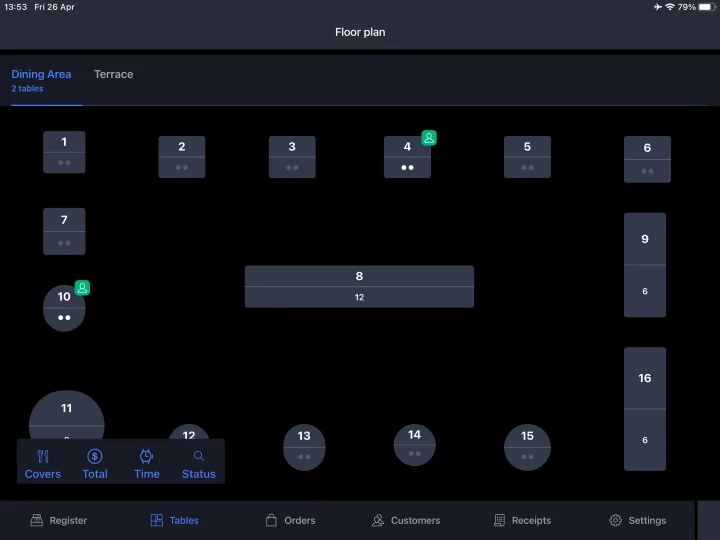
Lightspeed is a tablet-based POS that’s been built for manoeuvrability, and in our testing we found it be a high-performance software that can handle complex inventories.
I appreciated the custom colour-coded floor plan, which made editing easy to manage, especially as you could customise the colours on the screen. There were a few design issues though, with the back office being slightly less polished than the frontend interface.
What’s new with Lightspeed Restaurant in 2026?
Earlier in the year, Lightspeed announced the launch of Lightspeed AI. This will include new conversational AI-assistants embedded into Lightspeed Restaurant so users can get fast answers and business insights. Lightspeed has confirmed it will continue expanding Lightspeed AI’s capabilities into 2026.
- Lightspeed includes offline functionality which automatically syncs once your system's back online
- The POS has built-in, detailed, inventory management features
- Lightspeed's mobile apps can provide real-time data monitoring
- Lightspeed's POS system is tablet-based, so if you want a durable, countertop terminal then choose Clover instead
- Despite being a more advanced POS system, unlike Toast, it doesn't have built-in automated tip management
- You can't change floor plans from the frontend, which won't be ideal if you need to edit this frequently
How much does Lightspeed Restaurant cost?
| Pricing | |
| Software | Basic: £79 + VAT per month Core: £149 + VAT per month Pro: £219 + VAT per month |
| Transaction fees | Quote-based |
| Free trial? | Yes |
Lightspeed isn’t a budget option, and even the Basic plan (£79 + VAT) only gives you what you need to take payments alongside some basic reporting, with many features such as inventory management and marketing and loyalty tools only accessible as paid-add ons.
To get the most out of Lightspeed as a POS system, most pubs and bars beyond a basic craft beer kiosk or single-register cocktail bar will need at least the Core plan (£149 + VAT). This would be considered a premium option for a lot of businesses.
Lightspeed would be my number one choice if you’re looking to build a bigger community and customer base with your pub or bar. It has a great range of tools like automated marketing, customer segmenting and rewards programmes. As well as this, the iPad-based platform means you can serve customers without going back to the till constantly, and its QR code system means your staff can focus on getting food and drinks out rather than serving!
6. takepayments: best all-in-one POS platform for pubs and bars
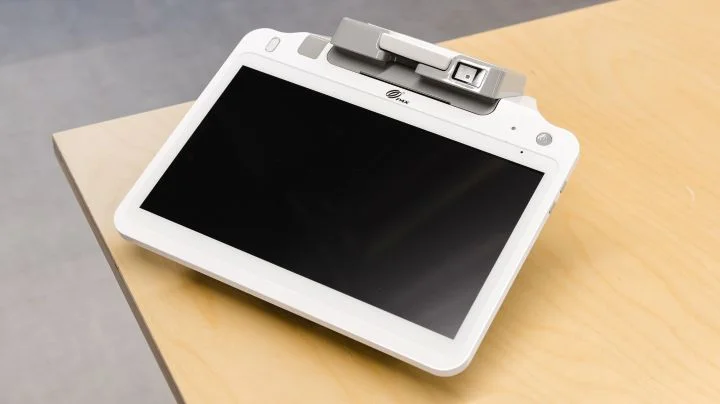
The tPOS Counter comes with built-in scanners, a printer and a customer facing display. Source: Startups.co.uk
Overall rating: 3.8
Transaction fees from: quote-based
Contract length: 12 months
POS terminal price from: £55 + VAT per month (plus £200 setup fee) for the tPOS counter
takepayments is the best POS for pubs and bars who want administrative simplicity, as it provides an all-in-one POS terminal, software, and the best merchant account for small businesses.
Using takepayments as your POS means cutting out the admin of having to deal with multiple vendors, and you’ll also benefit from its bespoke fees based around your business model as well as fast next-day payments.
takepayments also provides pub owners with its dedicated support, helping you through the often complex onboarding period with its specialist Welcome Team. Not only that but takepayments has a UK-based Customer Support team available seven days a week.
It’s not just the software that’s streamlined either, as takepayments helps declutter your bar space with a compact POS terminal that integrates a printer, barcode scanners, and a customer facing screen so bar patrons can clearly see their total.
We did find that the frontend interface could feel outdated, slow and clunky, although the backend of the system was extremely fast and easy to use, so it’s a system that favours managerial roles more than front-of-house staff.
- Human-led, UK-based customer support
- takepayments allows for helpful cost vs profit analysis
- Well-designed backend management, allowing for easy admin like quickly adjusting menu categories
- takepayments doesn't provide customer engagement tools (check out Lightspeed for a comprehensive loyalty system)
- No visual floor plans in the frontend interface
- takepayments has no app market, so you can't add on third-party integrations (Clover has a much more impressive app store)
How much does takepayments cost?
| Pricing | |
| Software/Hardware | tPOS counter hospitality: £55 + VAT per month tPOS complete hospitality: £65 + VAT per month |
| Transaction fees | Quote-based |
| Free trial? | No |
takepayments provides a bespoke fee structure that will be more favourable for pubs and bars with higher transaction volumes (around £2,000 to £3,000 in monthly sales), as you’ll secure lower rates. A newer, untested pub or bar will benefit more from SumUp or Square’s contract-free, set rates.
takepayments also leases its terminals at a monthly rate (there’s a one-off set-up fee alongside this) so be sure to factor this into your budgeting, too.
I loved how simple and easy to use the takepayments POS system was. The layout was really clearly divided into each section, which minimised any confusion or mistakes when adding an order. I was also really impressed by its onboarding and support as it has someone to take you through the processes and they can also remotely log in (with your permission, of course) so when you have a problem they can see exactly what is happening and fix it 10 times quicker!
7. TouchBistro: best for a bespoke POS package
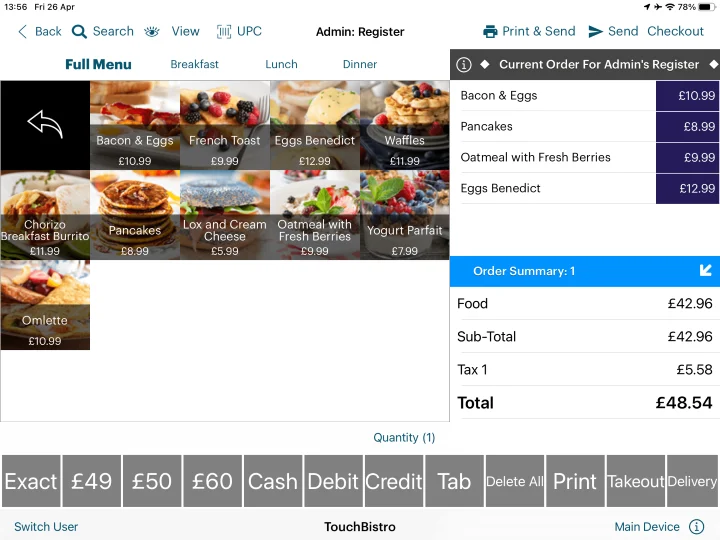
TouchBistro is a premium level software, that can help manage high-volumes of drink orders. Source: Startups.co.uk
Overall rating: 3.7
Transaction fees from: quote-based
Contract length: typically 12 to 24 months
POS terminals from: quote-based
TouchBistro is a sophisticated, iPad-based POS platform that’s best for more established bars with niche needs, due to the bespoke nature of the software. TouchBistro allows you to create a package tailored specifically to your business.
TouchBistro’s POS platform is particularly adept at managing a fast-paced bar environment, thanks to the drag-and-drop interface, allowing staff to rapidly move items between seats. It also provides speed and simplicity with the ability to split a bill amongst guests’ cards evenly, as well as being able to separate food items from a drinks tab.
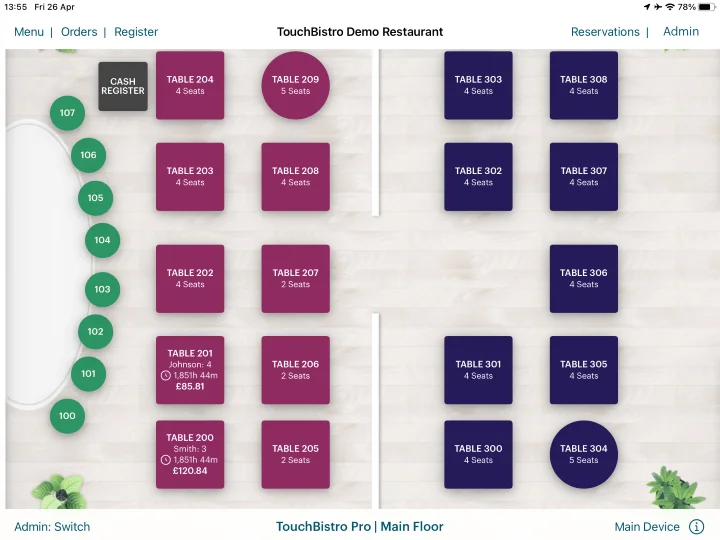
The interactive, customisable floor plans are another standout feature of TouchBistro, which allows for visual alerts for managing seats, including how long a party has been sat, and who’s ready to pay their bill.
Our testing found that TouchBistro has an exceptionally smooth frontend experience that’s been built with the needs of front-of-house staff in mind. It’s a highly visual workflow that can easily manage a complex drinks rush at happy hour, and provides a dedicated training mode for new staff. However, the back office is less intuitive, and while feature-rich, it can take some time to learn.
What’s new with TouchBistro in 2026?
TouchBistro hasn’t rolled out any major new feature updates in the past few months, but it has launched it 2026 Patio Season Guide to help hospitality owners capitalise on summer spending.
- TouchBistro's floor plans are particularly easy to edit
- TouchBistro allows you to create a hybrid network architecture, to ensure you can still continue to operate if your internet goes down
- TouchBistro provides loyalty tools and a customisable reservation system
- TouchBistro's pricing model won't suit smaller bars with simple requirements (check out Square or SumUp instead)
- TouchBistro is iPad-based only, so you should look at Clover if you need a dedicated countertop terminal
- TouchBistro's cost/profit analysis isn't quite as granular or detailed as Lightspeed
How much does TouchBistro cost?
| Pricing | |
| Software | From $69/month (pricing available in US dollars only) |
| Hardware | Quote-based |
| Transaction fees | Quote-based |
| Free trial? | No, but you can get a free demo |
TouchBistro’s pricing model can be a double-edged sword, as the modularity of the software means that bar owners will be confident they will only pay for the tools they need, however, if you do need a full suite of features it can be a very expensive option (the base price is already a hefty $69 per month)
8. Epos Now: best for bars with complex inventories
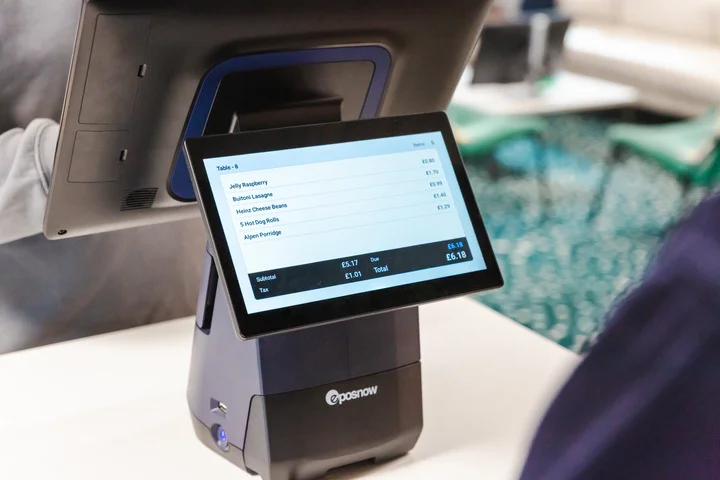
Epos Now’s rugged, dual-screen terminal is excellent for streamlining orders. Source: Startups.co.uk
Overall rating: 3.7
Transaction fees from: 1.3%
Contract length: 12 months
POS terminals from: £249 + VAT for the full countertop POS
Epos Now’s POS is best for pubs and bars trying to manage a complicated stock, especially hotel bars, thanks to the granular inventory management. Epos Now’s stock tracking can break things down to individual ingredients.
Epos Now combines its excellent stock tracking features with its own durable, dual-screen POS countertop terminal with a built-in printer. I got hands-on with the terminal itself and found that the large, 15.6″ HD touchscreen display made navigation easy and streamlined ordering.
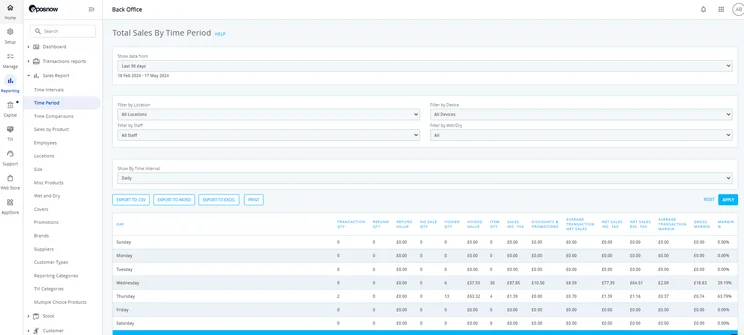
Epos Now also includes Standalone Mode. This allows you to continue processing sales directly from a card terminal by using 4G or WiFi if the main till is experiencing a technical issue. So if your internet has gone down or your till isn’t connecting to a reader, you won’t have to miss any payments (it’s also seven times as fast the previous iteration of Epos Now Payments).
Pub and bar owners should note that Epos Now has a visually impressive interface but a steeper learning curve than a competitor like Square or SumUp, so you should factor in training time for your bar staff. We also occasionally found that there could be synchronisation issues between the frontend and back office.
- Epos Now provides helpful cost versus profit analysis
- Epos Now has an all-in-one ecosystem of hardware, software, and payment processing
- Epos Now provides low stock alerts, so you know when to order more kegs
- Epos Now doesn't include automated tip sharing, unlike Square or Toast
- Epos Now's complex system has a steep learning curve
- The contract lock-in won't be suited to smaller pubs and bars
How much does Epos Now cost?
| Pricing | |
| Software | From £25/month |
| Hardware | From £299 + VAT |
| Transaction fees | Quote-based |
| Free trial? | No |
Epos Now’s contract based model won’t be the best option for new, untested bars and pubs, but it’s a solid package considering you’re getting the impressive terminal and customised software together which are often sold at a discounted rate.
Epos Now’s pricing model and complex backend are more suited to complex multi-site hospitality groups than independent pubs with high staff turnover.
Epos Now is an excellent choice for both pubs and bars thanks to its impressive business-centric approach. Not only does it offer great hardware but its software is reliable, meaning you can have a large inventory and never worry about it crashing. It also offers integrated payment solutions to keep everything under one roof and the portable payment device means your staff can take payments on the go.
How we test pub and bar POS systems
In May 2025, we carried out independent analysis and testing of 11 of the top POS platforms in the UK, to determine our top eight recommendations.
The research was carried out in the Startups London offices, with our dedicated Senior Reviews Writer, and other users, engaging in hands-on user testing of both the frontend and backend of the POS systems.
This testing was based on our review framework which rates each product against the same six core categories we determined to be the most relevant to UK pub and bar owners looking for an EPOS system. Each category was also given an appropriate weighting when deciding overall scores.
We worked with our Head of Research to recently adjust these weightings, to ensure we are most accurately reflecting the needs of a pub or bar owner in 2026:
- How does the software help me run my pub or bar? (35%): we examined how the system handles tipping, floor plan creation, bill splitting, if users can receive SMS messages for order collection, if you can add stock modifiers, if it can handle shifts, if there’s a built-in reservation system, and what happens if the system can’t connect to the internet.
- Is the hardware suitable for a pub environment? (20%): we analysed the POS terminals’ performance in terms of display quality and portability, what accessories are available, and if there’s a separate kitchen display system available.
- Is the system easy for my staff to use? (20%): we conducted hands-on, task-based testing of the systems, focused on setting up the system and selling items, as well as the customisability of the interface.
- Can I get adequate help and support? (10%): we evaluated the avenues of customer support that are available to pub and bar owners, including the types of support provided, how accurate the knowledge centre was based on our test questions, and the accuracy and responsiveness of the chat functionality (and if you got through to a human or a bot).
- How much does the system cost? (10%): we compared hardware costs, software costs and transaction fees to assess if you’re getting a good deal.
- What’s the reputation of the platform? (5%): w determined the overall reputation of the provider based on brand recognition, online comments, competitor reviews and how likely our users were to recommend the platform after testing it.
How do I choose a POS system for my pub or bar?
POS systems aren’t skeleton keys that can fit in any scenario, and the best POS systems for a retail business will be different to the best POS systems for the hospitality industry.
What are the essential features for a pub or bar POS?
The most essential features for a pub or bar POS are:
- Simple bill splitting: customers on the same tab expect to be able to pay separately.
- Detailed inventory management: look for systems that can handle a complex pub or bar inventory. For example, those that can track individual spirit pours and partial kegs.
- Actionable sales reporting: you need to be able to make purchasing and advertising decisions based on what’s selling and what isn’t.
- Swift and easy order entry: to keep your bartenders serving customers quickly.
- Automatic discounts for ‘happy hour’: the ability to quickly change prices based on the time of day or day of the week is critical for most pubs and bars.
- Tip management: so you can stay compliant with UK tipping laws and ensure everyone gets their share.
- Reconciliation: in order to prevent being stung by “ghost liabilities” that can be missed in the POS data, your system needs to be able to track “unearned revenue” and liabilities during business handovers. Square, our number one POS recommendation for pubs and bars, can seamlessly connect with top accounting software like Xero and Sage, making reconciliation easier.
You should also look at how scalable the system is. If you’re planning to expand your business, is it easy to buy more terminals and upgrade your software to include more sophisticated features? Steer clear of providers that’ll charge the earth when you want to grow.
How important is ease-of-use?
You’ll need a well-designed UX that allows for fast service speeds and is able to prevent order entry errors which can harm the bottom line. It’s also important that it’s quick for onboarding and training staff to use.
How much should I spend on a POS system?
Pub POS costs can generally be broken up into three categories: hardware costs, monthly costs for the software, and the transaction fees. You can jump over to our expert guide to understand the overall cost of your POS system,
Should I try before I buy?
We always recommend a test drive of the software before you’re actually taking payments, as you need to know you can operate it quickly and easily during an after-work rush at the bar.
What should I look for in POS hardware?
Think splash-proof and durable, and you should also consider whether the hardware will be easy to carry around a pub floor: you can take a closer look at this in our top iPad-based POS systems.
What security features do I need?
Security is non-negotiable, and you need to make sure you have a system that includes EMV compliance, data encryption, and frequent security updates to safeguard your business and your customers’ sensitive payment information.
Jump back up to any of our reviews:
- Best pub and bar POS: comparison table
- 1. Square: overall best pub and bar POS
- 2. Clover: top of the range POS terminal and accessories
- 3. SumUp: excels at speed and efficiency in a smaller environment
- 4. Toast: adept at managing a complex inventory
- 5. Lightspeed Restaurant: excellent tools for driving repeat business
- 6. takepayments: an all-in-one terminal to declutter your bar
- 7. TouchBisto: a tailored software package for bespoke needs
- 8. Epos Now: extensive tools for managing a complex bar inventory
- How we test pub and bar POS systems
- How do I choose a POS system for my pub or bar?
FAQs
This can be a particular pain point for pub owners because if you’re running an 8pm to midnight shift, your late-night reports might inaccurately make 11pm look completely dead in your data. This can make staffing and planning tricky but POS systems like Lightspeed Restaurant can provide advanced reporting to give you a much deeper look at your sales data.
Many pub and bar POS systems, such as Lightspeed Restaurant, can be run from an iPad or Android tablet, which can save money for business owners who already have tablets they don’t mind repurposing. iPad-based POS systems can also provide a lot of manoeuvrability for bartenders and staff who need to move around a busy environment swiftly. However, a dedicated terminal, such as Epos Now’s or Clover’s, can offer more durability and some come with customer-facing screens so customers can check what they’re buying and the prices for each item before they pay.
The majority of our top pub and bar POS recommendations are ‘closed’ systems, meaning you can’t use an existing payment processor with them. This is the case for Square, SumUp, Toast, and takepayments. However, Epos Now is an example of a POS that can support various payment processors. Clover is slightly different, as it is generally ‘locked’ to the payment processor you purchase it from (including Clover itself).
Look for POS systems with features that will have you covered for all seasons. You’ll need a user-friendly system so your staff can quickly process orders in the peak summer months, and detailed reporting features so you can see where you can cut costs in the slower winter season. For example, in the summer months, you might get an influx of tourists into your establishment, or see high footfall to your beer garden. Whereas, in winter, you might experience lower footfall, but be faced with higher heating costs.
Startups.co.uk is reader-supported. If you make a purchase through the links on our site, we may earn a commission from the retailers of the products we have reviewed. This helps Startups.co.uk to provide free reviews for our readers. It has no additional cost to you, and never affects the editorial independence of our reviews.


