
Starting a small business can be a costly endeavour, so we’ve rounded up the best free POS options to keep your operations running smoothly and overheads low.
Startups.co.uk is reader supported – we may earn a commission from our recommendations, at no extra cost to you and without impacting our editorial impartiality.
After testing 11 of the UK’s leading point-of-sale (POS) platforms across 37 categories, including fresh hands-on testing in May 2026, we determined that Square is the best free POS system, thanks to the incredibly easy-to-use interface and reasonable 1.75% transaction fees.
Cash flow margins are tighter than ever in 2026 and, according to new data from The Director’s Helpline, 76% of SMEs are uncertain if they can even cover next month’s bills. As a result, it’s important not to be locked into an expensive monthly contract for your POS system if you have unpredictable revenue.
That’s why we’ve used our expert research to recommend the best POS systems for small businesses that have a free plan.
- A free POS system is a strong starting point for budget-conscious small businesses, including retailers, cafés, food stalls, and service-based traders.
- Square is the best overall free POS system. It’s simple to set up and use, and offers strong tools and scalable paid plans for small businesses.
- PayPal Point of Sale (formerly Zettle, rebranded in November 2025) is great for micro-businesses already using PayPal.
- SumUp’s slick frontend interface makes it ideal for fast-paced small shops and mobile traders.
Our reviews follow a user-led testing framework devised by our in-house research team. This is comprised of six key categories we’ve identified as the most important to business owners searching for a free POS platform.
The key categories are as follows: software features (Hospitality: 35%/ Retail: 35%), additional hardware and accessories (Hospitality: 20%/ Retail: 25%), ease-of-use (Hospitality 20%/Retail 15%), additional costs (Hospitality 10%/Retail 15%), support options (Hospitality 10%/Retail 15%), and brand reputation (Hospitality 5%/Retail 5%). To finalise our ranking, we split the criterion between hospitality and retail to ensure a comprehensive list
You can find more detailed information about this testing process in the full methodology section.
Compare free POS software at a glance
|
Overall Score
Based on our in-depth research and user testing
|
Software cost
|
Hardware cost
|
Key benefits
|
||
|---|---|---|---|---|---|
|
BEST OVERALL
 |
 |
 |
|||
|
Square |
PayPal Point of Sale |
SumUp |
|||
|
4.8
|
3.6
|
4.2
|
|||
|
Free |
Free |
Free |
|||
|
|
|
All pricing and information are correct as of this date. Always check with each provider for the latest prices before you buy.
1. Square: best overall free POS software
Overall rating: 4.7
Transaction fees: 1.75%
Read our full Square review
Square is the best free POS software for small business owners due to how well designed and easy-to-use the interface is. It was easily the most straightforward software I’ve tested. I loved the exceptionally clear and clean Square interface, which made processing sales and making adjustments on the fly incredibly simple.
We conducted test runs of a complex food and drink order, with nested modifiers and discounts, and found that Square was able to manage a completion time of 8.7 minutes, far quicker than SumUp’s 16.1 minutes.
Square isn’t just easy-to-use, but it also provides impressively sophisticated features for a no-contract plan, including:
- Multi-channel inventory syncing
- Specific item variation
- Automated alerts for stock levels
- Real-time reports
- Customer support 9-5 on weekdays
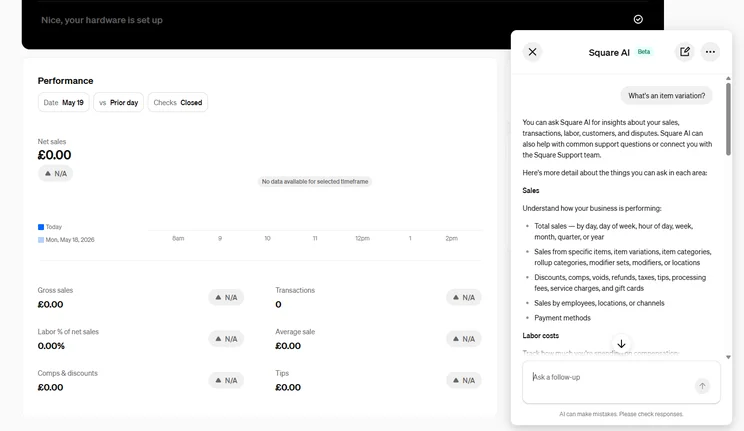
I was also impressed to see that Square has embedded Square AI into the back office, on the free plan. Launched in February 2026, Square AI is the business productivity assistant that you can use as a chatbot to get quick answers about your sales.
Square’s free plan is also suitable for scaling startups that need a low-cost option for the moment but want to be supported in the future. Unlike PayPal Point of Sale, Square has industry-specific premium plans – Square for Restaurants Plus and Square for Retail Plus – which are ideal for growth.
- You can seamlessly integrate a free website with Square Online
- Square has a very short-learning curve, so you can get trained quickly
- The free plan includes unlimited devices and unlimited locations
- Advanced tools like purchase ordering, barcode label printing, and multi-location inventory are restricted to the Retail Plus plan
- The support hours are limited to 9-5 workdays, which won't suitable for 24/7 businesses
- Floor planning is restricted to the Restaurants Plus plan
What do I need to pay for?
Square charges a flat 1.75% fee per in-person card payment, with no ongoing monthly costs, but just note that there’s a higher rate for non-UK card transactions:
| Transaction type | UK cards | Non-UK cards |
|---|---|---|
| In person | 1.75% | 1.75% + 1.5% |
| Online | 1.4% + 25p | 2.5% + 25p |
| Manually entered | 2.5% | 2.5% + 1.5% |
| Invoices | 2.5% | 2.5% + 1.5% |
What hardware does Square provide?
You can save money by using just the Square POS app on a smartphone or tablet, but Square does provide an excellent range of card readers and terminals, including:
- The Square Reader (£19 + VAT): a simple, basic card reader that pairs to your smartphone, with 24/7 fraud protection
- The Square Terminal (£149 + VAT): a handheld POS terminal with a built-in printer, which I’ve tested personally and was extremely impressed with
- The Square Handheld (£169 + VAT): the latest edition to the lineup, this is a pocket-sized POS terminal with a built-in barcode scanner and camera
Square also provides a range of accessories including stands, docks, cash drawers, printers, and more.
Who do we recommend Square’s free plan to?
We recommend Square to microbusinesses that need a free plan with the highest level of functionality. Our testing found that Square outperforms both PayPal Point of Sale and SumUp when it comes to the depth of features the free plans offer, with Square being a better option for handling advanced item modifications.
However, we would not recommend Square’s free plan to all-night hospitality businesses, due to the lack of 24/7 phone support.
I’ve tested a range of different POS platforms, and Square stands out for for how easy it makes every step of the process. Signing up to the free plan was so quick and simple, and the frontend interface is so smooth to navigate around. It’s an impressively well-designed platform considering you’re getting it on a completely free plan.

2. PayPal Point of Sale: best free POS for short-term, casual traders
Overall rating: 4.5
Transaction fees from: 1.75%
Read my head-to-head comparison:PayPal Point of Sale vs Square
PayPal Point of Sale is the best free POS for very simple, short term, and seasonal businesses, as you’ll have a POS system that’s seamlessly integrated with the existing PayPal ecosystem. If you already have a PayPal account, it’ll be an extremely painless process.
If you’re a solopreneur with no ambitious plans to scale and you just need to take payments as quickly and easily as possible (let’s say you’re setting up a market stall over the summer), then PayPal Point of Sale is an ideal option. You’ll also get the benefit of PayPal’s sophisticated financial infrastructure, preventing fraud and helping to fight bad-faith chargebacks.
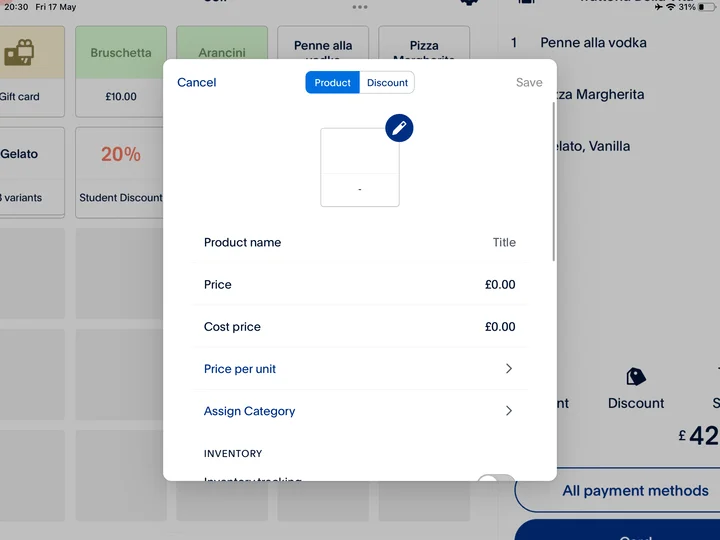
In my testing, I found that PayPal Point of Sale’s interface excels at simplicity, meaning a very short-learning curve. PayPal Point of Sale opts for a clean, minimalist design, that can handle a smooth payment process, including an automated “repeat payment” tool that can really speed orders if you’re dealing with a busy crowd.
- All payments go straight into your PayPal Business account, making it simple to manage payouts, online sales, and invoicing in one place
- Simple, entry-tier inventory logging
- PayPal Point of Sale provides phone support backed up by the larger PayPal framework
- Unlike Square, PayPal Point of Sale doesn't have premium level plans, so it's less equipped for scaling businesses
- PayPal Point of Sale doesn't include deep ingredient tracking, or multi-tiered customisable floor plans
- There's no dedicated search utility on the iPad product screen, which could be an issue if you have a large product category
What do I need to pay for?
PayPal Point of Sale has no monthly fees, and charges a flat 1.75% transaction fee for all in-person card payments, the same as Square:
| Transaction type | Fee |
|---|---|
| In peron | 1.75% |
| Payment links via PayPal | 2.9% + 30p |
| Payment links not via PayPal | 1.2% + 30p |
| Manual card entry | 3.4% + 20p |
Just keep in mind that manual card entry (payments that are keyed in) has a far higher 3.4% + 20p transaction fee. If you suspect a lot of your payments will be coming from phone orders, or backend invoicing, then Square’s free plan is a better option.
What hardware does PayPal Point of Sale provide?
You can start accepting contactless payments immediately with just the PayPal Point of Sale app. You can download it onto a smartphone or tablet, so any additional hardware isn’t necessary, though if you do want a dedicated card reader, there are two to choose from:
- The PayPal Card Reader connects to your phone via Bluetooth and can be bought at a first-time purchase price of just £29 + VAT (each additional reader then costs £69 + VAT). It includes a basic touchscreen, to make it easier for customers to tip you
- The PayPal Terminal is an all-in-one portable POS device with a pre-loaded SIM card, which can be bought for a one-off fee of £149 + VAT. Retailers can add on a barcode scanner for £50 +VAT, and a printer (with dock) for £50 + VAT
Who do we recommend PayPal Point of Sale for?
We recommend PayPal Point of Sale for casual traders, market stalls, and pop-up shops due to the simplicity of connecting your POS system to your PayPal account. Square might present better functionality and a better-designed interface, but merchants on-the-go who just want the simple, short-term reliability of the PayPal payment ecosystem will be best off with PayPal Point of Sale.
We would not recommend PayPal Point of Sale to retail businesses with complex stock, as you’ll need the deeper functionality of Square POS.
Read next:SumUp vs PayPal Point of Sale
When I tested PayPal Point of Sale, I was really impressed with how clean and modern it felt for a free plan. It’s solidly designed, and really easy to navigate around, and I liked how it categorised everything, which made it easy to find whatever I was looking for. It might not have the depth of other POS systems, but if you’re a seasonal trader who just wants to get set up as quickly as possible with an easy-to-learn platform, then PayPal Point of Sale is going to fit the bill nicely.
3. SumUp: best for low-fees and fast ordering
Overall rating: 4.4
Transaction fees: 1.69% for in-person transaction fees
Read ourfull SumUp review
SumUp has an exceptionally slick frontend interface that makes it the best free plan for dealing with rapid orders. It requires virtually no onboarding to get to grips with and it also has a low 1.69% transaction fee. SumUp’s frontend is clean, visually appealing, and highly responsive, so it’s great for making quick-adjustments mid-sale.
SumUp’s minimalist black-and-white interface design streamlines basic ordering and menu navigation. While it lacks the depth of a more enterprise-level software, this simplicity will be appreciated by solopreneurs with basic needs.
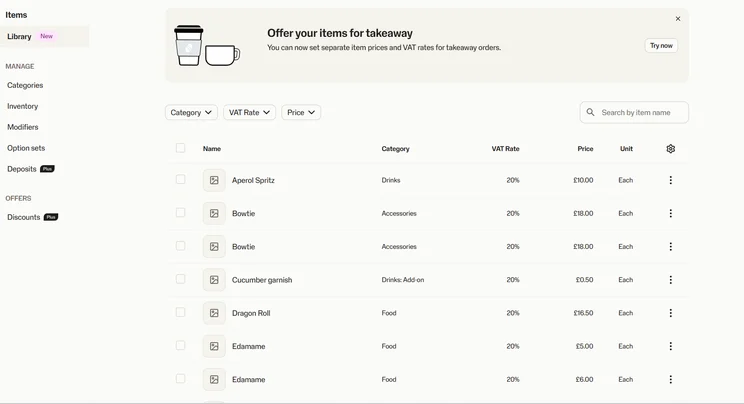
Beyond the simplicity of the software, merchants will also benefit from opening up a free SumUp Business Account, which allows you to send instant transfers and, crucially, fast next-day access to funds (including weekends and public holidays).
- SumUp's free plan includes management tools with stock alerts and cost management
- Get access to next-day payouts, including at weekends, with a free SumUp Business Account
- The "park order" function on the frontend makes for easy order management
- Unlike Square's free POS, SumUp's free tier doesn't support bill splitting at checkout
- I found SumUp's back office to be clunkier to use than Square's or PayPal Point of Sale's
- The free plan doesn't include online ordering, whereas Square allows you to access Square Online
What do I need to pay for?
SumUp charges the lowest in-person transaction fee on the roundup at just 1.69%:
| Transaction type | Fee |
|---|---|
| In peron | 1.69% |
| Online | 2.5% |
| Manual card entry | 2.95% + £0.25 |
SumUp also provides more options for scalability than PayPal Point of Sale, as it has the option to upgrade to SumUp Payments Plus for £19 + VAT per month, which unlocks low 0.99% transaction fees and 24/7 support. While you might need a free POS plan for the moment, if you start taking in more than £3000 per month in card sales, Payments Plus will save you money in the long run.
What hardware does SumUp provide?
As with Square and PayPal Point of Sale, you can use the free POS app on a tablet or smartphone, but you can also upgrade to a reader or terminal from SumUp’s range of physical hardware:
- The SumUp Solo Lite (£25 + VAT): a lightweight but durable reader that connects to your smartphone and gives your customers the option to tip
- The SumUp Solo (£59 + VAT): a standalone touchscreen reader, which comes with free built-in 4G
- The SumUp Terminal (£135 + VAT): a handheld POS system with built-in printer, real-time sales tracking, and AI-powered catalogue creation
Who do we recommend SumUp’s free plan to?
We recommend SumUp for micro-businesses that are processing less than £2,500 per month, including seasonal traders, pop-up stalls, and mobile solopreneurs who need low monthly fees, zero lock-in, and a simple system that’s very easy to learn.
If you’re a running a food market stall, you’re a craft fair vendor, or you’re an on-the-go service provider (like a hair stylist or personal trainer) and you don’t need to depth of functionality that Square provides, then SumUp’s operational simplicity will be a great fit for you.
SumUp certainly excels at simplicity, and while the back office can be a little clunky, if your priority is fast customer-facing functionality on a free tier, then this is the POS for you. During my testing, a nifty feature I particularly appreciated was the “park order” function, which meant balancing multiple customer carts at once was really easy.
How to choose free POS software
Choosing a free POS software system means considering the three Ss: your scale, sector, and sales.
Can the free plan scale alongside my business as it grows?
Free POS software works well for small, single-location businesses, such as pop-up stalls, food trucks, market traders, boutique shops, and independent cafés. It gives you the essentials: taking card payments, managing simple inventory, and day-to-day reporting.
But what happens when your business starts to take off? You’re going to need more from your POS software – more advanced inventory management tools, more powerful reporting, staff scheduling tools, etc.
If you expect to scale, find a provider that offers clear paid tiers and more advanced hardware options you can upgrade to as you grow.
How to choose a POS based on your industry sector
Different industries demand different POS features. For example, small and medium-sized retailers need barcode tools and inventory-tracking features, while small hospitality businesses need table-booking, order management, and ingredient-tracking features.
But free POS systems typically offer the essentials all sectors need, while reserving more specialised, industry-specific tools for paid plans.
All providers in our guide can work as a free retail POS system, but Square and SumUp offer stronger retail and hospitality tools overall.
Analysing your monthly sales volumes and needs
Lastly, consider your sales needs:
- Do you want monthly, annual, or quarterly sales reports?
- How many card transactions do you expect to make each month?
- Do you need online payments or invoicing?
Have these answers ready before you sign any contracts.
Also, consider the card fees you’ll pay as a merchant. A free plan can still cost you money – possibly even more in the long run – if fees are high and you process a lot of payments.
Methodology: how we ranked the best free POS software
To rank the best free POS software, we analysed providers offering a genuinely free plan and tested them across six key categories deemed to be most important to merchants looking for a free POS platform.
Our user-led scoring framework was developed by our Head of Research, and the evaluation process included hands-on testing by our Senior Reviews Writer and users at our London offices. We conducted a new round of testing as recently as May 2026 for Square and SumUp.
Each of the following categories was weighted by importance, and split between retail and hospitality respectively to ensure we’re factoring the needs of both industries:
What are the software capabilities of the free POS platform?
- Hospitality: 35%
- Retail: 35%
We assessed the capabilities for inventory management, data reporting, app integrations, customer engagement tools, menu creation, bill splitting, and the offline functionality.
Do I need additional hardware with the free plan, and what range of readers and accessories are available?
- Hospitality: 20%
- Retail: 25%
We examined the range of terminals and card readers the free platform sells, if required by merchants, including the portability of the device, display quality and size, customer display options, and the option for a receipt printer.
How easy is the software to use?
- Hospitality: 20%
- Retail: 15%
I carried out actual, hands-on user testing across the three platforms to test-run an end-to-end sales order, to see how easy-to-use the platform would be for a merchant to use.
What are the additional costs involved with the no-cost tier?
- Hospitality: 10%
- Retail: 15%
No free platform is every truly free: we examined all the other possible costs involved, including the payment processing fees and the price of any hardware if you choose to use a physical reader.
What help and support options are available on the free plan?
- Hospitality 10%
- Retail 15%
We examined the range and types of customer support available, including by phone, email, live chat, forums, and in-platform support, as well as testing the accuracy of the knowledge centre.
What is the overall reputation of the POS brand?
- Hospitality: 5%
- Retail: 5%
We researched the brand reputation of each provider, through competitor reviews, how likely our expert testers are to recommend the platform, online comments via platforms like Trustpilot, and price comparison analysis.
Verdict: which is the best free POS software?
Square is the best free POS software for small businesses, thanks to the exceptionally intuitive interface, impressive functionality, and option for premium plans if you scale in the future.
SumUp is the top choice if keeping transaction fees low and checkouts fast are your main priorities, whereas PayPal Point of Sale offers straightforward in-person payments connected to PayPal.
SumUp offers the lowest transaction fees: 1.69% for in-person card payments. Square and PayPal Point of Sale both charge 1.75% for in-person transactions.
Square, SumUp, and PayPal Point of Sale are all great options; you can run their free software on a smartphone or tablet. But SumUp is the best specifically for mobile-only businesses. Its free plan is solid and has the lowest transaction fees of the providers on our list. That said, Square is a better long-term option if you want room to grow or add online sales later.
Square offers basic online payments and invoicing, including advanced eCommerce tools on paid tiers. SumUp supports online payment links and invoicing on its free plan, but remote payment fees are higher than in-person transaction fees. PayPal Point of Sale connects directly to your PayPal Business account, which means you can pair the free POS app with PayPal’s online payment and invoicing tools. This makes it the simplest option if you want to handle both online and in-person sales without upgrading to a paid plan.
Jump back up to any of our reviews:
- Free POS comparison table
- 1. Square: best overall free POS software
- 2. PayPal Point of Sale: best POS software for simplicity
- 3. SumUp: best free POS software for a fast-paced environment
- How to choose free POS software
- Methodology: how we ranked the best free POS software
- Verdict: which is the best free POS software?
- FAQs
Startups.co.uk is reader-supported. If you make a purchase through the links on our site, we may earn a commission from the retailers of the products we have reviewed. This helps Startups.co.uk to provide free reviews for our readers. It has no additional cost to you, and never affects the editorial independence of our reviews.


