

Your ideal ecommerce platform will help you grow your retail business and allow more customers to discover you online. Find the right platform for your online store today.
Startups.co.uk is reader supported – we may earn a commission from our recommendations, at no extra cost to you and without impacting our editorial impartiality.
Hostinger: 10% off with code STARTUPS

Wix: 10% off with code TAKE10

Shopify: £1/month for 3 months

Our in-depth research shows that Wix is the best ecommerce platform for small businesses, thanks to its impressive range of sales features, 2,000+ templates, and simple drag-and-drop editor.
I have worked with our in-house research team to test 12 of the best ecommerce platforms, completing over 1,200 tasks to rigorously test their suitability as ecommerce website builders, including 300+ hours of research.
- Wix’s range of templates and built-in sales features – including inventory management and multichannel selling – make it our number one recommendation.
- Shopify is our recommended platform for rapidly scaling businesses due to the range of feature-packed plans.
- The typical transaction fees you can expect to pay are from 0% to 3%.
- When choosing an ecommerce platform, don’t just focus on price – make sure the builder has modern AI-features to give you the edge in 2026, like AI visibility tracking and agentic commerce.
- Hostinger is the cheapest ecommerce platform (from £3.99 per month) but it doesn’t offer a free plan, and the cheapest £2.99/month plan doesn’t let you sell online.
- Even with a low monthly plan, you still need to factor in additional costs like transaction fees, domain names, and third-party apps.
At Startups, we use an independent research method to investigate 12 top ecommerce platforms, involving over 100 hours of data collection, and 54 individual user tests.
To determine our top six recommendations we assessed this data collection against seven categories which are we found to be most essential to an effective ecommerce builder: the core sales features included (30%), the design tools (15%), the website functionality (15%), the customer support (15%), the value for money (10%), the usability (10%), and the builder’s reputation (5%).
You can find a full explanation of our testing framework in the methodology section of this review.
The best ecommerce platforms: comparison table
|
Overall score
Based on our in-depth research and user testing
|
Starting price
|
Cheapest ecommerce plan
|
Free plan or free trial
|
Templates
|
Transaction fees
|
||
|---|---|---|---|---|---|---|---|
|
FEATURED PROVIDER
 |
 |
 |
 |
 |
|||
|
Hostinger |
Wix |
Shopify |
Squarespace |
GoDaddy |
|||
|
4.2
|
4.8
|
4.8
|
4.7
|
4.0
|
|||
|
|
|
|
|
||||
|
£3.99/month |
£16/month |
£19/month |
£12/month |
£13.99/month |
|||
|
14-day free trial |
Free plan |
3-day free trial |
14-day free trial |
Free plan |
|||
|
400+ |
2,000+ |
200+ |
150+ |
150+ |
|||
|
0% – Hostinger does not charge transaction fees |
2.1% + 20p per transaction |
From 1.5%-2% + 25p per transaction (online) |
From 1.5% + 25p to 2% + 25p, depending on your plan |
Up to 2.9% + 20p per transaction (depending on payment provider) |
1. Wix: best all-round ecommerce platform for small businesses
Wix

-
FREE TRIAL
14-day money-back guarantee
-
PRICE FROM
£16 per month, billed annually
- Flexible pricing plans
- AI chatbot builder
- Great additional features that support everything any up and coming merchant needs
Summary
When we say Wix really does have it all, we mean it. Its largely improved sales features now support multi-channels including Facebook and other marketplaces. The Light plan, at only £9 per month, comes equipped with 24/7 customer support, unlimited product showcasing and the option to sell on social channels. If you want further insight into your ecommerce business and control of where you can sell, the £119 per month Business Elite plan comes with customised reports, marketplace selling capabilities and priority customer care. However, despite the product priding itself on its ease of use, a rather steep learning curve is required, particularly when navigating set "ecom" functionalities.- Wix pricing: £9-£119 per month (billed annually)
- Transaction fees: 2.1% + 20p per transaction
- Standout features: Wix Payments, Wix Owner app, POS integration, keyword data support from Semrush, AI chatbot builder
- What’s missing?: Unlimited products, template flexibility
Wix is the best all-around ecommerce platform for UK startups due to its 2,000+ templates and all-in-one marketing suite.
You can use its built-in tools, such as the marketing suite and abandoned cart recovery, to grow a loyal customer base. What’s more, everything from managing your inventory to running a blog can be done directly from the Wix platform.
Wix provides all merchants with the basic sales features they’ll need to start successfully selling online, including:
- Aria, an AI-powered business assistant
- The ability to offer discounts on products
- Free custom domain to help boost brand awareness
- Multichannel selling so you can connect with customers on social media and marketplaces)
- Sell directly through YouTube Shopping
- Integration with Semrush, which can help users create AI-answer ready content (Wix is the best website builder for SEO)
- Easy drag-and-drop editor
- All-in-one dashboard for managing your sales
- Extensive app store so you can add extra functionality
- Wix is a great all-rounder, but doesn't provide specialised tools for niche stores
- Wix has limited storage space
- Once your site is live, you can't change the template
How easy is it to build an online store with Wix?
When I tested the builder, I found the drag-and-drop editor incredibly easy to use – I had complete creative control over how my online store looked.
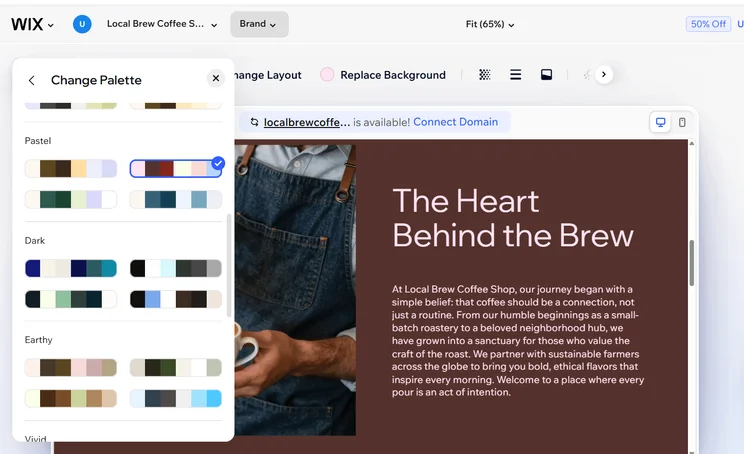
I was impressed with the results of the AI chat builder (it made me a pretty serviceable fake coffee shop site from just one prompt), but you can also choose from the massive range of professional-looking templates available. Whichever you opt for, I’d recommend Wix as the best option for designing your online store.
How much does Wix cost?
| Plan | Exclusive Startups deal (TAKE10) | Cost (annually) | Cost (monthly) | Ecommerce |
|---|---|---|---|---|
| Free | £0/mo | £0/mo | £0/mo | No |
| Light | £8.10/mo | £9/mo | £11.50/mo | No |
| Core | £14.40/mo | £16/mo | £19/mo | Yes |
| Business | £22.50/mo | £25/mo | £29/mo | Yes |
| Business Elite | £107.10/mo | £119/mo | £129/mo | Yes |

Expert insight – Eddie Harris, Senior Writer
I was reasonably impressed with Wix's AI tools when designing. However, certain elements did feel quite random, as it first produced a design with 'fun, tropical colours' which I felt was at odds with the information I had initially given the AI. I had to tweak/regenerate a few times before getting something I felt was acceptable.
With our business toolkit, you can create a business listing and microsite and appear in searches before you’ve even launched your full website.
2. Shopify: best for rapidly growing businesses
Shopify

-
FREE TRIAL
3-day free trial
-
PRICE FROM
£19 per month
- AI site theme builder is able to create a bespoke site in seconds
- Great range of apps and extensions
- Perfect for dropshipping
Summary
Shopify is perfect for users looking for that all in one online store solution. Its ability to predict what a merchant will need next when creating a website is a brilliant feature, and its countless apps give you complete control over your business, enabling you to grow through diverse multi channel integration options and automated SMS and email marketing. It is definitely better suited to store owners with complex, larger inventories and because there are fewer built in features, using the platform can get expensive compared to other feature-filled competitors like Squarespace and Wix.- Shopify pricing: £19-£259 per month (billed annually)
- Transaction fees: From as low as 1.5%-2% + 25p per transaction (online)
- Standout features: Unlimited products, new AI site theme builder, Shopify Magic, Shopify Payments, VR functionality
- What’s missing?: Free custom domain, longer free trial period, drag-and-drop editor
Shopify’s range of plans with deep ecommerce features (like multi-currency payouts on the Advanced plan) make it the best choice for scaling ecommerce businesses.
Shopify can take you from side hustler to complex multinational seller, with an impressive set of features included on even the cheapest Basic plan (£19 per month, plus VAT), including:
- Sell unlimited products
- Create automated emails
- Multichannel selling, so you can connect to other sales channels, including LLMs
- Shopify Sidekick, Shopify’s AI-powered assistant
- Customisable one-click checkout experience
- An app market, boasting over 21,000 apps to add extra functionality to your store
- Real-time inventory syncing, so you won’t suddenly discover you’re out of stock during a live shopping event
- Shopify Collabs: great for managing micro-influencer partnerships (a popular marketing tactic in 2026)
Shopify is also a top option for combining online selling with brick-and-mortar sales, thanks to the unified dashboard. You can update all your prices, online and on-shelf, with ease.
- Shopify is equipped to handle complex inventories
- You can sell beyond your website – via social media and marketplaces
- Shopify can seamlessly sell between an online store and a physical shop
- Shopify isn't the easiest builder to use
- Shopify’s plans are expensive for an ecommerce platform
- Free trial is limited (just three days)
Is it easy to build a website with Shopify?
Despite the excellent ecommerce tools and customisation, I found it difficult to customise my site’s appearance, as the editor isn’t the most beginner-friendly. Shopify doesn’t use the popular drag-and-drop style that other builders, like Wix, use, which I felt made it trickier to achieve the look I wanted.
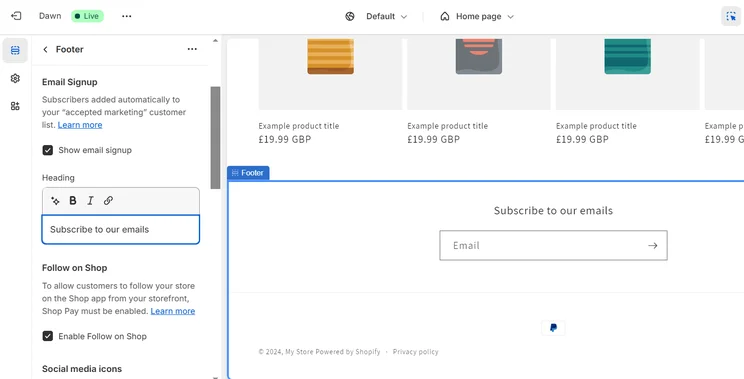
Shopify’s unintuitive editor might be less of a problem for those who are happy to rely on AI-powered site generation. Shopify Magic can do a lot of the work for you and instantly create AI-generated templates with just a basic prompt.
How much does Shopify cost?
| Plan | Cost (annually) | Cost (monthly) | Ecommerce |
|---|---|---|---|
| Basic | £19/mo | £25/mo | Yes |
| Grow | £49/mo | £65/mo | Yes |
| Advanced | £259/mo | £344/mo | Yes |
| Plus | From £1,800/mo | From £1,800/mo | Yes |

Expert insight – Emma Ryan, Deputy Editor B2B
This is the first time I've used Shopify's AI template generator and I'm really impressed! I usually hate selecting Shopify's free templates because they pull through differently into the editor (with blank images/copy), whereas the AI template includes images and copy related to your business which makes designing from scratch easier. You can see what you can actually do within Shopify's editor with these.
3. Squarespace: best for eye-catching online stores
Squarespace

-
FREE TRIAL
14-day free trial
-
PRICE FROM
£12 per month
- Easy to use dashboard that links seamlessly with the builder
- Fully customisable checkout page
- Use code "SU10" to receive a 10% discount on all Squarespace plans
Summary
Squarespace's ecommerce offering has plenty of great selling points to keep its users happy. The ecommerce platform provides polished templates help create a luxury brand experience for your business as well as strong email marketing features. It also provides a step-by-step AI builder, giving you greater control over the look and style of your site.- Squarespace pricing: £12-£79 per month (billed annually)
- Transaction fees: 0-3% per transaction
- Standout features: Service-based tools, Squarespace Payments, stunning templates and designs, AI site builder, excellent booking tools through Acuity, customisable checkout page
- What’s missing?: Built-in dropshipping functionality, UK POS integration
Squarespace is the easiest to use of all the ecommerce platforms I tested, and the fantastic-looking design templates make it the best option for creative and service-based businesses.
Acuity Scheduling (starting from £11 per month on top of your plan cost) lets you create and manage bookings directly in Squarespace, and you can also create branded invoices.
Squarespace is good for building a high-value hub for your audience, not just because of the sleek design, but thanks to its tools, for example the ability to build a “members area” on your site. Having a community of buyers is key to financial solidity in 2026, and by creating exclusive content you can make sure you have a captive audience.
Squarespace has also introduced an AI Visibility tool to help you track your site’s performance and mentions across AI search engines, including ChatGPT and Gemini.
- Squarespace's slick templates and editor can produce a stunning site
- Squarespace is the easiest ecommerce platform to understand and use
- Squarespace includes built-in scheduling tools
- Squarespace lacks any built-in support for dropshipping
- Squarespace’s ecommerce plans won’t support a scaling business as well as Shopify’s
- Squarespace's site speeds weren't the fastest in our testing
How easy it to build an online store with Squarespace?
Based on my hands-on testing of the platform and our rigorous research, I can confidently say that Squarespace is not only the easiest platform to use, but it also boasts a stunning range of templates.
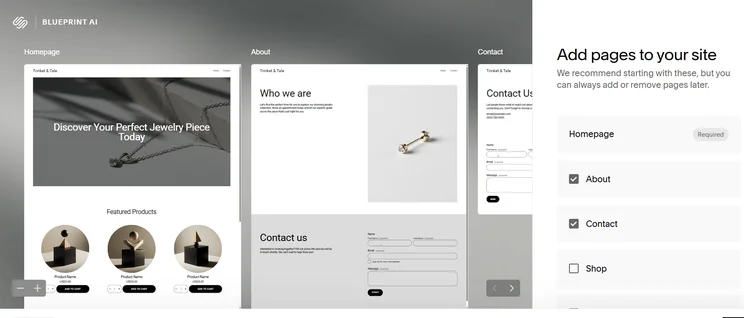
I particularly love the testimonial and digital product design elements – they make the process of building a page from scratch quick and simple. You can also create a customisable checkout page containing special fields and a guest checkout function.
How much does Squarespace cost?
| Plan | Exclusive Startups deal (SU10) | Cost (annually) | Cost (monthly) | Ecommerce |
|---|---|---|---|---|
| Basic | £10.80/mo | £12/mo | £16/mo | Yes |
| Core | £15.30/mo | £17/mo | £24/mo | Yes |
| Plus | £26.10/mo | £29/mo | £36/mo | Yes |
| Advanced | £71.10/mo | £79/mo | £89/mo | Yes |

Expert insight – Natasha McMullen, Head of Insights
As an AI builder goes, Squarespace has a very different feel from other platforms. For example, when you select the site info and the type of site needed, it shows you the difference in font based on the text selected – taking you on the journey more than others.
4. Hostinger: best for side hustles and new businesses
Hostinger

-
Free trial
14-day
-
Price from
£3.99
- Affordable deals for beginners
- The drag-and-drop editor is very easy to use
- A growing suite of AI features
Summary
Hostinger is a simple and low-cost website builder, offering affordable plans and introductory deals for new businesses. It's made recent upgrades in overall usability and navigation, though it lacks basic functionalities like email marketing. That said, its design options are impressive and its suite of AI tools makes building a website quick and easy.- Hostinger pricing: £2.99-£7.99 per month (for a 48-month subscription)
- Transaction fees: 0% transaction fees
- Standout features: Suite of AI tools including AI blog generator, speedy setup time, fastest site loading speeds on the roundup
- What’s missing?: Scalable ecommerce plans, unlimited products, built-in email marketing
Hostinger’s cheap plans and beginner-friendly builder make it a great choice for side hustlers and new business owners.
Hostinger also provides an impressive selection of AI features, including AI content generation tools for blog posts, product descriptions, and metadata.
Another bonus of Hostinger is that it charges 0% on processing fees for businesses (just keep in mind you’ll still be subject to any fees from your payment processor).
Having made improvements to site speed (now having the fastest load times that we tested), interface, navigation, and overall usability, it’s a builder that’s gone from strength to strength.
- Hostinger is very beginner-friendly
- Hostinger is budget-friendly
- Hostinger is the fastest loading website we tested
- Hostinger only offers one basic ecommerce plan
- Hostinger doesn't include email marketing tools
- The platform doesn't include strong booking tools
How easy is it to build an online store with Hostinger?
I could get my online store up and running in minutes thanks to Hostinger’s AI website builder and its intuitive drag-and-drop editor. I was impressed with the level of design freedom I had with Hostinger’s editor, even more so than Squarespace.
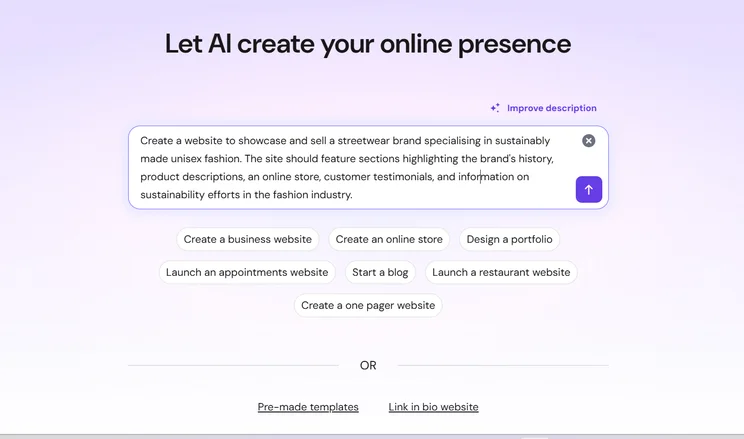
During my testing, Hostinger’s AI also managed to create an effective site for my fake online bookshop. It already came equipped with useful elements, like shop categories and a contact form to join a book club. I only had to make a few tweaks here and there to refresh the imagery and copy.
How much does Hostinger cost?
| Plan | Exclusive Startups deal (STARTUPS) | Cost (48-month term) | Renewal cost (48-month term) | Cost (monthly) | Ecommerce |
|---|---|---|---|---|---|
| Premium | £2.69/mo | £2.99/mo | £10.99/mo | £11.99/mo | No |
| Ultimate | £3.59/mo | £3.99/mo | £14.99/mo | £13.99/mo | Yes |
| Cloud Startup | £7.19/mo | £7.99/mo | £22.99/mo | £20.99/mo | Yes |
Expert insight – Emma Ryan, Deputy Editor B2B
I'm very impressed that Hostinger's SEO tool had already filled lots of the SEO details out for me, suggesting keywords, completing the SEO title/description, and offering other SEO tips like flagging how many images had alt text already.
5. GoDaddy: best for marketing
GoDaddy

-
Free trial
7-days
-
Price from
£13.99
- Built-in social media calendar and post planner
- Simple to use builder
- Simple pricing
Summary
It lacks sophisticated sales and design features, but GoDaddy is still one of the easiest ways to create an online store, and it has excellent integrated marketing tools. It just has one ecommerce plan, for the reasonable price of £13.99 per month.- GoDaddy pricing: £7.99-£13.99 per month (billed annually, first term discount)
- Transaction fees: Dependent on the payment provider, up to 2.9% + 20p per transaction
- Standout features: Quickest setup time, AI website builder, built-in social media calendar and post planner
- What’s missing?: App market, drag-and-drop editor, additional ecommerce plans
GoDaddy is an entry-level website builder that’s best if your business is heavily reliant on marketing and social media promotion, thanks to the built-in marketing and AI tools:
- AI-generated social calendar planner
- A social post creator for social media channels
- Connect your events to social media platforms
GoDaddy also provides integrated booking tools like calendar syncing and customer notifications, both of which are great for businesses that need to manage lots of appointments.
GoDaddy’s simplicity works in its favour, with the stripped-back sales features and easy builder appealing to novice online sellers. However, GoDaddy does lack the advanced sales functionality of a competitor like Shopify, and this extra depth is something that larger stores will need.
- GoDaddy includes built-in marketing tools
- GoDaddy has the quickest setup time out of all the builders I’ve tested
- GoDaddy’s simplicity is great for smaller businesses
- GoDaddy’s editor is restrictive and you'll struggle to create a unique appearance
- GoDaddy isn't well equipped to handle bigger stores with complex inventories
- GoDaddy doesn't have an app market, so you won't be able to integrate third-party apps
How easy is it to build an ecommerce site with GoDaddy?
GoDaddy is not only easy to use, but it’s also one of the quickest ways to get online. The onboarding process took me a few minutes, and I could immediately dive into designing my store or adding products in the backend.
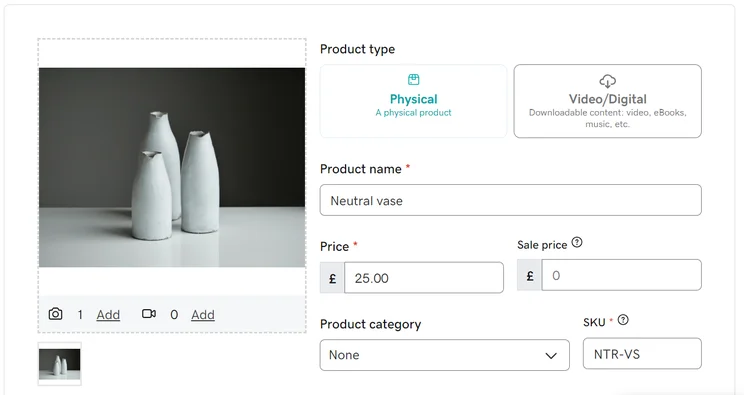
GoDaddy’s simplicity makes it ideal for beginners, but as a result its editor and features can be too basic at times.
How much does GoDaddy cost?
| Plan | Cost (annually) | Renewal cost (annually) | Cost (monthly) | Ecommerce |
|---|---|---|---|---|
| Free | £0 | £0 | £0 | No |
| Basic | £7.99/mo | £12.99/mo | £12.99/mo | Limited |
| Premium | £11.99/mo | £22.99/mo | £21.99/mo | Limited |
| Commerce | £13.99/mo | £26.99/mo | £26.99/mo | Yes |
Expert insight – Eddie Harris, Senior Writer
GoDaddy's social media calendar is a great addition to their product offering, but I'd like to see more consistency when it comes to pulling site branding into other areas of marketing – such as in email and on social posts. Solving this misalignment would be such an easy way to give greater brand confidence but also save users time.
How to choose an ecommerce platform for your business
I recommend thinking about questions such as your target market, and which AI-tools you need, as you research which ecommerce platform is right for your business:
- Where are your customers based? – Think about your target market and audience to determine what features your store needs. Are they local? Are they mostly on social media? Do you need international shipping options?
- Will you need to pay transaction fees? – Your ecommerce platform subscription won’t be your only cost when you set up an online store, as many providers charge additional transaction fees. If you want to avoid this, consider builders like Hostinger, or use a provider’s in-house payment gateway to minimise costs.
- What do you want your online store to look like? – If building a stylish store is a priority, you’ll want to choose a design-focused builder, such as Squarespace. Assess a platform’s website themes, editor style, and pre-designed elements.
- Are the features you need built-in? – How many features are available with your ecommerce platform subscription? Will you need to install third-party apps and plugins to add extra functionality? For example, Shopify relies heavily on its app market, and many of these apps come with additional costs.
Wix is our top recommendation for UK startups, thanks to its all-in-one simplicity and excellent design tools. Though if you’re specifically looking to scale as quickly as possible, then Shopify is the best choice due to the ability to manage both online and brick-and-mortar stores.
If you’re having trouble making your decision between the two, these are the standout points to consider:
- Wix is a great all-rounder, with an intuitive website builder that’s good for beginners.
- Shopify is particularly well suited to rapidly growing businesses, and can handle complex online inventories as well as in-store sales.
How do I manage sales across multiple platforms?
To effectively manage selling on multiple platforms you will need to make sure you have reliable inventory syncing tools.
Many online UK sellers will be simultaneously selling on a dedicated ecommerce platform like Shopify, but will also have a presence on Etsy.
How you manage this will change from platform to platform but you’ll need some way of connecting your separate stores. For example, with Shopify you can use the Marketplace Connect app.
How we test ecommerce platforms
I worked with our research team, conducting 100 hours of data collection over eight categories, to determine my ecommerce platform ranking. In total, 283 individual areas of the ecommerce platforms were investigated.
This was broken down into the areas which we felt were more critical to a successful ecommerce platform, which were then given individual importance weightings, ensuring that you were receiving the most helpful recommendations possible.
For example, a heavier focus was shifted to help and support and the user experience for this round of testing: to consider the needs of those who are at the beginning of their small business journey.
Our key review categories were:
- What sales features will I be able to use? 30% – Such as shipping options, multi-channel integration, abandoned cart recovery, revenue analytics, customisable invoices, payment processing fees, marketing campaign ROI, customer behaviour tracking, customisable check out page, inventory reports, and scheduling discounts for sales.
- What is the range of website features? 15% – The quality and range of the website features, such as SEO, internationalisation, AI tools such as text creation, social media marketing, email marketing, blogging capabilities (including monetisation), and the extent of the app market for integrating third-party dropshipping, delivery, loyalty, and product review apps.
- Can I design a professional-looking site? 15% – We assessed the quality of the website builder templates based on three ecommerce examples: fashion, food & restaurant, and home & garden. We also tested the AI builders, based on metrics such as: the time it took the AI to complete a first draft, the relevance and clarity of questions, and quality of the end site.
- What help and support options are there? 15% – Investigating how website owners can seek help, such as customer support channels and the availability and responsiveness of a knowledge centre.
- How much will it cost? 10% – The balance between features and price, the availability of a free trial or plan, and overall affordability. We also assessed the scalability of each platform based on the percentage increase from the first to second plan, as well as the average price increase between plans.
- What’s it like to use the platform? 10% – Based on hands-on testing with each ecommerce platform, assessing the accessibility for different skill levels.
- Does the platform have a good reputation? 5% – We examine an ecommerce platform’s position and popularity in the market.
Final verdict: which platform is best for selling?
Wix is our top ecommerce platform for small businesses, thanks to the 2,000+ professionally-designed templates and easy-to-use sales features, such as multichannel selling and inventory management.
That said, you might find a different platform is better for your specific needs, for example Shopify’s range of plans is ideal for rapidly scaling ecommerce businesses.
Before making a final decision, I recommend making use of free trials or plans if available. Once you’ve chosen your ecommerce platform, check out these tips for building your business website.
Jump back up to any of our reviews:
FAQs
Based on our research, we found that Shopify is the best platform for dropshipping businesses, as it integrates with a range of dropshipping suppliers.
We found that Squarespace, Hostinger, and GoDaddy were the most beginner-friendly ecommerce platforms, primarily because of their easy-to-use drag-and-drop editors.
On top of the monthly platform fee, you’ll also need to budget for payment processing charges, international transaction fees, chargebacks, Cost of Goods Sold (COGS), and shipping/fulfilment costs.
Yes, but migration can be time-consuming as you’ll need to move products, design, and SEO data manually or with a paid migration tool. To avoid this, you should choose a platform that can scale with you (e.g., Shopify).
Shopify stands out as a strong platform for international sales, primarily because of its global shipping options and help preparing to enter new markets.
We found that Wix offered the best SEO features. However, Hostinger also scores highly for its AI SEO tool and heatmaps, while GoDaddy connects your store to Google to help get your business noticed on the search engine and found by your target audience.
While you can sell on TikTok and Instagram with all six of our top ecommerce platform recommendations, some allow for this more easily than others. Shopify, for example, provides some of the strongest tools for this as you can connect your TikTok Shop directly to your Shopify platform. Others might require third-party integrations, or you might just be as basic a simple ‘link in bio’ approach.
Startups.co.uk is reader-supported. If you make a purchase through the links on our site, we may earn a commission from the retailers of the products we have reviewed. This helps Startups.co.uk to provide free reviews for our readers. It has no additional cost to you, and never affects the editorial independence of our reviews.


